Download Ovobrowser
Choose your desktop platform and install.
Create a realistic, isolated browser profile for every account. Manage identities, automate repetitive work, and collaborate from one clear workspace.
Anti-linking · Fingerprint simulation · Automation API · Teamwork · Proxy IP · Window sync · Human support
Cloudflare, BrowserScan, Fingerprint Pro, Device & Browser Info, and Sannysoft verify browser fingerprint authenticity, automation signals, risk indicators, and human recognition.
From account safety to team efficiency, Ovobrowser brings essential multi-account capabilities into one workspace.
Give every account an isolated browser profile with its own fingerprint, proxy, cookies, storage, and account data.
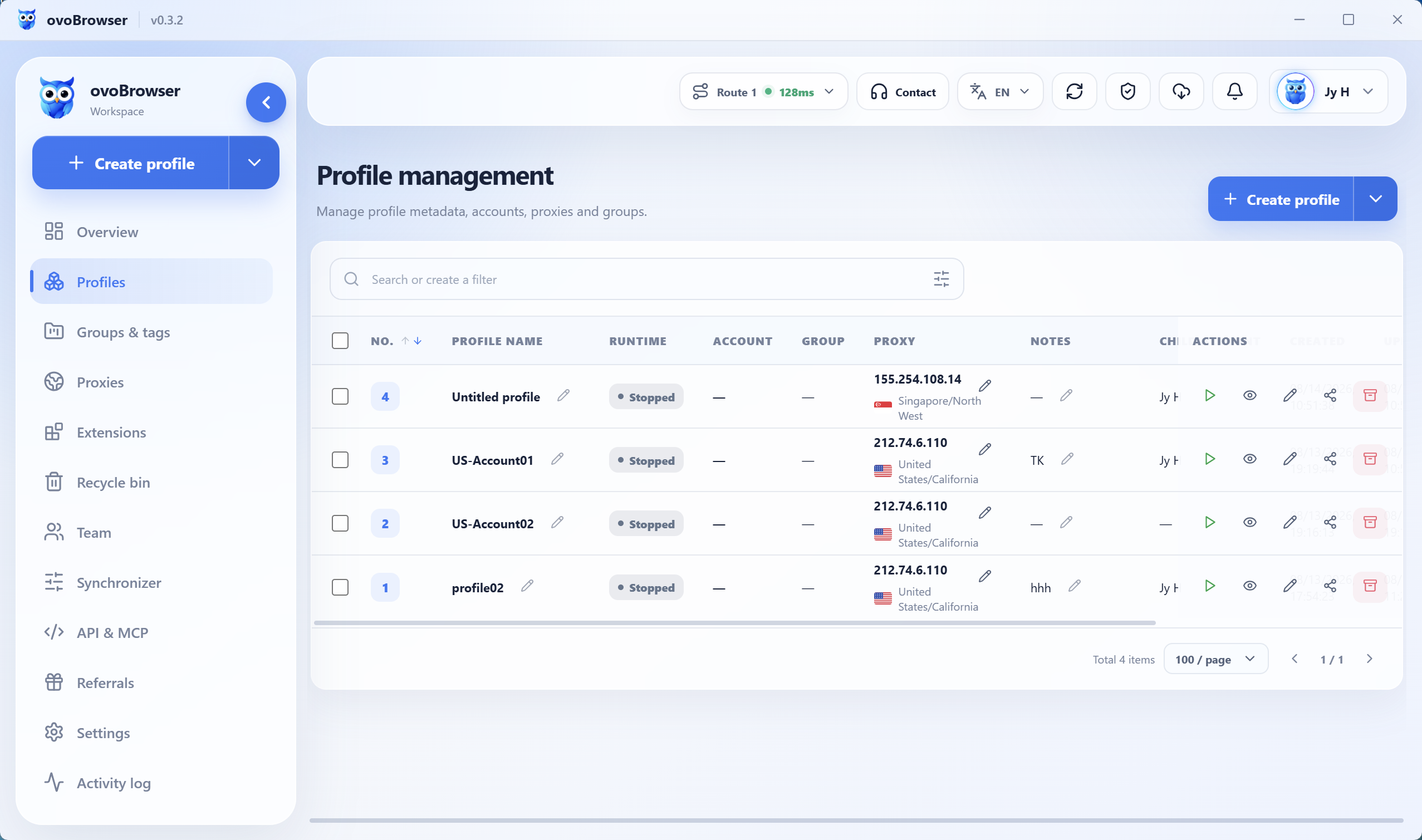
Learn more02Create, import, launch, stop, and archive browser profiles in batches with consistent templates and independent fingerprint seeds.
Learn more03Synchronize mouse, keyboard, scrolling, text, window arrangement, and tab actions from one master profile to multiple followers.
Learn more04Control Ovobrowser profiles through a local POST and JSON API and connect Playwright, Puppeteer, Selenium, or your own tools through CDP.
Learn more05Invite members, create accounts and roles, assign granular permissions, and review team activity from one workspace.
Learn more06Save, test, inspect, and assign HTTP, HTTPS, and SOCKS5 proxies to browser profiles from one workspace.
Learn moreA normal browser exposes device, network, and behavioral signals. An antidetect browser gives every account its own fingerprint, proxy, cookies, and local data — as if each one ran on a different device.
Organize stores, regions, proxies, account data, and team access in separate, reusable browser profiles.
Organize authorized social account matrices, content workflows, window synchronization, and team access in one workspace.
Separate client, project, ad-account, network, and team contexts in organized browser profiles without making unverifiable performance promises.
Organize affiliate projects, regions, account profiles, proxies, and authorized automation workflows in one workspace.
Connect isolated browser profiles to local automation for lawful public-data and authorized data workflows while respecting access rules and rate limits.
Organize authorized traffic sources, landing pages, regions, account profiles, proxies, and team access without promising business outcomes.
No complicated setup. Go from download to your first profile in minutes.
Choose your desktop platform and install.
Use your email and start for free, solo or with a team.
Set fingerprint, proxy IP, and account notes.
Open profiles, manage in bulk, or connect automation.
We believe account safety and collaboration should not be split across feature walls. Profile management, window sync, proxy setup, and the basic API are free from day one.
New users currently receive a permanent profile quota. Final benefits are shown at signup.
We do not hide behind unverifiable numbers. We focus on what a useful antidetect browser should do well.
Clear status and guidance cover profile creation, account setup, and proxy configuration, helping new users prepare a real workflow quickly.
Profile management, window sync, collaboration, and the basic API are ready for daily work without requiring a paid plan first.
Human support remains available on the site and in the product, so questions, requests, and real feedback can reach the team.
Each account keeps separate cookies, storage, fingerprints, and proxy settings, making boundaries between projects easier to understand.
Assign browser profiles by member and project, retain essential settings, and reduce repeated setup or permission confusion during handoffs.
Use window sync for visual batch work or connect the Local API and Playwright when your workflow is ready for deeper automation.
From visual batch operations to engineered automation, Ovobrowser stays open to teams at every level.
API docs coming soon OVOLOCAL API
Download Ovobrowser and create your first isolated browser profile in minutes.
OvobrowserWindows · macOS