 Ovobrowser
Jump to an article section
A multi-account matrix is not simply a larger collection of accounts. It is an operating system that connects account positioning, content production, separate browser profiles, proxy assignments, team permissions, and performance reviews around one business objective. This guide explains how to plan, build, operate, and review that system with a practical checklist.
Important: Separate browser profiles and consistent proxy assignments can reduce configuration mix-ups and improve operational clarity, but they cannot guarantee that an account will never be restricted. Teams must still follow platform rules and manage content, login behavior, and access permissions responsibly.
What Is a Multi-Account Matrix?
A multi-account matrix is a group of accounts operated across one or more platforms for a shared business objective. Individual accounts may focus on brand communication, product education, customer support, regional audiences, or specialized topics, while following a common strategy and review process.
How It Differs from Ordinary Multi-Account Use
| Area | Ordinary multi-account use | Multi-account matrix |
|---|---|---|
| Account goals | Accounts may have unrelated goals | Accounts have defined roles within one strategy |
| Content planning | Ad hoc posting or direct duplication | Content is planned by audience, role, and pillar |
| Environment management | Relies on memory or scattered notes | Each account has a documented profile and proxy assignment |
| Team collaboration | Ownership and permissions may be unclear | Members, groups, and responsibilities are defined |
| Performance review | Reviews individual posts in isolation | Compares accounts, content types, and trends over time |
The defining feature is not the number of accounts. It is the clarity of their roles and the consistency of the operating process around them.
Four Foundations of Matrix Operations
Account Positioning
Every account needs a defined audience, content focus, and outcome. Common roles include:
- Brand account: communicates core brand, product, and campaign information;
- Product account: explains a specific product, workflow, or use case;
- Vertical content account: builds expertise around one topic;
- Regional or language account: serves a specific market or language;
- Support or community account: handles education, feedback, and community communication.
When several accounts target the same audience with the same message, the matrix becomes a set of duplicate publishing channels rather than a coordinated system.
Separate Browser Profiles
Accounts that require independent management should run in clearly assigned browser profiles so that cookies, local storage, cache, extensions, and other settings are not mixed accidentally. Record the following for each profile:
- Platform and account name;
- Business owner and group;
- Assigned proxy and target region;
- Last login and maintenance time;
- Notes, incidents, and handover information.
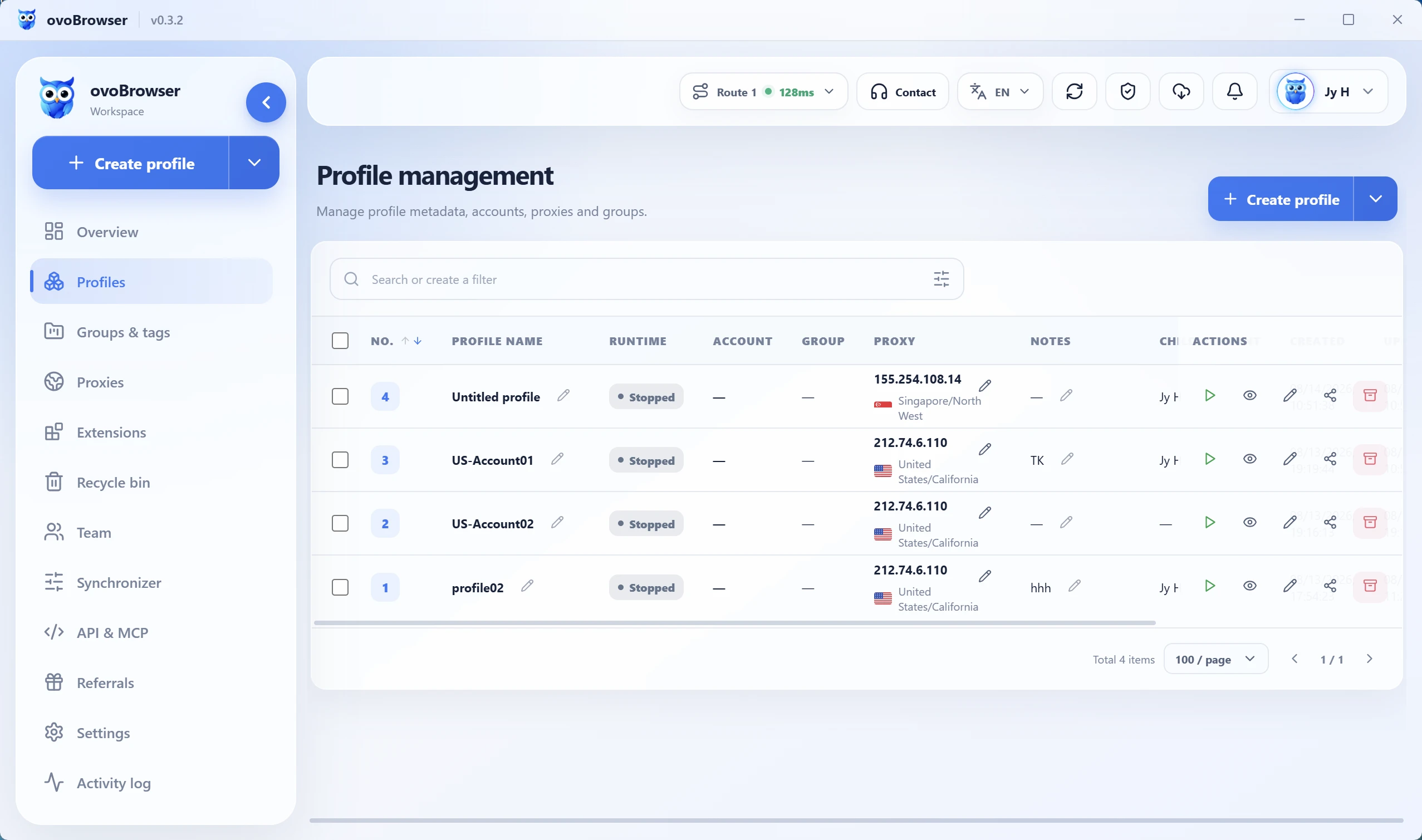
The Ovobrowser profile management page keeps profiles, proxies, groups, owners, and operational controls in one place. This reduces dependence on spreadsheets and individual memory. Visit the Ovobrowser English website to learn more about the product.
Proxy Assignment
A proxy is not a one-time setting that can be forgotten. A more reliable process is to:
- Select a network exit that fits the business region and applicable platform rules;
- Keep the account's normal login region reasonably consistent;
- Record the proxy owner, activation date, and assigned browser profile;
- Check proxy availability and region changes when an anomaly appears;
- Avoid sharing one exit across several important accounts without a documented assessment.
Content Production and Team Collaboration
A content matrix needs a shared framework without making every account sound identical. Define three levels:
- Business theme: the central problem the team will address during the cycle;
- Content pillar: tutorials, product education, cases, industry knowledge, or common questions;
- Account expression: a version adapted to the account's audience, platform, and language.
The workflow should identify who owns research, drafting, review, publishing, and reporting. Give each team member only the access required for their responsibilities, and revoke access promptly when roles change.
How to Build a Multi-Account Matrix
Step 1: Define the Business Objective and Metrics
Start with the problem the matrix should solve, such as expanding brand reach, serving different regions, educating users, or increasing topic coverage. Then choose measurable signals such as qualified visits, inquiries, content completion, account health, and period-over-period trends.
Follower count alone is not enough. Different account roles require different success measures.
Step 2: Create an Account Register
Prepare the operating register before creating browser profiles:
| Field | Example | Purpose |
|---|---|---|
| Account name | English product tutorial | Identifies the account's role |
| Platform | Target content platform | Defines publishing and compliance requirements |
| Audience | New English-speaking users | Guides content and language choices |
| Content pillars | Onboarding and troubleshooting | Keeps topics consistent |
| Owner | Operator A | Establishes daily responsibility |
| Profile ID | profile-en-01 | Maps the account to a browser profile |
| Proxy region | United States | Checks network consistency |
Step 3: Create Profiles and a Naming Standard
Profile names should be understandable at a glance. A practical format is region-platform-role-number, for example:
zh-platform-tutorial-01
en-platform-product-01
If the team synchronizes its register through an API, keep the record structure predictable:
{
  "profileName": "en-platform-product-01",
  "region": "en",
  "role": "product",
  "owner": "operator-a",
  "reviewCycle": "weekly"
}
This step is complete when every account maps to one documented profile, owner, proxy, and set of operational notes.
Step 4: Configure the Proxy and Run a Pre-Login Check
Before signing in, confirm that the proxy is available, the region matches the business plan, and the profile belongs to the intended account. Do not switch to another account's profile merely to save time.
Step 5: Build the Content Calendar and Review Flow
At minimum, the calendar should include the publishing date, account, topic, content format, owner, review status, and intended link. Product specifications, platform policies, prices, and compliance statements should be checked by the responsible reviewer before publication.
Step 6: Validate the Process Before Scaling
Run a small group of accounts first. Validate naming rules, profile assignment, proxy records, content handoffs, and reporting. Scale only after the process is repeatable; premature expansion magnifies unclear ownership, duplicate content, and profile errors.
Daily Management and Performance Reviews
Daily Checks
- Confirm that each account is opened in its assigned profile;
- Confirm proxy availability and investigate unexpected region changes;
- Verify that scheduled content has completed review;
- Review login, permission, and account-status warnings;
- Complete operation logs and handover notes.
Weekly Review
Compare results by account role and content type. A useful weekly review answers three questions:
- Which accounts met their objectives, and why?
- Which successful methods can be reused without duplicating the content itself?
- Which incidents came from content, process, permissions, or environment configuration?
Monthly Adjustments
Use monthly data to adjust account roles, content pillars, and resource allocation. If an account lacks a clear purpose, repeatedly duplicates content, or has no active owner, pause expansion and reassess it.
Common Risks and Recommended Responses
| Risk | Common cause | Recommended response |
|---|---|---|
| Profiles are mixed between accounts | Unclear names or incomplete handovers | Maintain a unique account-to-profile map |
| Login region changes frequently | Temporary proxy changes or unstable service | Keep assignments stable and record every change |
| Content is overly repetitive | Missing account positioning and content pillars | Adapt the angle, structure, examples, and wording by audience |
| Permissions are too broad | Every member receives the same access | Apply least-privilege access by responsibility |
| Incidents are not followed up | Missing owners and operation logs | Assign an owner and document the resolution |
| Account count grows too quickly | No validated process or reporting standard | Start small and scale from verified results |
Profile separation is an operational control, not a method for bypassing platform rules. Every account strategy should be grounded in a legitimate business purpose, compliant content, and reasonable behavior.
Pre-Publication and Operations Checklist
- Every account has a defined role, audience, and content pillar;
- Every account maps to one clearly named browser profile;
- The proxy region fits the business need and has passed an availability check;
- Ownership, groups, notes, and handover records are complete;
- Content has passed fact, brand, and platform-policy review;
- Team members have only the permissions needed for their work;
- Daily checks, weekly reviews, and incident handling are documented;
- The current process has been validated before new accounts are added.
Conclusion
The value of a multi-account matrix comes from coordinated systems, not unlimited account creation. Establish positioning, browser profiles, proxies, content, permissions, and reporting with a small set of accounts first. Then expand gradually based on real results and operational capacity.
Frequently asked questions
Is a larger account matrix always better?+
No. Account count should match the business objective, content capacity, and management resources. Begin with a small group, validate the workflow, and expand only when every account has a clear role, owner, and review metric.
Can several important accounts share one browser profile?+
It is not recommended when those accounts need independent management. Use a clear one-to-one mapping to reduce accidental mixing of cookies, local storage, extensions, and other settings.
Can incognito mode replace a separate browser profile?+
Usually not. Incognito mode mainly limits the persistence of some local history and cookies; it does not provide full profile configuration, proxy assignment, grouping, permissions, or operation records.
Can one proxy be assigned to several accounts indefinitely?+
That depends on platform rules, the business region, and account importance. For accounts that require clear operational boundaries, use documented and stable assignments and record every change.
Should every matrix account publish identical content?+
No. Teams can reuse research and core methods, but the title, structure, examples, format, and language should be adapted to the account's role, target audience, and platform.
How should a team assign account permissions?+
Use the principle of least privilege. Give members only the access required for their duties, review permissions regularly, and revoke access promptly after role changes or departures.
Does browser profile separation guarantee account safety?+
No. Separate profiles can reduce configuration mix-ups and improve accountability, but account status also depends on content quality, platform rules, login behavior, and network stability.