 ovobrowser
Jump to an article section
2026 GitHub Open Source Crawler Project Recommendation: 10 Tools Worth Collecting, with ovo Browser Automation Integration Guide
From AI web page collection, traditional web crawling frameworks, browser automation to Go concurrent crawling, take stock of 10 real GitHub open source projects, verify project purposes, technology stacks, and open source protocols, and introduce how the official GitHub repository and local API of ovo Browser are integrated with tools such as Playwright and Puppet, helping developers build clearer and more maintainable web data workflows.
To build a web data collection system, it is not necessary to write web crawlers from scratch. There are already many mature open source projects on GitHub, covering different aspects such as traditional HTTP crawling, JavaScript page rendering, browser automation, AI content extraction, and concurrent task scheduling.
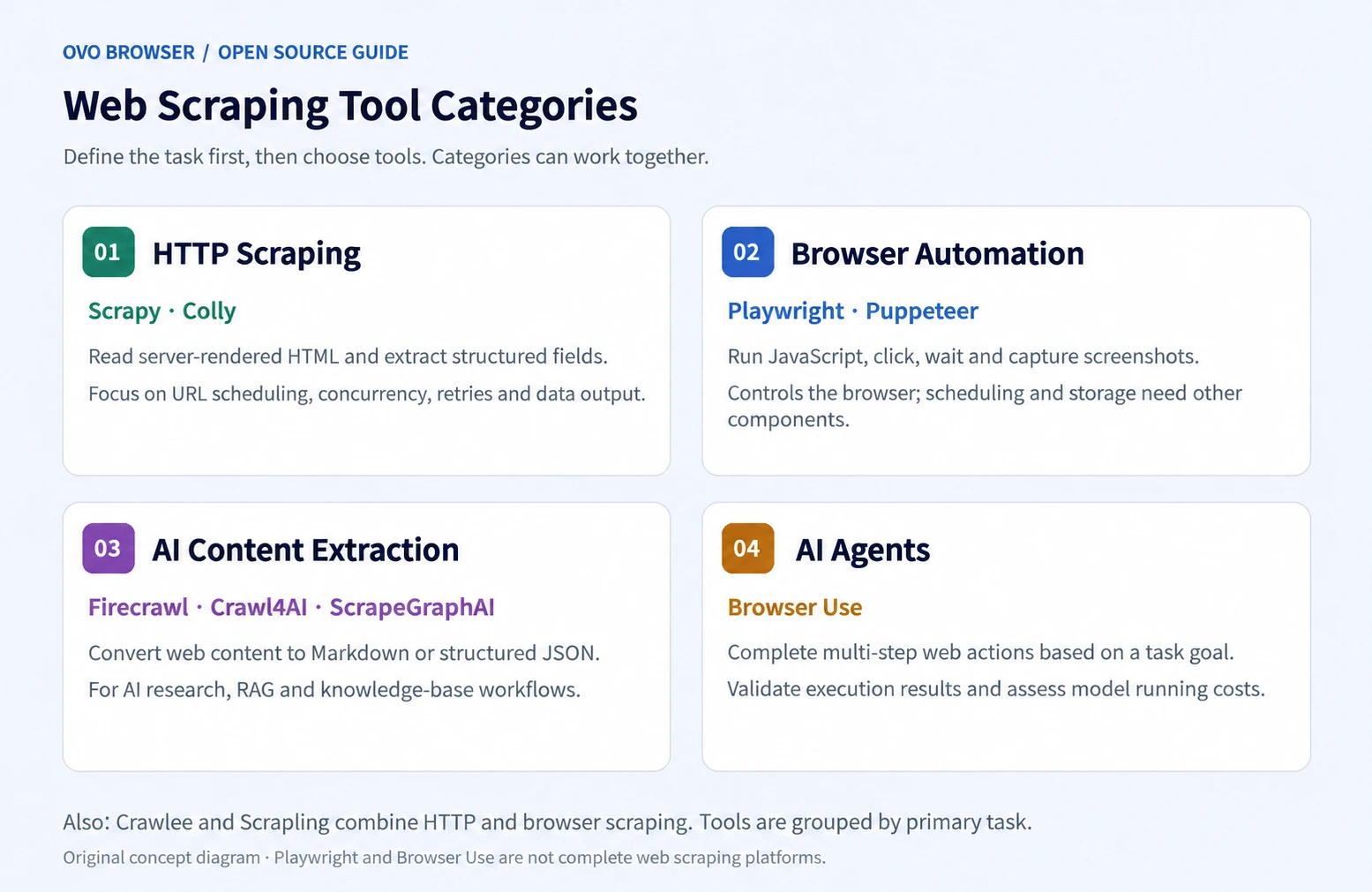
But 'crawler projects' are not a single category: Scrapy and Colly are more inclined towards collection frameworks; Playwright and Puppet are responsible for browser control; Browser Use: Multi step web operations for AI agents; Firewall, Crawl4AI, and ScrapGraphAI emphasize more on web content structuring and AI workflow. When selecting, first confirm the task and then compare the tools, which is usually more effective than simply looking at GitHub Star numbers.
This article refers to the topic selection and organization of the original AdsPower article, independently checks the official GitHub repository, README, and license information of each project, and supplements the integration instructions of ovo Browser's public GitHub repository and local API. The project positioning, technology stack, and license shall be based on the official materials verified in this verification; The number of stars is not used as a ranking basis as it will continue to change.
1、 First, clarify: Do you need web crawlers, browser automation, or AI agents?
- Traditional web crawling:The page content is mainly returned by the server, with a focus on URL scheduling, parsing rules, concurrency, retries, and data storage. You can prioritize watching Scrapy and Colly.
- JavaScript dynamic page:When a browser needs to execute scripts, wait for elements, or simulate interactions, Playwright, Puppet, or Crawle, Crawl4AI, and Scraping with integrated browser execution capabilities can be considered.
- AI/RAG content collection:If you want to convert web pages into Markdown, JSON, or knowledge base corpus, you can look at Firewrawl, Crawl4AI, ScrapeGrapeAI.
- Complex webpage interaction:Agents need to click, scroll, and fill out forms based on the target to understand Browser Use. It is not a direct substitute for traditional high-throughput crawlers.
2、 GitHub Open Source Crawler and Browser Automation Project Recommendation
Below are 10 real open source repositories introduced by project positioning. The project sequence is used for reading organization and does not represent comprehensive ranking.
1. Firewall: AI web page collection/content structuring
Official warehouse:https://github.com/firecrawl/firecrawl
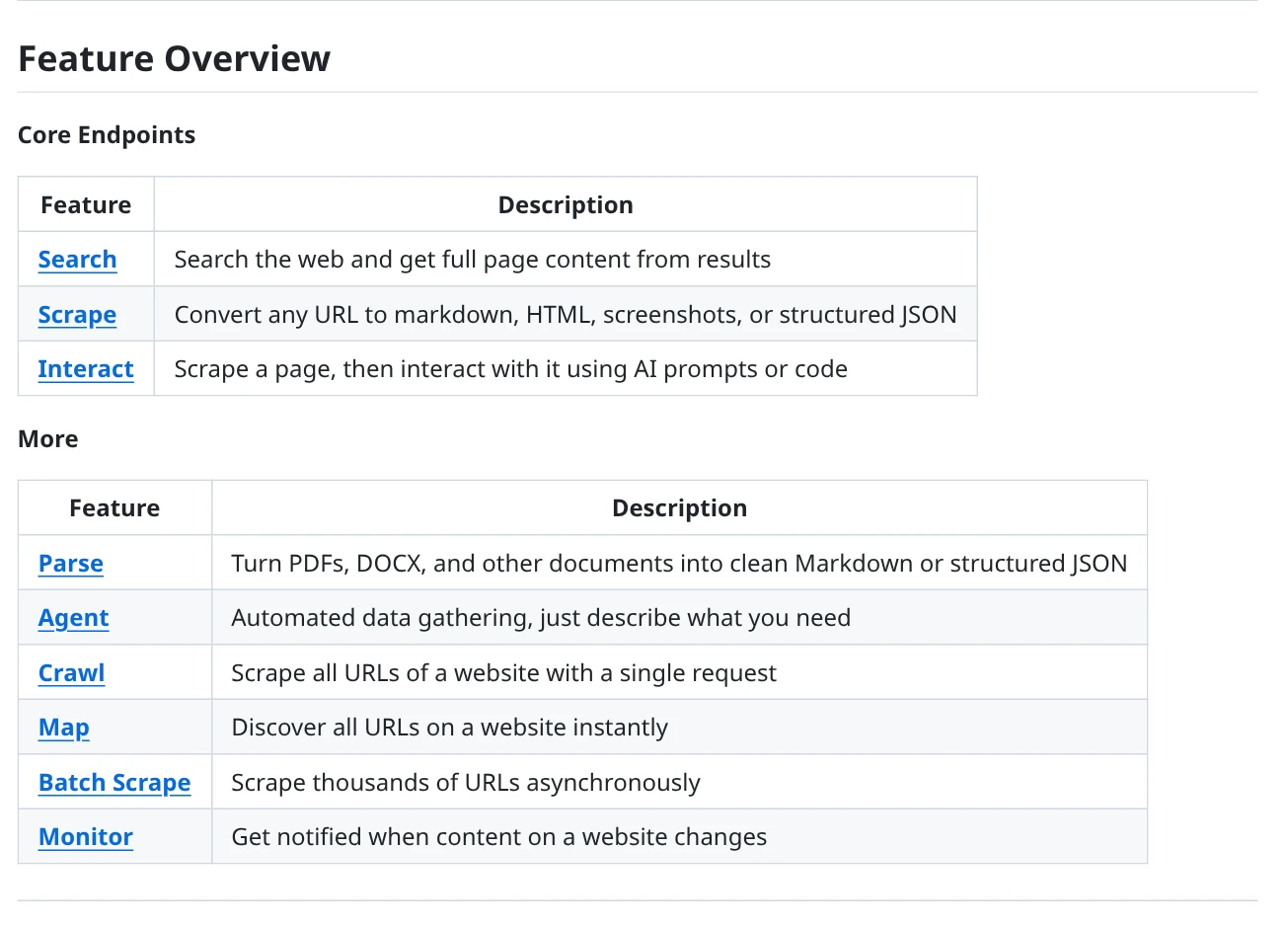
Firewrawl is designed for AI agents and knowledge base scenarios, providing capabilities such as Search, Scrape, Crawl, Map, and Interact. It can organize webpage content into Markdown, HTML, screenshots, or structured JSON, and also supports interactive operations such as clicking, scrolling, typing, and waiting on the page before extracting content.
Technology stack:TypeScript/Node.js ecosystem licence:AGPL-3.0 (Core Project; Part of the SDK and UI components are from MIT
- Suitable for converting webpage content into LLM readable Markdown or JSON.
- Support single page crawling, whole site crawling, site URL mapping, and interactive page collection.
- The official repository provides open-source self hosted paths and also offers hosted cloud services.
- The core project adopts AGPL-3.0, and the legal/technical team should verify the license obligations before commercial integration or distribution.
- Hosting cloud services includes additional capabilities, and cloud functionality cannot be assumed to be fully present in the local open source version by default.
Suitable scenarios:Suitable for RAG knowledge base, AI agent web information collection, document content organization, and website content building.
2. Crawl4AI: LLM/RAG friendly crawler
Official warehouse:https://github.com/unclecode/crawl4ai
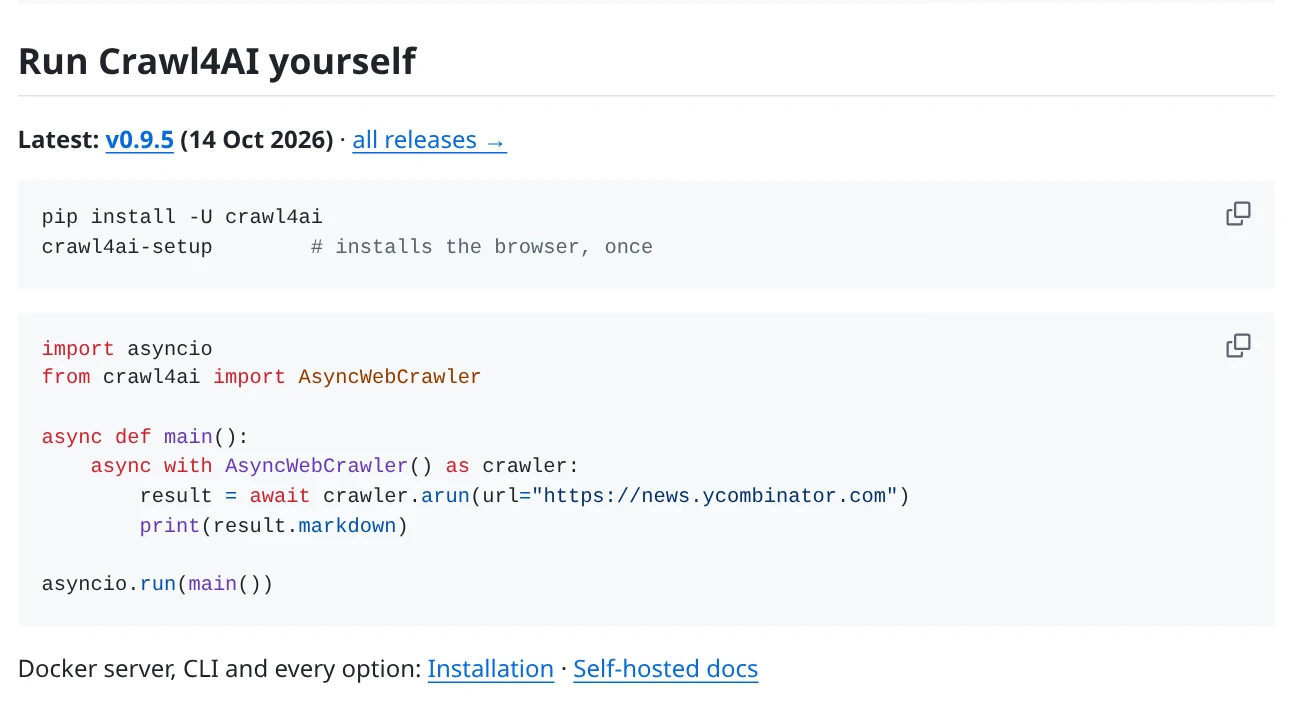
Crawl4AI is an open-source web crawler designed for AI applications, capable of converting pages into structured Markdown and extracting structured data through CSS, XPath, or LLM strategies. The official documentation also introduces asynchronous crawling, JavaScript page rendering, deep crawling, screenshot, PDF, and local/Docker self hosting methods.
Technology stack:Python licence:Apache-2.0 (Official README recommends adding project attribution as required)
- Markdown output is suitable for subsequent integration into RAG or LLM workflows.
- Can combine traditional CSS/XPath extraction with LLM structured extraction.
- Support local Python running, or use Docker self hosting according to official documentation.
- Browser, proxy, runtime environment, and concurrent resources need to be configured and maintained by oneself.
- LLM extraction will involve the resource or API cost of the selected model; Do not confuse the functionality of hosted cloud APIs with local open source libraries.
- When using, follow the signature instructions of the project README.
Suitable scenarios:Suitable for developers who need to convert web materials into Markdown, JSON, and further build knowledge bases or AI retrieval systems.
3. Browser Use: AI Browser Agent
Official warehouse:https://github.com/browser-use/browser-use
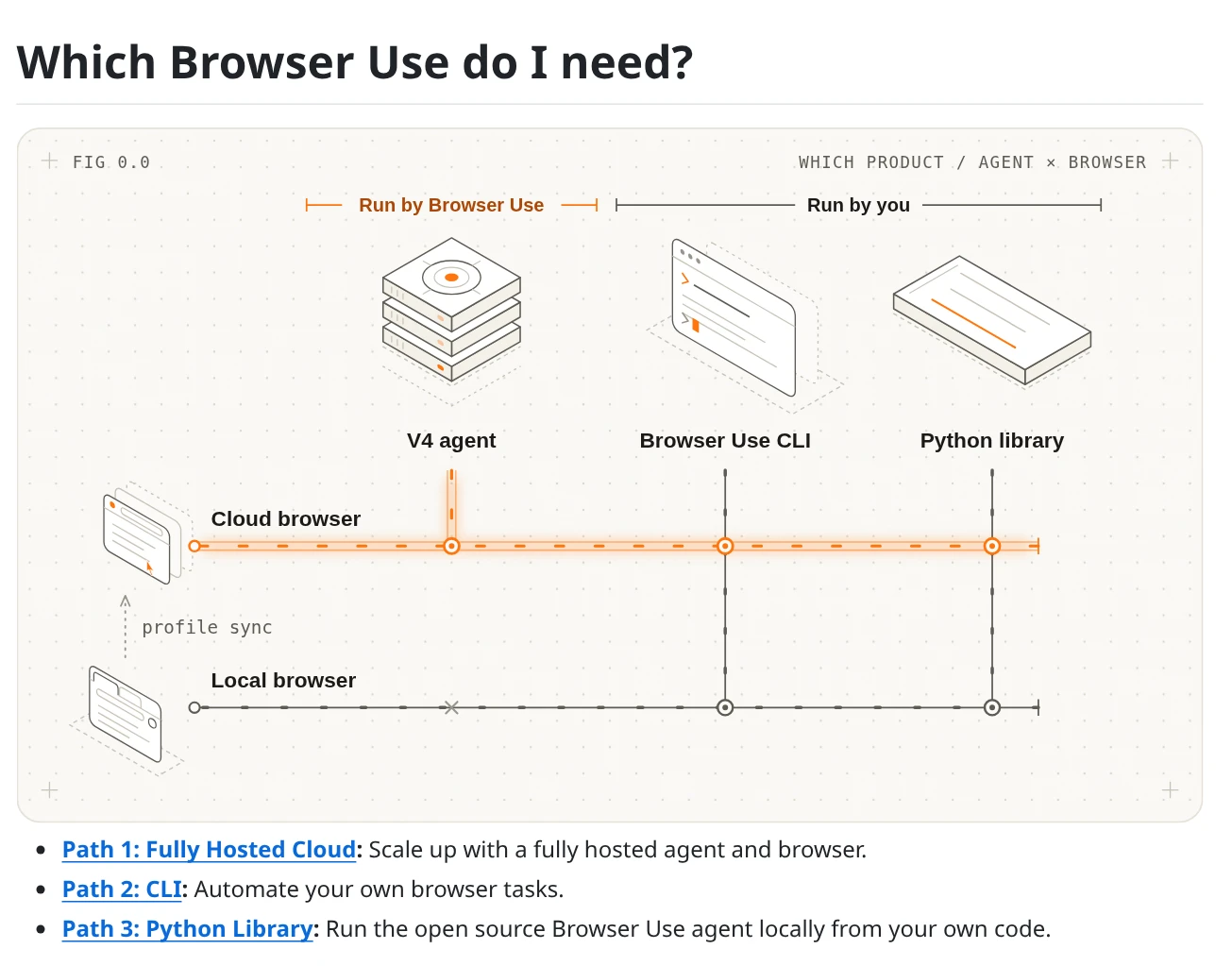
The focus of Browser Use is not on traditional URL queue crawlers, but on enabling AI agents to complete multi-step web page tasks through the browser. The official README provides usage paths for local Python Library, CLI, and hosted cloud; Local libraries can be run in conjunction with the model chosen by developers and local/cloud browsers.
Technology stack:Python (with related TypeScript tool ecosystem) licence:MIT (open-source Python library; Model inference and hosted browser services may be charged separately
- Suitable for complex interactive tasks that require clicking, scrolling, filling out forms, and cross page operations.
- The open-source Python library is licensed under the MIT license.
- You can choose a local browser according to the official documentation, or use a hosted browser service.
- It is a browser agent, not an out of the box high-throughput traditional crawler framework.
- Model inference, third-party model APIs, or hosted browser services may incur additional fees.
- The execution results of the agent are affected by model, webpage changes, and task design, and require manual verification.
Suitable scenarios:Suitable for research tasks that require browser interaction, repetitive web page operations, and AI agent workflows.
4. Crawlee: Production level crawler framework
Official warehouse:https://github.com/apify/crawlee
Crawlee provides a unified HTTP and headless browser crawling interface for Node.js developers. The capabilities listed in the official repository include persistent URL queues, data storage adaptation, scaling by system resources, proxy rotation, session management, error retries, and driving real browsers through Playwright or Puppet.
Technology stack:TypeScript / JavaScript(Node.js) licence:Apache-2.0
- A unified framework interface can be used between HTTP crawling and browser crawling.
- Built in production workflow components such as queues, storage, sessions, proxy rotation, and retries.
- Support browser automation tools such as Playwright and Puppet.
- More suitable for teams with Node.js engineering capabilities, but still need to design data cleaning, persistence, and monitoring.
- Production deployment requires reasonable configuration of queues, concurrency, proxies, and site access frequency.
Suitable scenarios:Suitable for TypeScript/JavaScript teams to build crawler systems that require task queues, session management, and browser rendering.
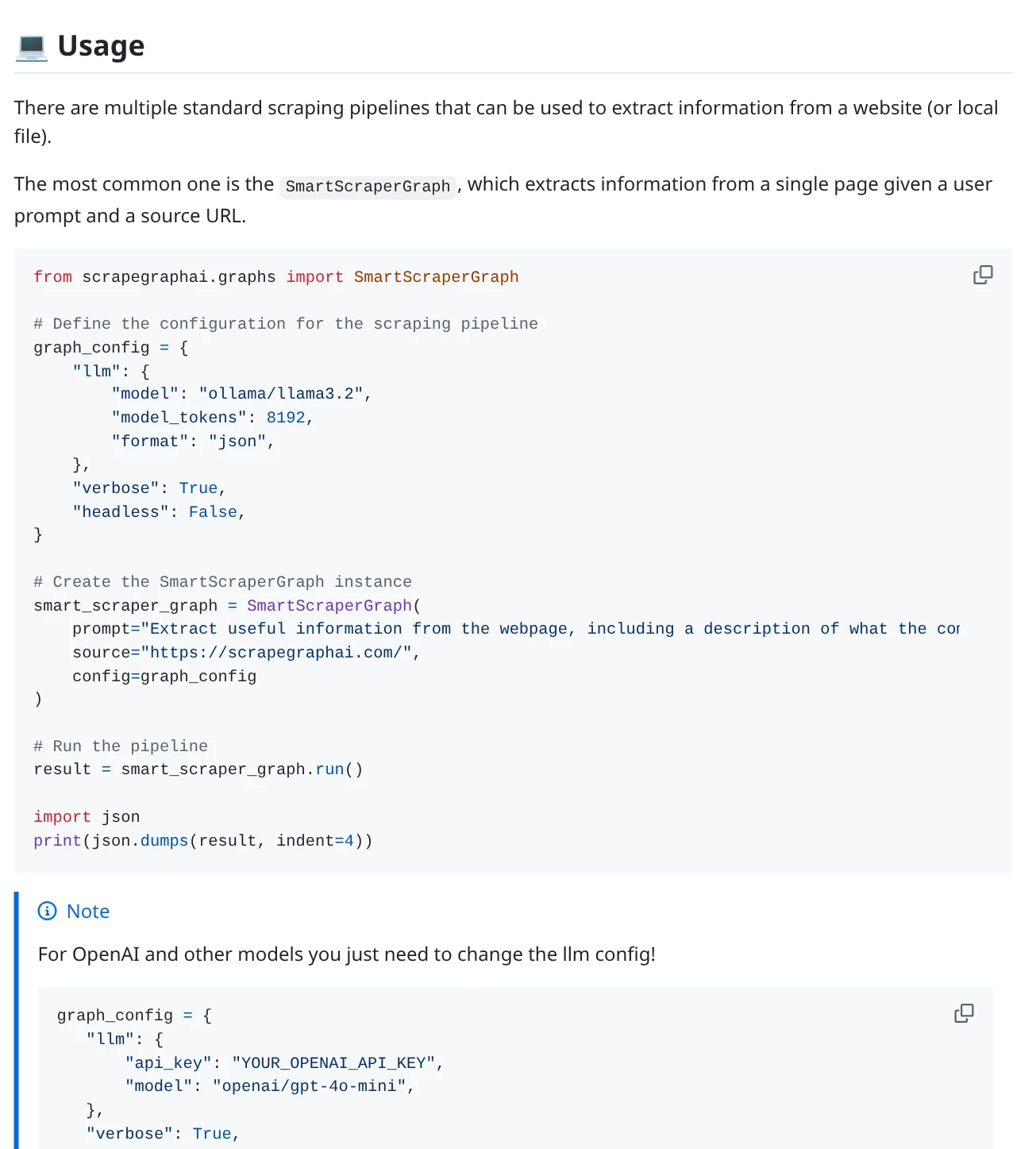
5. ScrapeGraphAI: LLM driven structured extraction
Official warehouse:https://github.com/ScrapeGraphAI/Scrapegraph-ai
ScrapeGrapAI uses a large language model and schema process to build a collection pipeline for web pages and local documents. The official README states that it can handle websites, as well as local documents such as XML, HTML, JSON, Markdown, etc; Open source libraries and hosted APIs at runtime locations LLM、 There are differences in browser rendering, proxy, and cost models.
Technology stack:Python licence:MIT (open-source Python library; Hosting API as an independent service
- It is possible to describe the extraction task around the target field, reducing the manual maintenance of some selectors.
- Suitable for integrating web pages and local documents into the information extraction process.
- The open-source library is licensed by MIT and can run on its own infrastructure.
- The self hosted open source version requires self configuration of LLM, browser/Laywright, proxy, and extension infrastructure.
- LLM output still needs to be verified and cannot be assumed to be completely accurate factual data.
Suitable scenarios:Suitable for Python teams who need to convert web pages or documents into specific JSON fields and are willing to configure their own models and runtime environments.
6. Scrapy: A Mature Python Crawler Framework
Official warehouse:https://github.com/scrapy/scrapy
Scrapy is a mature high-level web crawling and structured data extraction framework. The official repository positions it as a cross platform web scraping framework, suitable for building maintainable collection projects through spiders, request scheduling, and data processing workflows.
Technology stack:Python (official repository indicates Python 3.11+) licence:BSD-3-Clause
- Suitable for web data collection projects with clear structure, clear rules, and long-term maintenance needs.
- Mature ecology, suitable for organizing spider, request, parsing, and data output processes.
- BSD-3-Clause license, suitable for inclusion in various types of software projects (license requirements still need to be retained).
- Requires a certain foundation in Python and the ability to independently design parsing rules for the target site.
- For pages that heavily rely on front-end JavaScript, additional browser rendering solutions are typically required.
Suitable scenarios:Suitable for collecting e-commerce public directories, news archives, document directories, and other structured pages.
7. Playwright: Browser Automation Infrastructure
Official warehouse:https://github.com/microsoft/playwright
Playwright is a web testing and browser automation framework that can drive Chromium, Firefox, and WebKit through a unified API. It can handle pages, form interactions, page waiting, screenshots, and browser testing that require JavaScript execution, but it itself is not a complete crawler scheduling and data management platform.
Technology stack:Official bindings for JavaScript/TypeScript, Python, Java,. NET, etc licence:Apache-2.0
- Unified browser automation interface across Chromium, Firefox, and WebKit.
- Suitable for handling front-end rendering, interactive processes, and page screenshots.
- Can serve as the browser execution layer for crawler frameworks such as Crawle.
- URL queues, data storage, crawling scheduling, and content parsing usually need to be implemented independently or combined with other frameworks.
- Real browsers consume more resources than simple HTTP requests.
Suitable scenarios:Suitable for JavaScript rendering pages, interactive web page testing, and providing browser execution capabilities for other web crawling projects.
8. Scraping: Adaptive parsing and scraping
Official warehouse:https://github.com/D4Vinci/Scrapling
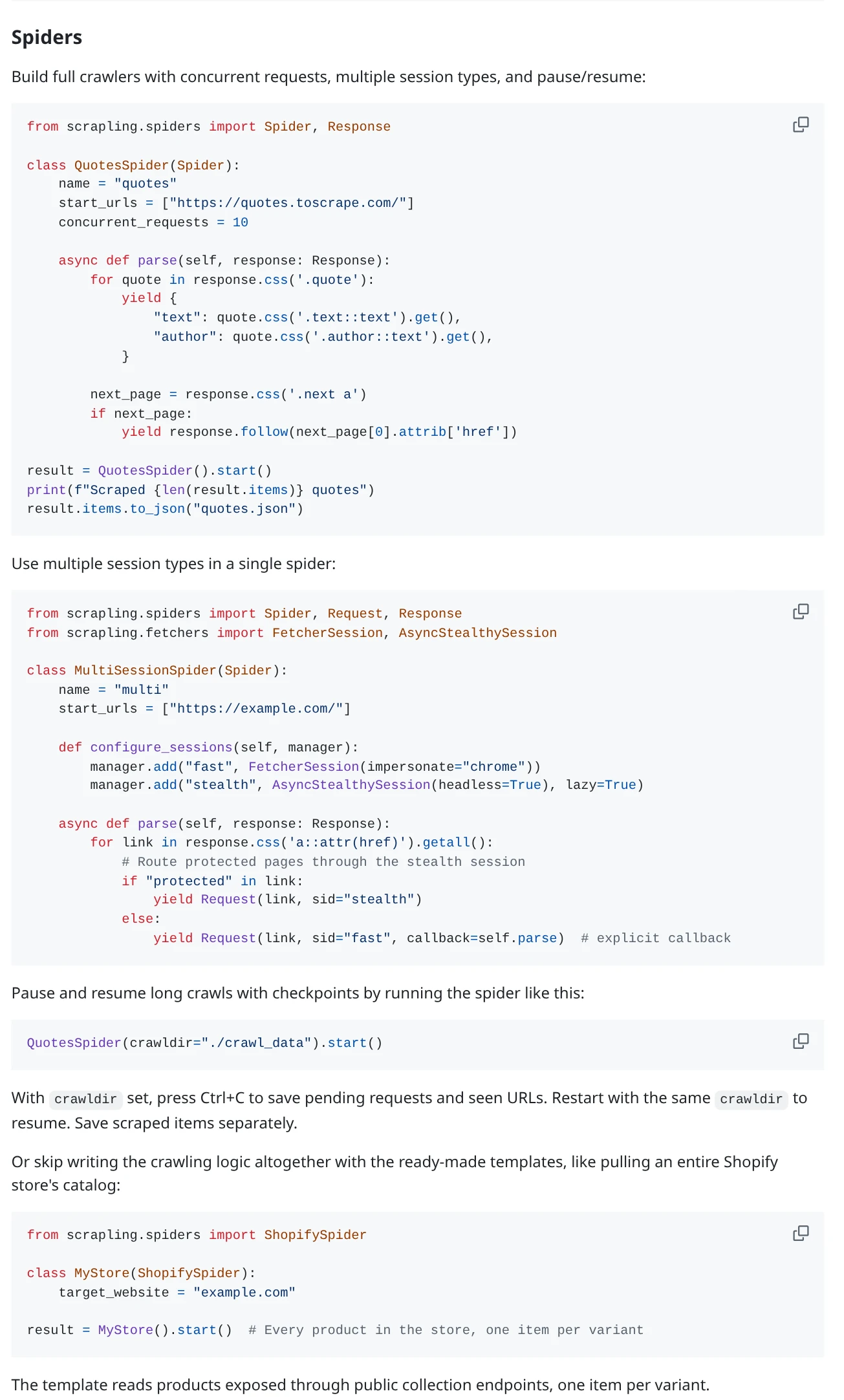
Scraping organizes HTTP scraping, browser Fetcher, parsing, and concurrent Spider into the same set of Python tools. Its adaptive parsing capability is used to reposition elements after changes in page structure; The official README also lists functions such as session management, proxy rotation, retry, pause/resume, and JSON, JSONL, CSV, XML export, etc.
Technology stack:Python (official README annotation for Python 3.10+) licence:BSD-3-Clause
- Adaptive parsing can reduce the maintenance cost of selectors caused by changes in the DOM of some pages.
- Can be extended from single page requests to concurrent spiders.
- Provide session, proxy rotation, retry, and multiple data export capabilities.
- The basic installation and optional dependencies such as Fetcher/Spider browsers are not exactly the same. Before enabling browser functionality, it is necessary to install extras according to the official documentation.
- Adaptive parsing cannot guarantee that all websites will not require manual maintenance after revision.
Suitable scenarios:Suitable for Python developers to handle projects with frequent changes in DOM structure and requiring multiple crawling methods.
9. Puppet Maker: Node.js Browser Control
Official warehouse:https://github.com/puppeteer/puppeteer
Puppeteer is a JavaScript library that controls Chrome or Firefox through VNet Protocol or WebDriver BiDi, and runs in headless mode by default. The common uses listed in the official documentation include form automation, UI testing, page screenshot, PDF generation, and capturing single page applications and generating pre rendered content.
Technology stack:JavaScript / Node.js licence:Apache-2.0
- Detailed browser control capabilities for Chrome/Firefox.
- Suitable for screenshots PDF、 Form operations and pages that require browser execution.
- Can be combined with frameworks such as Crawle to supplement task scheduling and data management capabilities.
- It is mainly responsible for browser control and does not provide complete crawler project management and data pipelines.
- Browser instances require additional CPU, memory, and operational maintenance.
Suitable scenarios:Suitable for Node.js teams for browser control, page screenshot, PDF generation, and SPA content collection.
10. Colly: Go language crawler framework
Official warehouse:https://github.com/gocolly/colly
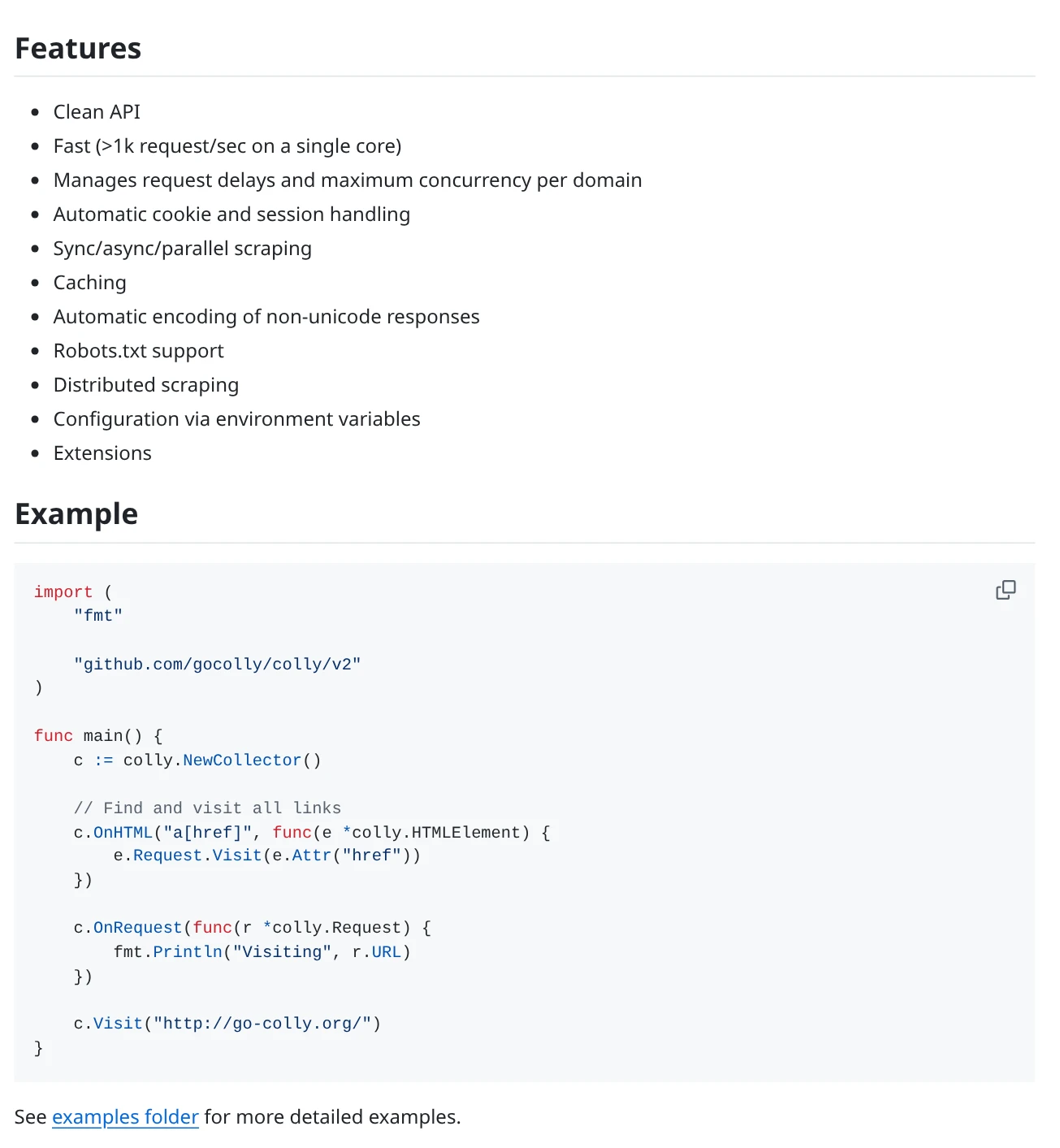
Colly is a web crawling and data scraping framework for Go language. The official repository lists features such as controlling request latency and maximum concurrency by domain name, handling cookies and sessions, synchronous/asynchronous/parallel crawling, caching, robots.txt support, and distributed crawling.
Technology stack:Go licence:Apache-2.0
- Suitable for Go technology stack and HTTP request based collection tasks.
- Delay and concurrency limits can be set by domain name for easy control of access pace.
- Supports cookies, caching, robots.txt, and distributed crawling.
- Mainly targeting HTTP crawling; Pages that require real browsers to execute JavaScript should consider browser automation tools.
- Need Go development capability and self-designed data output, monitoring, and task deployment.
Suitable scenarios:Suitable for Go teams to collect publicly available web pages, directories, and site content with relatively stable structures.
3、 How to choose 10 projects? Quick comparison of a table
| project | Main positioning | Language/Technology Stack | License | Priority consideration scenarios |
|---|---|---|---|---|
| Firecrawl | Web search, crawling, and content structuring | TypeScript/Node.js ecosystem | AGPL-3.0 (Core) | AI/RAG corpus collection |
| Crawl4AI | LLM friendly asynchronous crawler | Python | Apache-2.0 | Convert webpage to Markdown/JSON |
| Browser Use | AI Browser Agent | Python | MIT (Open Source Library) | Multi step interactive task |
| Crawlee | Production level crawler framework | TypeScript / JavaScript | Apache-2.0 | Queue, session, and browser crawling |
| ScrapeGraphAI | LLM schema extraction | Python | MIT (Open Source Library) | Extract web pages and documents by field |
| Scrapy | Structured web crawling | Python | BSD-3-Clause | Long term maintenance collection project |
| Playwright | Browser automation/testing | Multi language binding | Apache-2.0 | Dynamic pages and interactions |
| Scrapling | Adaptive parsing and concurrent capture | Python | BSD-3-Clause | There are many changes in the page structure |
| Puppeteer | Chrome/Firefox Control | JavaScript / Node.js | Apache-2.0 | Screenshots, PDFs, SPA pages |
| Colly | Go HTTP Capture Framework | Go | Apache-2.0 | Go technology stack and concurrent requests |
Simple selection suggestion:If you mainly crawl structured web pages, you can start with Scrapy or Colly first; If the page requires the browser to execute JavaScript, prioritize evaluating Playwright or Puppet; If the project wants to convert web pages into AI corpus, it can compare Firewall, Crawl4AI, and ScrapGraphAI; If you need the Agent to perform multi-step operations, then look at Browser Use.
4、 Extended recommendation: ovo Browser official GitHub project and automation capabilities
The above 10 projects are mainly responsible for "how to discover pages, read content, parse fields, or perform web page interactions". When a team needs to manage different browser working environments, proxy configurations, and automate browser processes, it is necessary to consider the browser runtime environment layer.
The positioning of ovo Browser is to integrate browser environment management with automation, not a web crawling framework. It will not replace the crawling scheduling, content parsing, and data storage functions of Scrapy, Crawle, or Firewall; It can serve as a layer of connection between the browser environment and automation tools.
1. ovo Browser Chromium kernel repository
Official public warehouse:ovobrowsersupport/ovobrowser.
The README repository positions it as a source code level modified Chromium fingerprint kernel and provides Windows x64 portable packages and developer examples. The warehouse description lists related configuration items such as Canvas, WebGL, Audio, Client Rects, Font, as well as startup examples for languages such as Python, Node.js, Go, C #, PowerShell, Java, Rust, etc. The warehouse page is labeled with MIT license.
Need to distinguish:This repository is designed for developers and includes instructions and startup examples for kernel portable packages; It is not a web crawler framework, nor does it represent the entire source code of the ovo Browser graphical client.
2. Introduction to ovo Browser graphical client repository
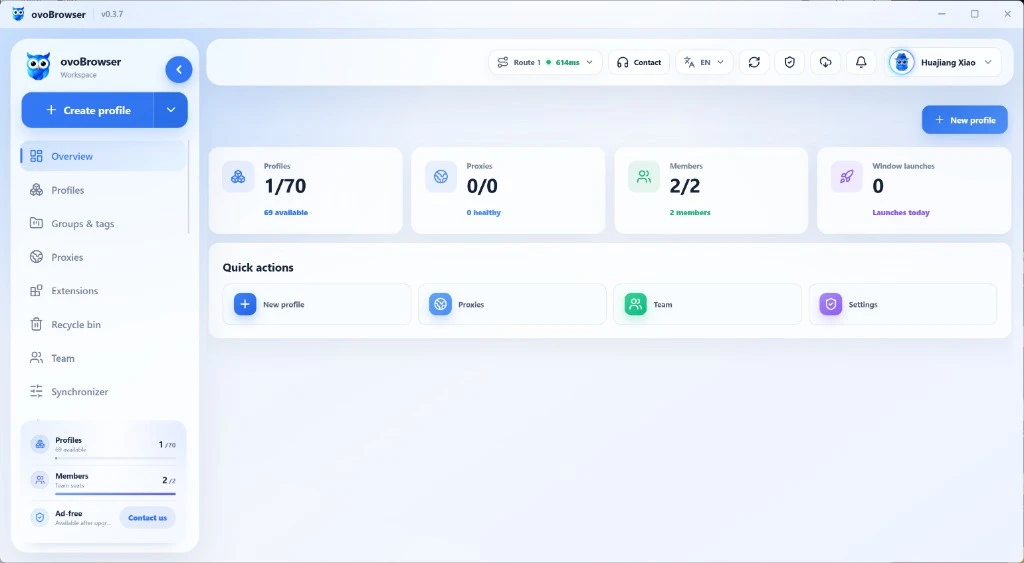
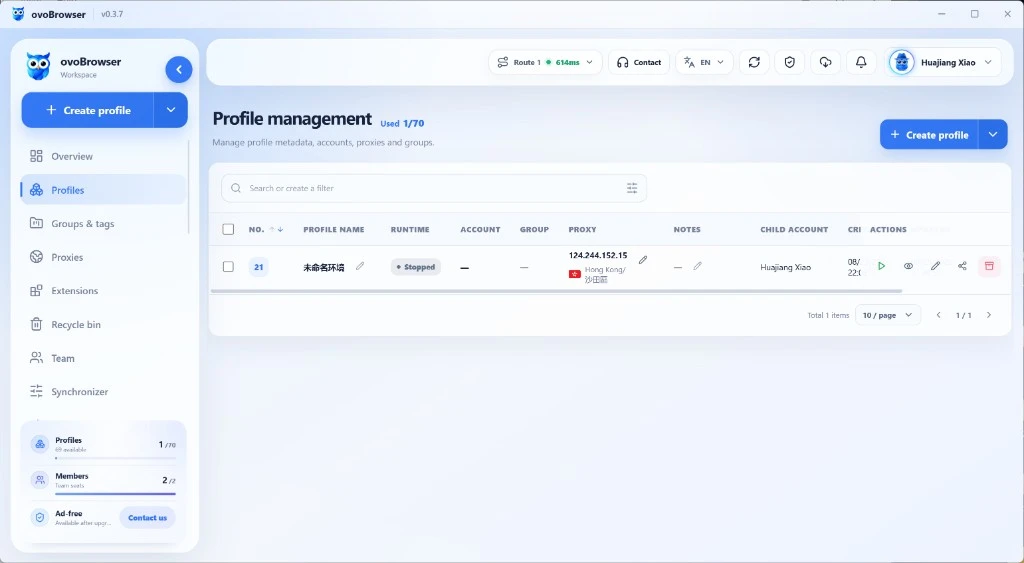
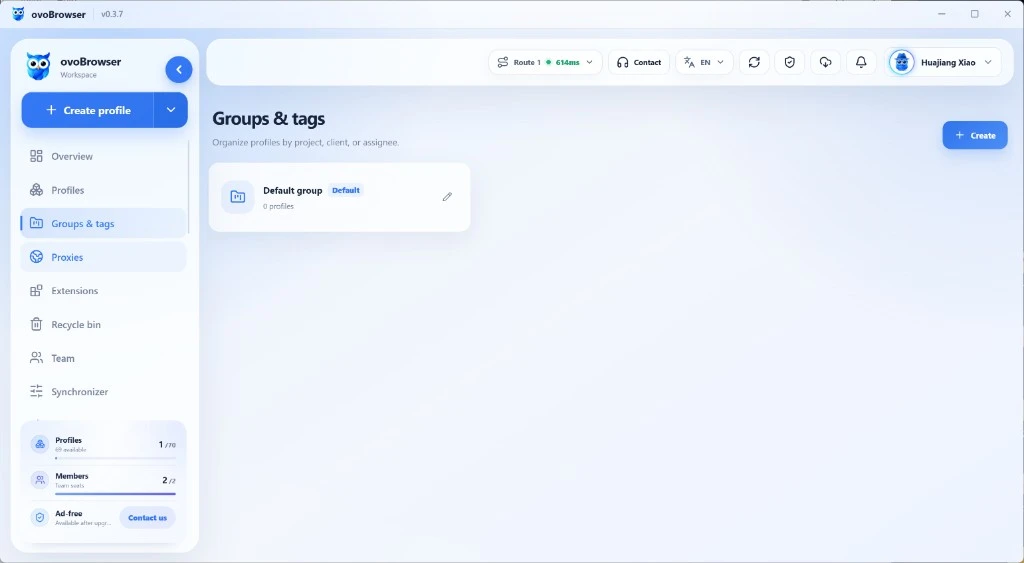
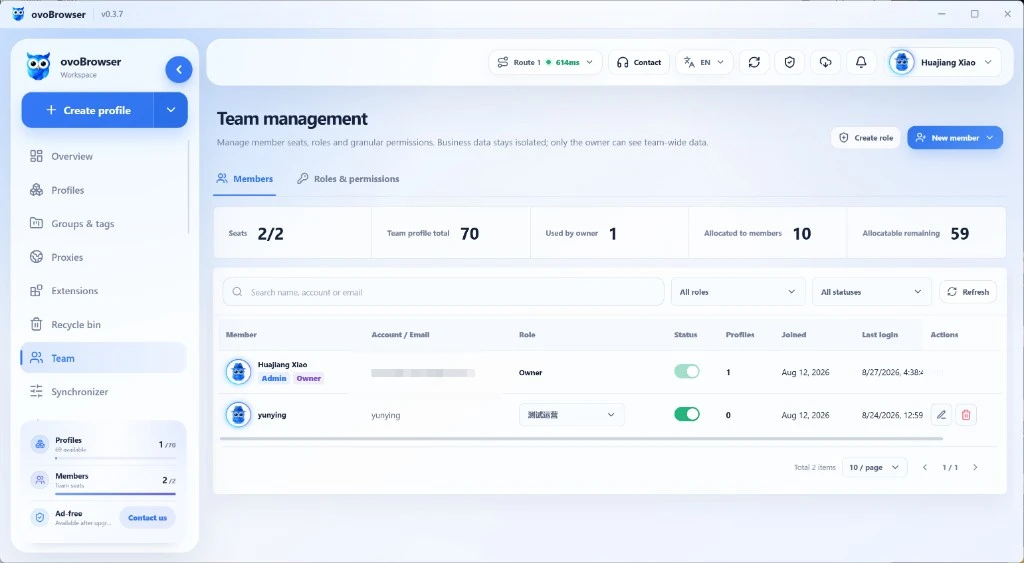
Official public warehouse:ovobrowsersupport/ovobrowser-mangerThe README of this repository describes it as an introduction and screenshot material for desktop clients aimed at ordinary users, indicating that browser environments, proxies, teams, and window synchronization can be managed in a graphical interface.
The client screenshot version marked in the README is v0.3.7. The image below is from the official repository's docs/assets directory and is a screenshot of a real product; If the client interface has already been updated at the time of release, it should be replaced with a screenshot of the current version and the version should be indicated in the caption.
3. ovo Browser Local API: Allow automation tools to connect to the browser environment
The official local API documentation for ovo Browser states that the local HTTP API can manage the browser environment, grouping, tags, proxies, recycle bin, and browser processes. The interface adopts POST+JSON Body; The interfaces listed in the document include environment list, creating/updating environment, proxy management, and opening, querying, and closing browser environment.
After opening the environment, the API response will return pid、ws、http Waiting for information; The official document clearly states that the returned ws Can be used by Playwright or Puppet. This provides an entry point to connect the environment management of ovo Browser with existing browser automation code.
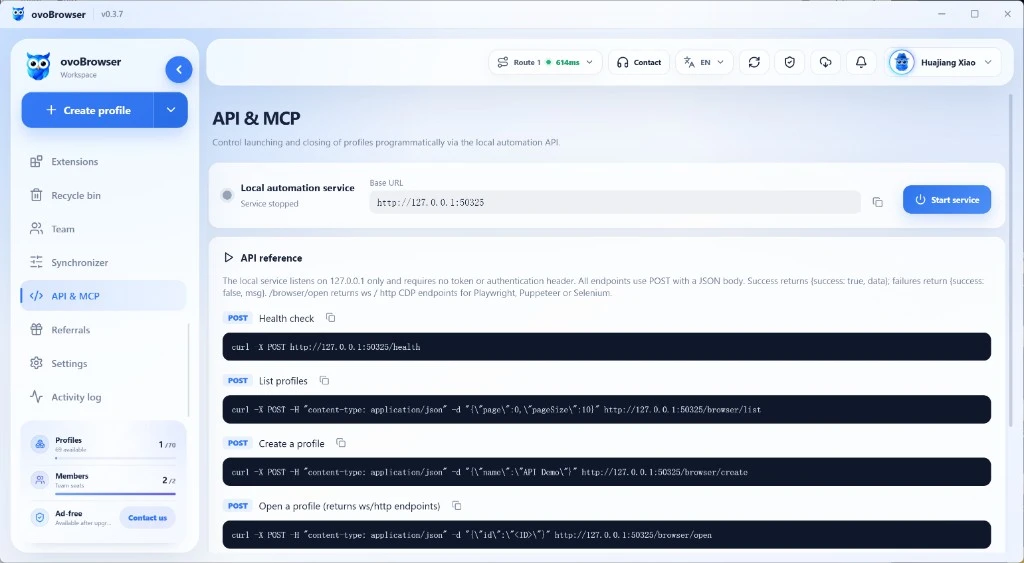
Example of opening environment request in official documentation:
curl --location 'http://127.0.0.1:50325/browser/open' \
  --header 'Content-Type: application/json' \
  --data '{"id":"YOUR_PROFILE_ID","headless":false}'
After the request is successful, the response will include process and browser connection information. Developers can return according to the official documentation ws Provide to Playwright or Puppeteer; The specific connection code should be based on your current client version and official API documentation.
4. A clearer ovo Browser+open-source crawler workflow
- Select collection framework:Select Scrapy, Crawle, Crawl4AI by task, or use Playwright/Puppet to process pages that require browser execution.
- Establish browser environment:Create and name environments by project in ovo Browser, and configure agents according to actual network needs.
- Open the environment through the local API:Open the specified environment using the local API and read the browser connection information in the response.
- Connect automation tools:According to the official documentation, hand over the connection information to Playwright or Puppet, and have the developer write the logic for page access, waiting, extraction, and saving.
- Manage data and access pace:Save the collection results to your own database or file, and set reasonable concurrency, latency, and retry for failures.
5. Safety precautions when using the ovo Browser local API
ovo Browser official API documentation states that the local API only listens 127.0.0.1And do not require Token, Bearer Token, or x-api-keyTherefore, the service should be kept for local use only and local API ports should not be exposed to the public network or untrusted LAN. The official document also reminds that accounts, cookies, 2FA keys, and proxy passwords are sensitive information and should not be written into public logs.
In addition, browser environment isolation and proxy configuration do not mean that access control of the target website can be bypassed. Developers should comply with the service terms of the target website robots.txt、 Privacy requirements, copyright rules, and applicable laws; For content that requires login, payment, personal data, or explicitly prohibits automated access, appropriate authorization should be obtained first.
5、 Frequently Asked Questions
Is the GitHub open-source crawler project completely free?
Open source licenses allow users to use, modify, or distribute code under corresponding conditions, but do not mean zero operating costs. Servers, proxies, browser runtime resources, LLM APIs, and hosted cloud services may all incur fees; The obligations of AGPL, Apache, MIT, BSD and other licenses are also different. Before commercial use, the LICENSE file in the project root directory should be checked.
How to choose Scrapy, Playwright, and Firewall?
Scrapy is more suitable for traditional structured web page collection; Playwright is a browser automation and testing framework suitable for handling JavaScript rendering and page interaction; Firewall is designed for web content crawling, searching, and structured output, especially suitable for AI/RAG workflows. The three solutions have different problems and can also be combined and used in the same system.
Is ovo Browser itself a web crawler software?
No. ovo Browser is mainly used for managing browser environments, proxies, and automated connections. The actual tasks of URL scheduling, webpage parsing, data cleaning, database writing, etc. still need to be completed by Scrapy, Crawle, Firewall, or the developer's own code.
Can ovo Browser connect to Playwright or Puppet Maker?
The official client instructions and local API documentation of ovo Browser both introduce the connection methods with Playwright and Puppet. The official API returns browser connection information after opening the environment, where ws Can be handed over to Playwright or Puppet. Please refer to the current version of the document for specific implementation.
Can using web crawling projects guarantee not being restricted by websites?
No. No framework or browser configuration can guarantee that the target website will always allow automated access. Should follow the rules of the target site and set a reasonable access frequency; Do not attempt to circumvent unauthorized access controls when encountering access denial, verification codes, login walls, or access restrictions.
Conclusion: First choose the right tools, then build a stable and compliant workflow
The open-source crawler ecosystem on GitHub has covered multiple levels, from simple HTTP crawling to browser automation and AI structured extraction. Scrapy and Colly are suitable for traditional data collection, Crawle is suitable for building projects with queues and session management, Playwright and Puppet are responsible for browser control, and Firewall, Crawl4AI, and ScrapGraphAI are suitable for web content entering AI workflows.
If the project still needs to independently manage the browser environment and connect it to existing automation programs, you can further learn about the official GitHub kernel repository and local API of ovo Browser. Making each tool responsible for its own strengths is often more reliable than expecting a single software to complete all the work.
Reference materials and official sources
- AdsPower Original Text: Recommended GitHub Crawler Projects for 2026 (Reference Topic and Structure Only)
- FireCrawl Official GitHub
- Crawl4AI Official GitHub
- Browser Use Official GitHub
- Crawlee Official GitHub
- ScrapeGrapAI Official GitHub
- Scrapy Official GitHub
- Playwright Official GitHub
- Scraping Official GitHub
- Puppet Official GitHub
- Colly Official GitHub
- ovo Browser Chromium Kernel Repository
- Introduction and screenshot repository of ovo Browser client
- ovo Browser Local API Official Document
Related articles

2026 Facebook Page Growth Guide: Content Strategy, Daily Operations, and Multi Account Collaboration
For cross-border e-commerce, overseas brands, and social media operation teams, Facebook page growth is not simply about increasing the number of posts, but about continuously providing valuable original content, establishing clear brand positioning, responding to audiences in a timely manner, and adjusting content direction based on data. This article starts with homepage preparation, content planning, 30 day operation rhythm, team collaboration, and data review, and introduces how ovo Browser helps teams manage multiple authorized business environments more clearly.
Read article
How to choose ovo Browser, GoLogin, and AdsPower?
Free version, automation, comprehensive price comparison
Read article
Why did Claude's account trigger verification, warning, or restriction?
This article follows the order of "account status - region and network - payment verification - usage behavior - devices and sessions - environment management", sorts out the links worth checking, and introduces how ovo Browser helps users organize their browser work environment.
Read article