 ovobrowser
Jump to an article section
2026 Facebook Page Growth Guide: Content Strategy, Daily Operations, and Multi Account Collaboration
Article Summary: For cross-border e-commerce, overseas brands, and social media operation teams, Facebook page growth is not simply about increasing the number of posts, but about continuously providing valuable original content, establishing clear brand positioning, responding to audiences in a timely manner, and adjusting content direction based on data. This article starts with homepage preparation, content planning, 30 day operation rhythm, team collaboration, and data review, and introduces how ovo Browser helps teams manage multiple authorized business environments more clearly.
Target Audience: Overseas brand operation, cross-border e-commerce team, content organization, social media agency operation team.

1、 First of all, let's clarify: What drives the growth of Facebook pages?
The foundation of homepage growth is to ensure that the target audience continues to see content worth reading, watching, or sharing. The long-term development of a homepage usually depends on four things: whether the audience is clear, whether the content is valuable, whether the interaction is authentic, and whether the operation is sustainable.
Don't take "number of days to maintain accounts", "fixed number of likes", or so-called "weight formulas" as official rules. The Meta public guidelines cited in this article do not provide a set of fixed operation tables that can guarantee the increase of followers on the homepage or the unrestricted account. The governance measures announced by Meta in 2025 indicate that the use of false interactions, bulk posting of duplicate content, and interference with information flow through irrelevant tags or copy may affect the eligibility for content reach and monetization. The original content description for 2026 also emphasizes that content that is simply moved or only modified with low value may be downgraded in recommendation.
Therefore, the first step in growth is not to pursue the number of operations, but to determine for whom the homepage aims to solve what problems.
2、 First, set up the homepage and account structure correctly
1. Brands and businesses prioritize using Facebook pages
Personal information and brand homepage play different roles. Brands, businesses, products, or organizations should use Facebook pages that are suitable for their business and invite real team members or partner organizations to participate in management through the enterprise asset and homepage access permission process provided by Meta. Do not create false identities, impersonate others, or duplicate personal information in order to expand your operations.
2. Complete the basic information of the homepage
Before publishing content, check:
- Is the homepage name, avatar, cover, and introduction accurate;
- Whether the homepage category, contact information, website, and business information are authentic;
- Whether the action button points to the correct consultation, purchase, or understanding page;
- Can the pinned content help new visitors quickly understand what the brand offers;
- Do administrators, editors, and advertising related personnel have appropriate permissions.
3. Establish a list of security and content assets
Enable available login protection measures to ensure that the recovery of email and contact information is controlled by the organization. Keep authorization records for images, music, videos, and customer cases. If collaborating with an agency, priority should be given to using the official homepage access permissions provided by the platform, and do not pass on the main account password in multi person chats.
3、 Content planning: Establish 3-4 stable columns first
A content framework that is easy to execute can start from the following columns:
- Product and Service Education: Explain what problems the product can solve, how to use it, and which scenarios it is suitable for.
- Practical Tutorial: Answer frequently asked questions from the audience using steps, checklists, and demonstration videos.
- Real cases and experiences: Share authorized customer cases, team experience, and verifiable data, and explain the background and scope of application.
- Brand and Community Content: Showcase the behind the scenes process, team perspectives, event information, and invite the audience to ask specific questions.
Before publishing each piece of content, ask yourself three questions: Is it helpful to the target audience? Do you have your own perspective, experience, or demonstration? Are the titles, images, and text accurately corresponding?
Original content should have truly added information
You can refer to industry trends, but do not directly copy the copy, images, or videos from other homepages. If using third-party materials, authorization should be confirmed and one should include their own explanation, testing, analysis, or substantive creation. Simply adding borders, subtitles, or speed changes to someone else's video does not necessarily create valuable original content.
Do not use interactive inducement as a substitute for content value
Avoid purchasing fans, organizing fake reviews, mutual brushing interactions, repeatedly sharing the same content, or using irrelevant tags to attract clicks. Meta has clearly stated that it will handle the manipulation of distribution and false interactions.
4、 From 0 to 30 days: an executable homepage operation rhythm
The following is a work plan for the team to test run, which is not an official Facebook policy and does not guarantee obtaining a specific number of followers on a certain date. Please adjust according to industry, content capacity, and audience feedback.
Week 1: Improve homepage and positioning
- Clearly state the region, language, audience, and core values of the homepage service;
- Improve profile picture, cover, introduction, contact information, and action buttons;
- Identify 3-4 content columns and establish a topic selection table;
- Prepare a set of original graphic and short video materials;
- Check homepage access permissions, member responsibilities, and login security settings.
Week 2: Test Content Format
Test various forms such as text, short videos, slideshows, or tutorials around the same theme. Each test only changes a small number of variables, such as the beginning, cover, content length, or CTA, and records the results. Focus on observing whether the audience has finished watching, saved, and asked specific questions, rather than just looking at the number of likes.
Week 3: Seriously manage comments and communities
Timely reply to real comments and private messages, organize duplicate questions, and convert them into the next batch of tutorial topics. Handle complaints or after-sales issues according to brand procedures; When encountering fake homepage or suspicious links, use the reporting and security tools provided by the platform. Do not use automated tools to mass produce comments or send unsolicited promotional messages.
Week 4: Review and adjust
Compare the reach, viewing time or completion status, effective interaction, link clicks, inquiries and conversions by content column. Identify themes that perform well, analyze the reasons, and create new original versions; For underperforming content, first check the audience, expression, and material quality, and do not directly use duplicate releases to 'replenish'.
5、 How to manage multiple homepages or client projects more clearly?
When a team serves multiple brands, regions, or clients simultaneously, the real areas that are prone to errors are often: mixed login environments, misplaced data items, excessive member permissions, incomplete handover records, and content being mistakenly sent to the wrong homepage.
It is recommended to first establish an account asset ledger that records at least: homepage or project name, business owner, platform, target region, corresponding browser environment, authorized members, content owner, recent inspection time, and notes. Only manage the homepage and business accounts that the team has access to.
1. Use ovo Browser to establish clear boundaries for different business environments
The official documentation of ovo Browser states that each browser environment can independently save account information Cookie、 Proxy, browser fingerprint, launch tab, and browser behavior. The team can establish naming and grouping rules based on brand, customer, region, or position to reduce confusion and mixing of information.
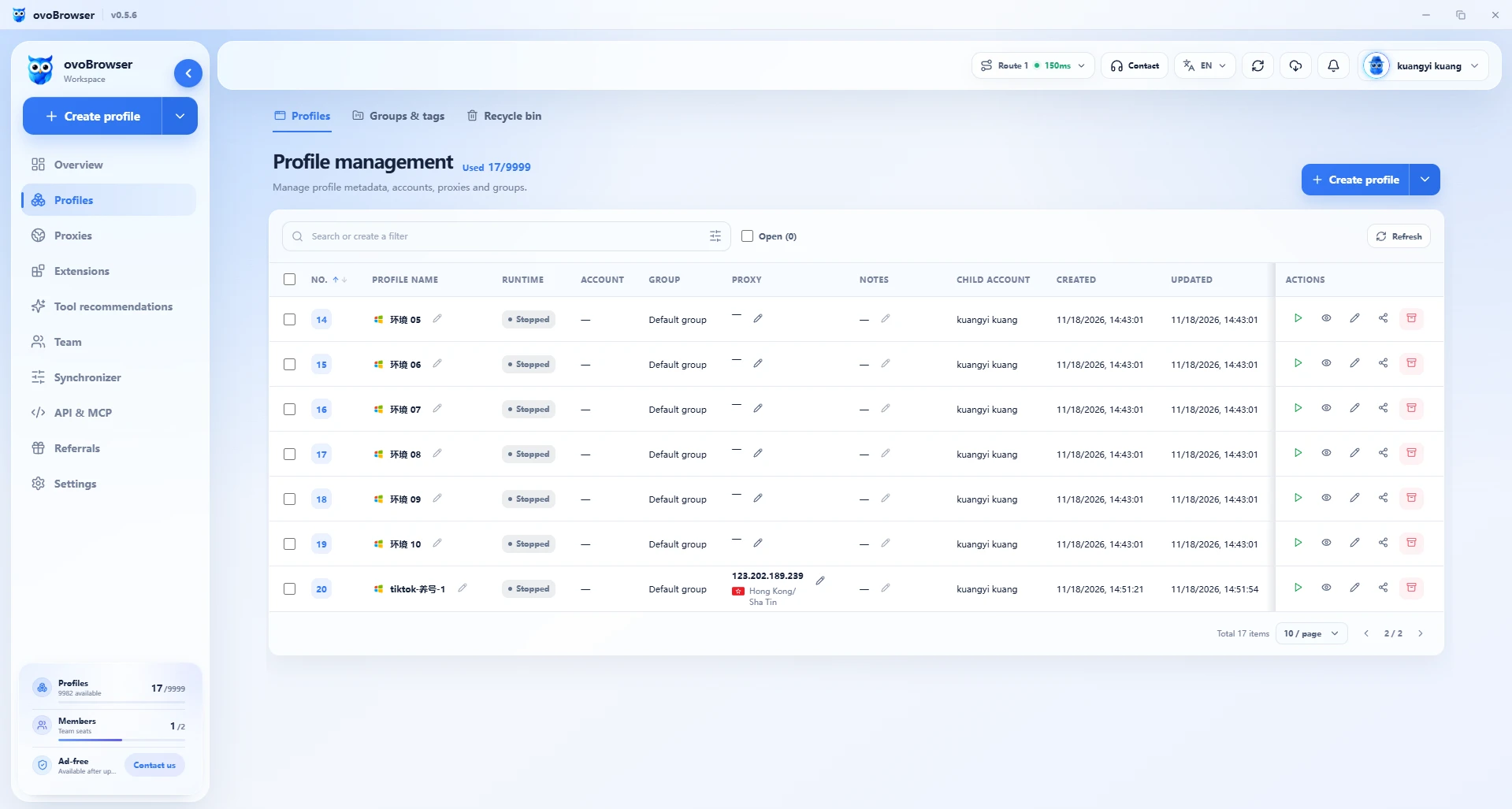
Batch management is suitable for organizing projects, but it does not mean batch publishing of content
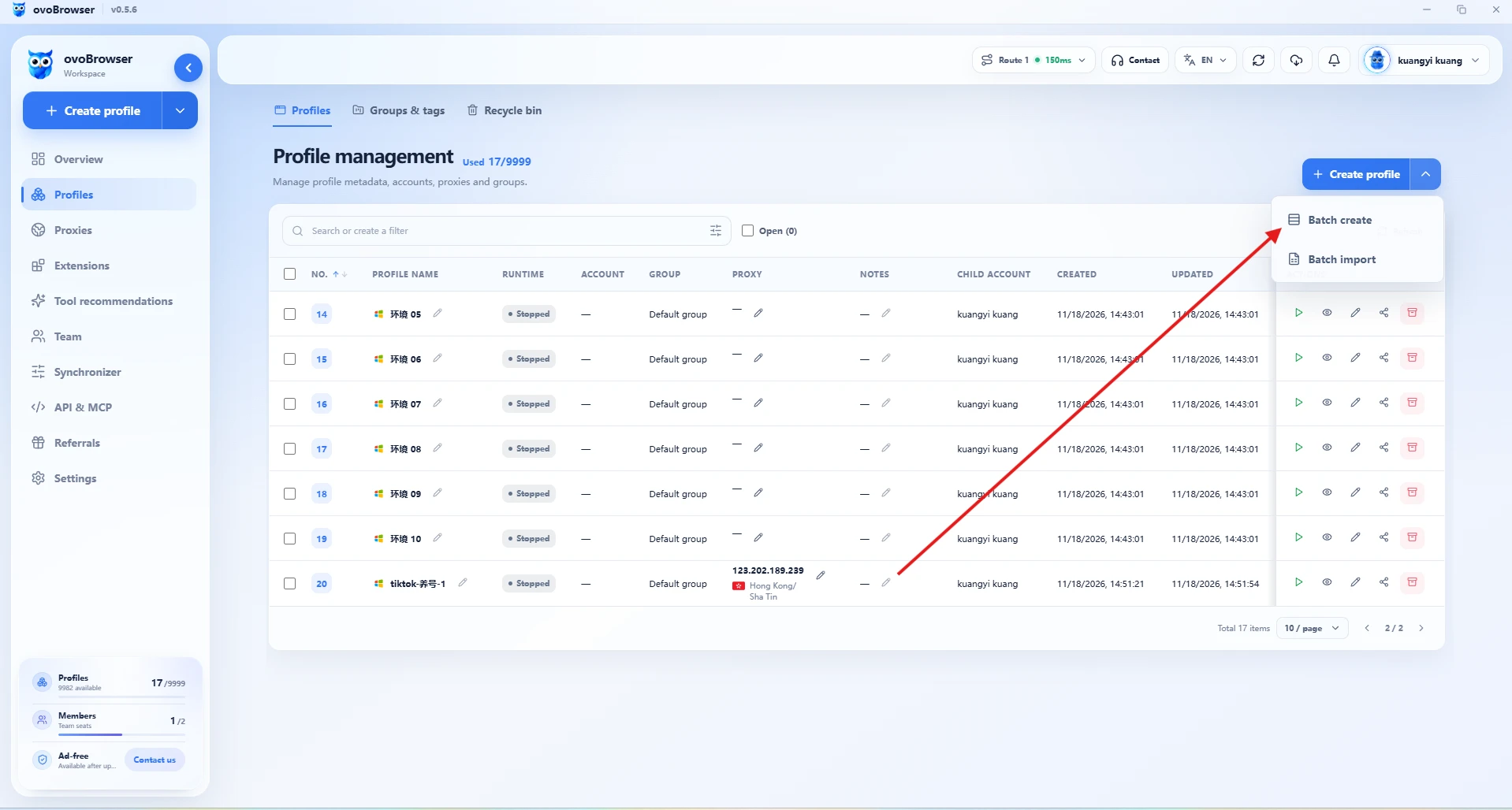
When the project increases, the batch creation or table import function of ovo Browser can be used to organize the environment. The official help documentation states that XLSX, XLS, and CSV imports are supported, and import previews are provided. Before submission, the name, grouping, proxy, and ownership should be checked to avoid importing incorrect configurations into multiple environments at once.
3. Proxy configuration should serve the real business network needs
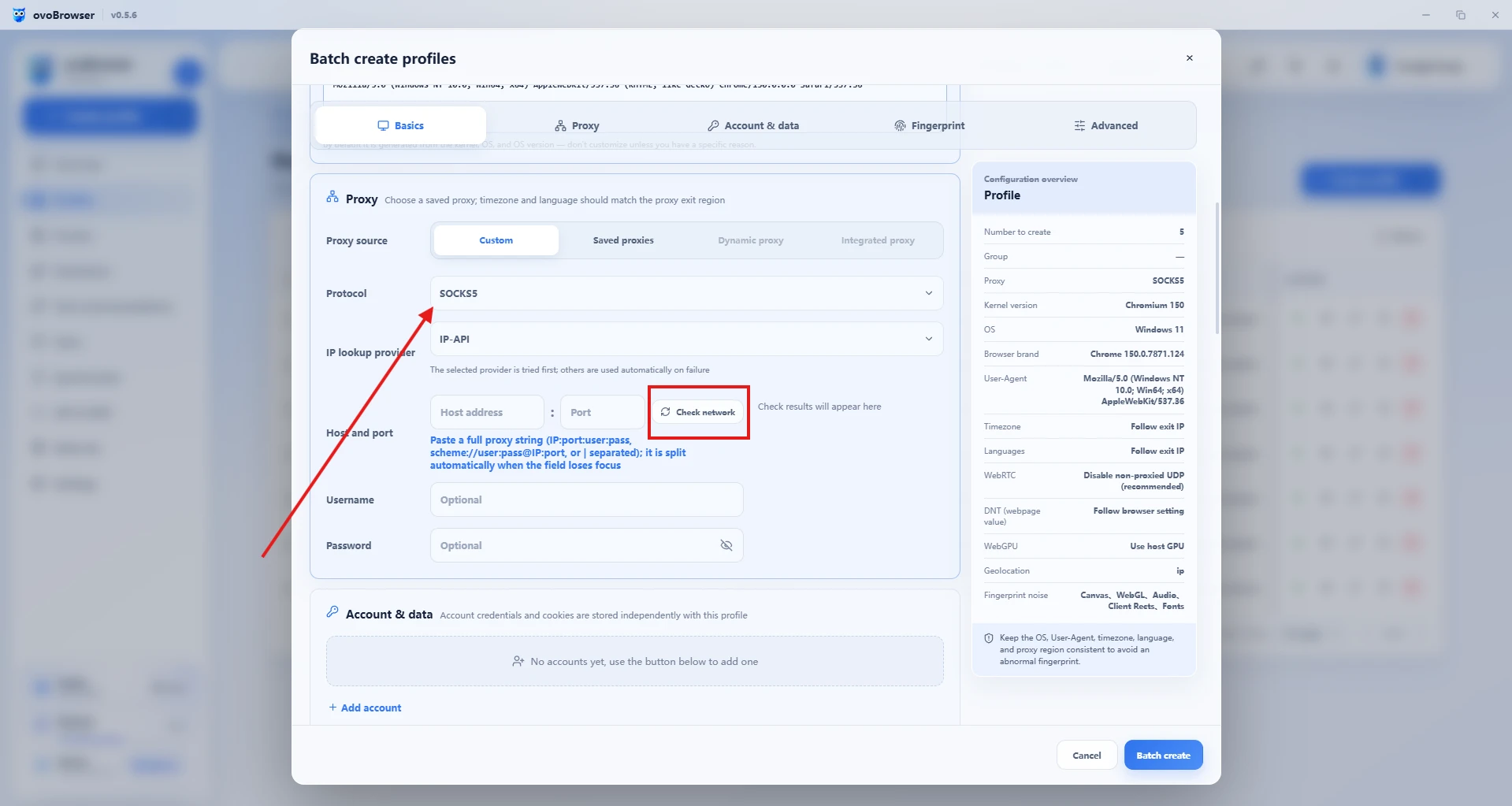
The ovo Browser help documentation lists HTTP, HTTPS, and SOCKS5 proxy management, and supports detecting egress IP, region, and latency. If the business indeed requires agency, the source, purpose, and responsible person should be recorded, and the configuration should be confirmed to comply with platform rules and local laws. Proxy settings cannot change homepage permissions, nor can they guarantee that accounts will not be audited or restricted; Do not use switching regions as a way to bypass platform requirements.
4. Window synchronization is used for authorized repetitive work
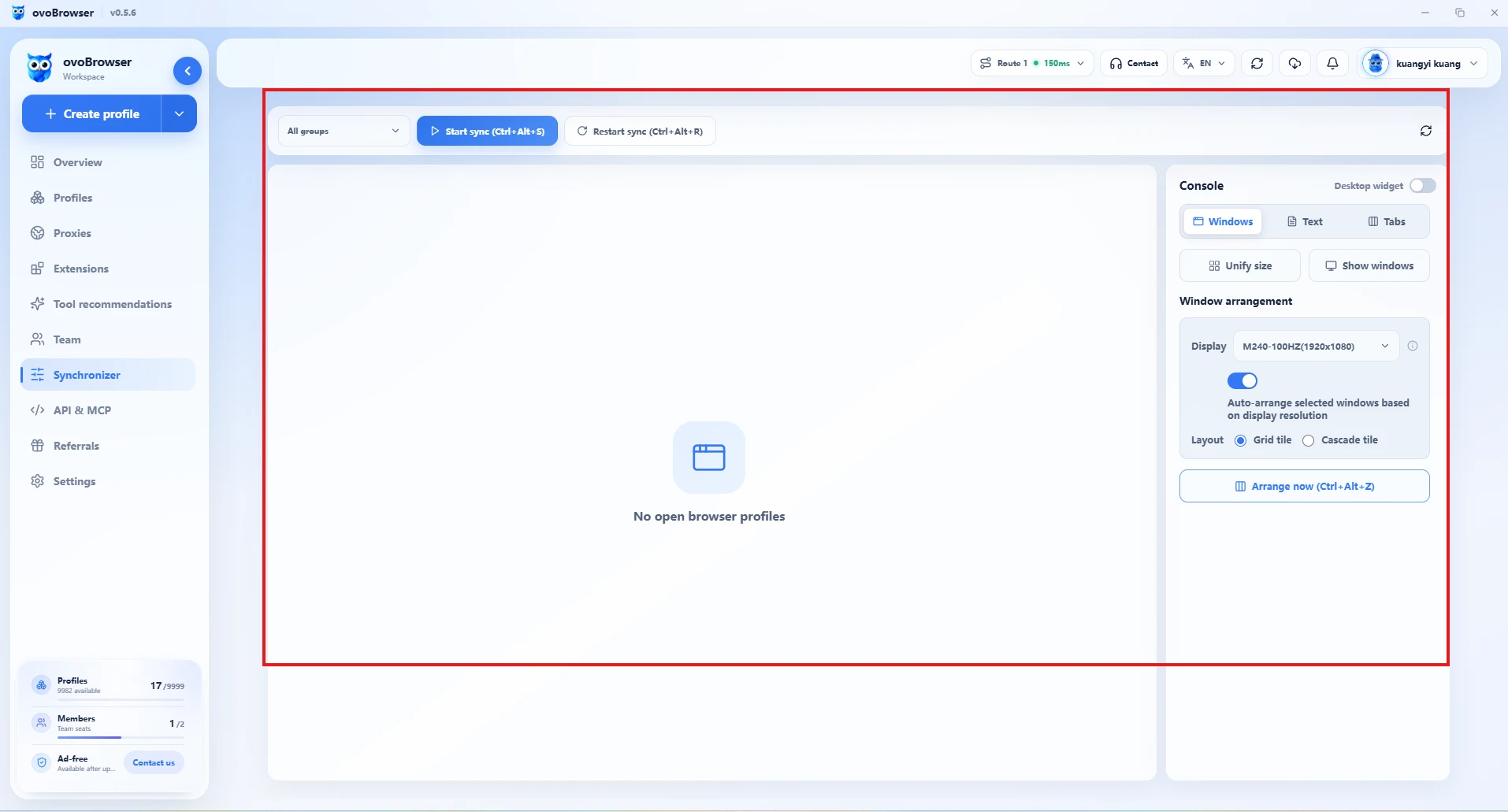
The window synchronization of ovo Browser can select the main control window and the following window, and synchronize supported mouse, keyboard, scrolling, text, and tab operations. It is suitable for authorized checks, repetitive interface operations, or internal QA processes. High risk actions such as publishing, payment, and deletion should not be blindly synchronized; It cannot be used to mass produce likes, comments, followers, or spam messages.
5. Separate management of team permissions and Meta homepage permissions
The team management of ovo Browser supports member, role, and fine-grained permission settings. Suggest assigning necessary permissions such as viewing, editing, proxy management, or automation based on job positions, and promptly revoking access after member departure or project completion.
Note: The team permissions of ovo Browser do not equal the Facebook Page permissions. The ownership and member access of the Facebook page should still be configured in Meta's official enterprise asset management process.
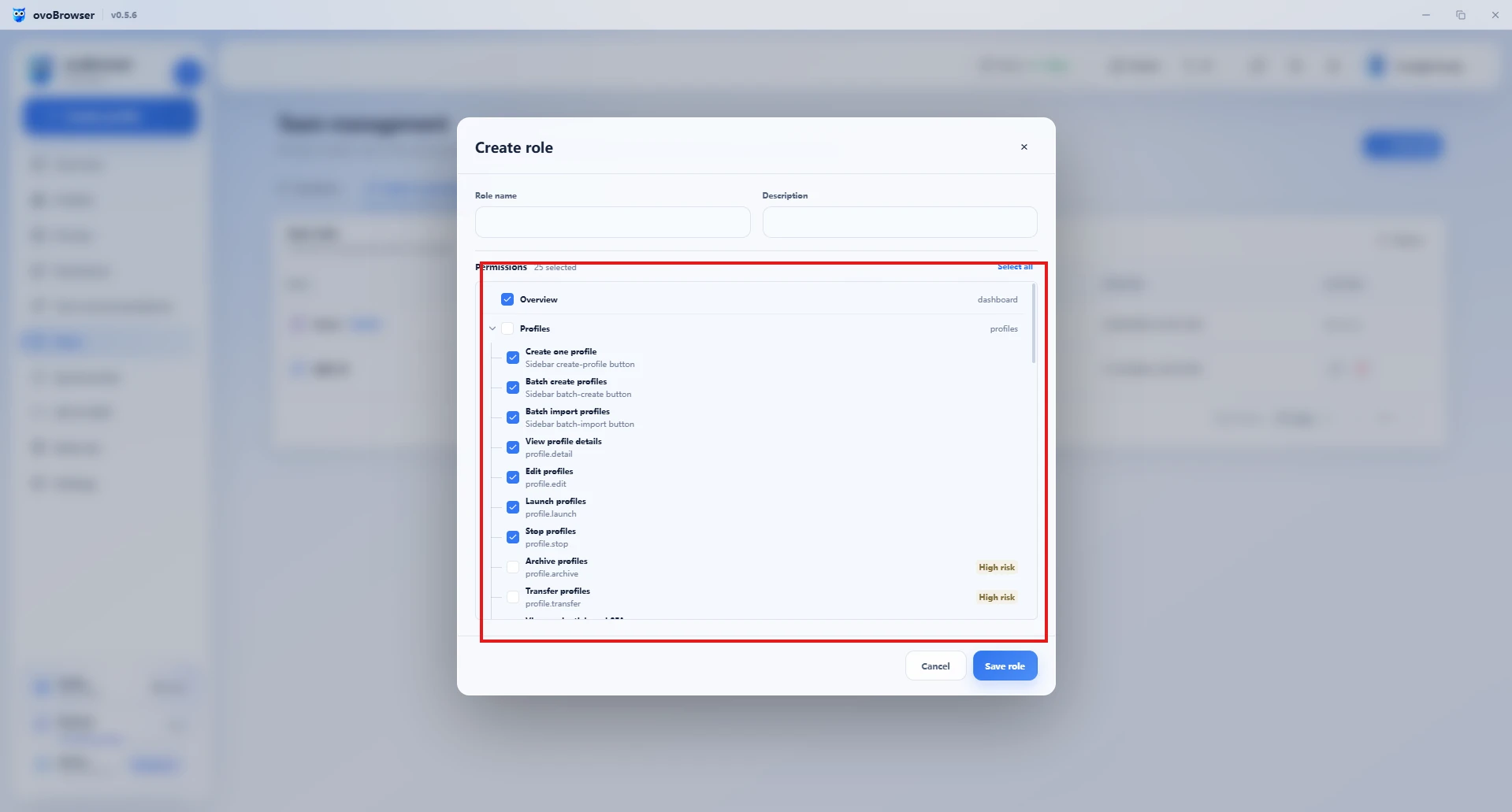
6. Local API for environmental management integration
The ovo Browser local API can be used to query, create, update, start, and close browser environments, and can be connected to Playwright, Puppet, or Selenium through CDP. It is recommended to use automation for internal environment lifecycle management, testing, and authorized workflows. Do not use scripts to create false interactions, bulk harass users, or circumvent platform restrictions.
6、 What should be checked daily and weekly?
Daily check:
- Whether the content has undergone factual, brand, and material authorization review;
- Whether the target homepage, language, links, and audience settings are correct for publishing;
- Are there responsible persons following up on comments, private messages, and after-sales issues;
- Whether there are security prompts, permission changes, or abnormal notifications on the homepage or account;
- Does the ovo Browser environment name, proxy record, and member affiliation correspond to the correct project.
Weekly review:
- What topics have brought valuable comments, consultations, or visits?
- Which videos have better viewing performance and why?
- What content is just repetitive expression without providing new information?
- Which member permissions or project handovers need to be adjusted?
- Which content hypothesis should we continue testing next week?
Please insert a screenshot of the real homepage data that you have access to here. Suggest blocking personal information, customer profiles, advertising account IDs, and sensitive indicators; This information package does not falsify Facebook backend data.
7、 Common Misconceptions and Correct Practices
| Common Misconceptions | A more secure approach |
|---|---|
| Believe that a fixed number of login days can increase the weight of the homepage | There is no publicly available universal 'weight days table'; Focus on authentic content and audience feedback |
| Multiple personal profiles used to expand the number of accounts | Brand business uses Page and official authorization mechanism, personal identity remains authentic |
| Copying popular content can lead to rapid growth | The research topic is acceptable, and the published content should include original expression and true value |
| Create popularity through batch comments and likes | Establishing community relationships through genuine discussions and useful responses |
| Browser environment isolation can ensure unrestricted access | Environmental management only improves work organization and cannot replace platform rules or ensure account status |
| All members share one main account password | Use official member authorization, minimum permissions, and traceable handover |
8、 Frequently Asked Questions (FAQ)
Can ovo Browser directly increase Facebook page followers?
No. ovo Browser is a browser environment and team work management tool that does not generate real audiences for the homepage, nor does it guarantee reach, fan growth, or monetization results. The growth of the homepage still depends on content value, audience demand, interaction quality, and platform rules.
Can using ovo Browser avoid Facebook account restrictions?
No. The independent browser environment can help reduce the mixing of cookies, data, and sessions between different projects, but it cannot guarantee that the account will not trigger platform audits or be restricted.
Can ovo Browser manage multiple Facebook business pages simultaneously?
ovo Browser can help teams organize data from multiple authorized browser environments and projects. The access permissions for the homepage itself should still be configured through Meta's official tools and comply with Meta's account and homepage rules.
Can window synchronization be used for bulk likes or comments?
It is not recommended to use window synchronization to create false interactions or spam messages. It is more suitable for repetitive interface operations, checks, and QA within the authorized scope; target windows should be confirmed item by item before publishing or other high-risk operations.
How often should content be published?
There is no fixed frequency applicable to all industries. First, choose a rhythm that the team can sustain, such as scheduling several original pieces of content and conducting a data review once a week, and then adjusting based on audience feedback. Stable and valuable, more important than repeatedly publishing for quantity.
Conclusion: Building Growth on Content and Process
The long-term growth of Facebook pages requires clear audience positioning, original content, authentic interaction, and continuous review. Multi project teams also need clear account ownership, environmental records, member permissions, and handover processes.
ovo Browser can help teams integrate authorized browser environments, proxy records, batch management, window synchronization, and Local API integration into a clearer workspace. It is an auxiliary tool for operational processes, not a substitute for platform rules.
First, prepare the homepage and then streamline the process; Win the audience with authentic content and improve team efficiency with clear management.
Reference materials and official sources
- Meta:Cracking Down on Spammy Content on Facebook(2025)
- Meta:Rewarding Original Creators on Facebook(2026)
- Meta for Developers:Pages / Business Asset Management
- Meta:Account Integrity and Authentic Identity
- ovo Browser: Social Media Marketing Solution
- ovo Browser: Software Function Navigation
- ovo Browser: Batch Environment Management Operation Guide
- ovo Browser: Team Members and Permission Management
- ovo Browser: Using Window Synchronization
- ovo Browser: Complete Tutorial on Local API
- ovo Browser Blog Center: Account Security and Management
Related articles
How to choose ovo Browser, GoLogin, and AdsPower?
Free version, automation, comprehensive price comparison
Read article
2026 GitHub Open Source Crawler Project Recommendation
10 tools worth collecting, with ovo Browser automation integration guide attached
Read article
Why did Claude's account trigger verification, warning, or restriction?
This article follows the order of "account status - region and network - payment verification - usage behavior - devices and sessions - environment management", sorts out the links worth checking, and introduces how ovo Browser helps users organize their browser work environment.
Read article