Why did Claude's account trigger verification, warning, or restriction?
This article follows the order of "account status - region and network - payment verification - usage behavior - devices and sessions - environment management", sorts out the links worth checking, and introduces how ovo Browser helps users organize their browser work environment.
ovo Browser 团队About 18 min read
Jump to an article section
Why did Claude's account trigger verification, warning, or restriction?
Article Guide
Recently, many Claude users have encountered login verification, payment method verification, usage warnings, and even account access suspension. After the problem arises, common practices include repeatedly switching networks, cleaning browser data, or changing devices, but these actions may not necessarily solve the real cause.
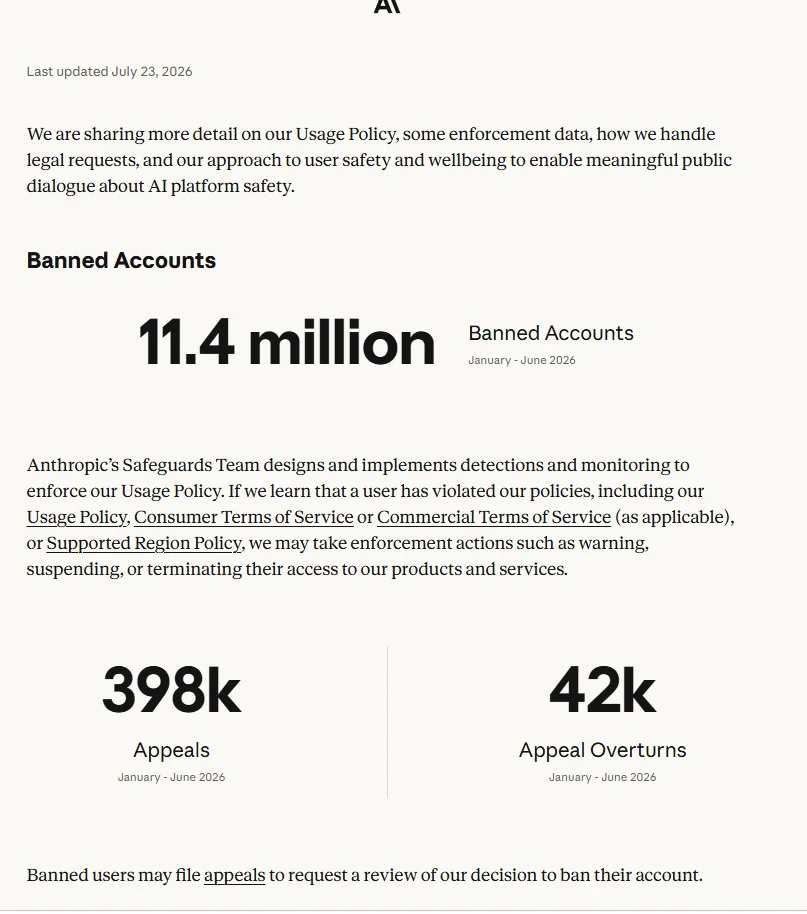
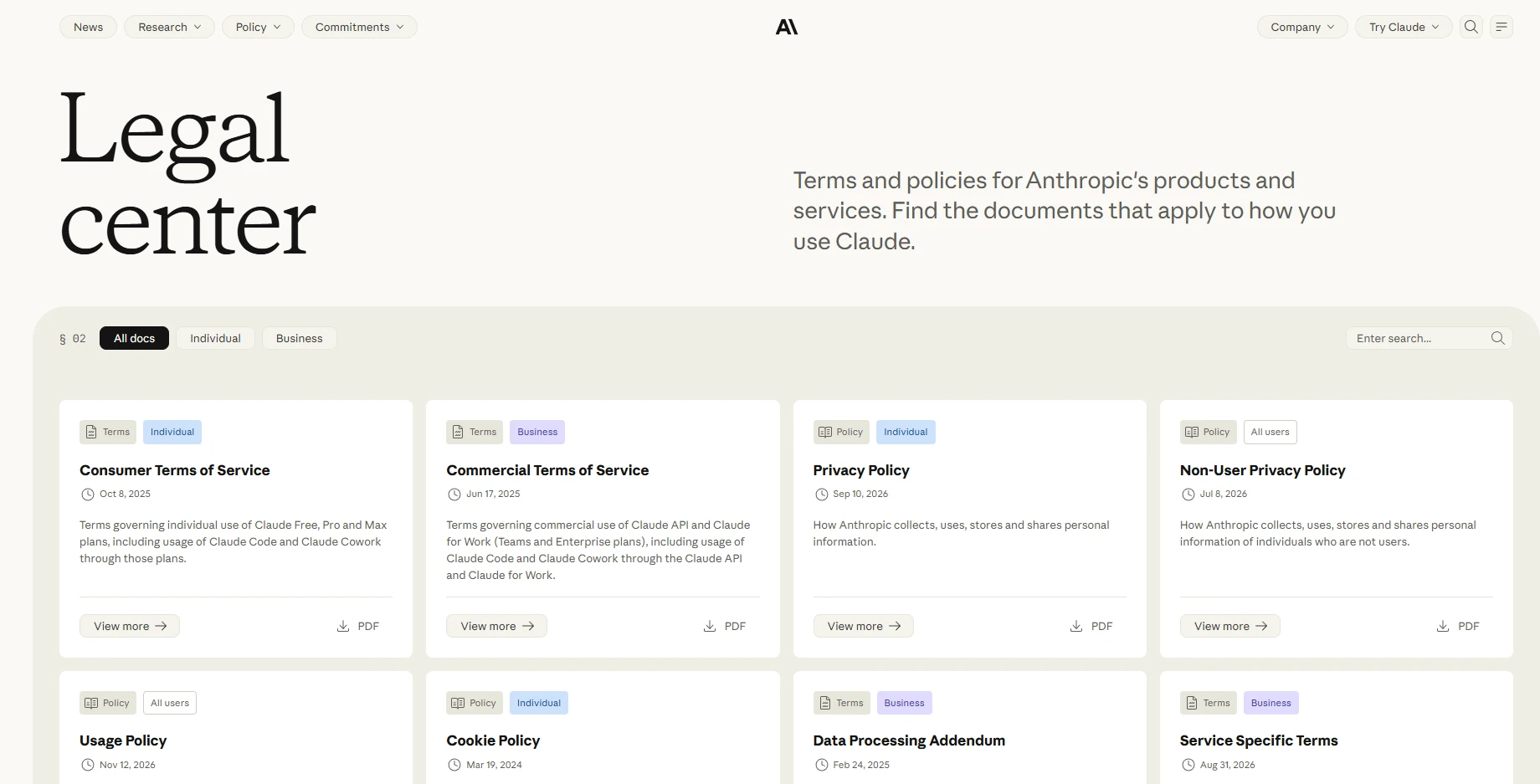
To understand such issues, the first step is to distinguish between the rules clearly announced by the platform and users' speculations about risk control mechanisms. Anthropic has publicly stated that its security team will conduct inspections based on Usage Policy, consumer or commercial service terms, and support regional policies, and may take measures such as warnings, suspensions, or termination of access; However, public information has not disclosed a set of "trust scores" or specific weights that can be calculated by users.
This article follows the order of "account status - region and network - payment verification - usage behavior - devices and sessions - environment management", sorts out the links worth checking, and introduces how ovo Browser helps users organize their browser work environment.
Let me clarify: What are official rules and what is just analysis?
This article refers to the topic organization of the article "Trust Assessment Behind Claude's Account Ban Mechanism", but does not directly consider the speculation as an official Anthropic rule. The following content is divided into three categories:
Official clarification: Anthropic's usage policy, terms of service, support region policies, as well as the warning, payment verification, and appeal processes listed in the official help center.
Observable usage phenomena include login verification pop ups, payment method verification, warning pages, account restriction prompts, etc.
Reasonable management suggestions: Keep account information and browser sessions clear, verify actual network exits, and reduce meaningless configuration changes. They help with troubleshooting and management, but do not mean they can predict platform judgments.
1、 Claude's account status, first distinguish between verification, warning, and restriction
The "account problem" in the user's account may correspond to completely different page prompts. First determine which state the current belongs to, and then take corresponding actions, which is more effective than blindly changing networks or repeatedly logging in.
1. Payment method verification does not mean that the account has been banned
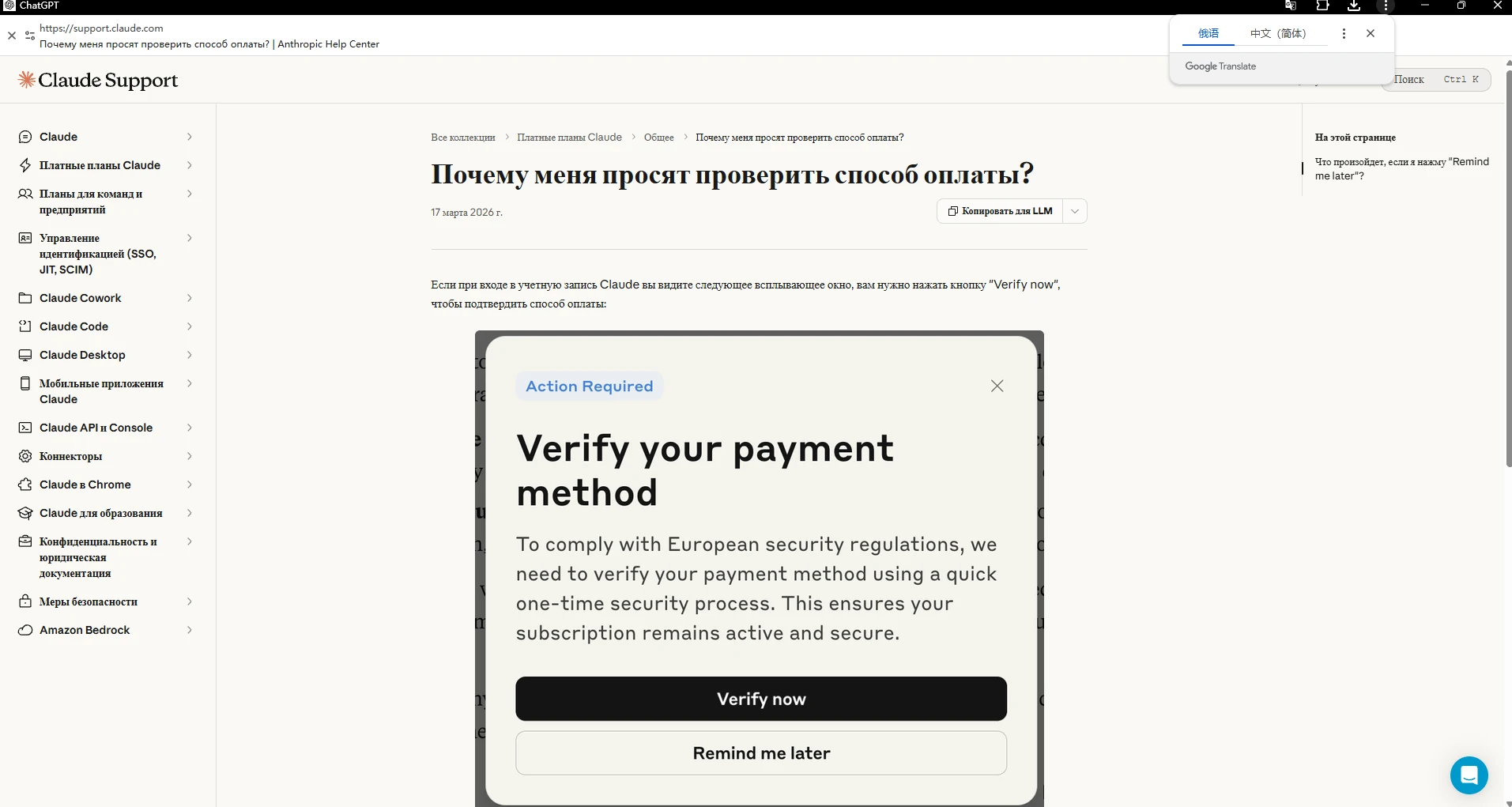
Claude's official help center explains that some users may see a payment method verification pop-up when logging in, and they need to click "Verify now" to complete the verification; If you select 'Remind me later', the pop-up window will temporarily close for 24 hours and prompt again afterwards. When you see such pop ups, you should complete the verification according to the official page requirements, and not directly interpret it as the account has been deactivated.
2. Safeguards warning and account suspension are not the same thing
Claude Help Center incorporates account warnings, suspensions, or termination of access into its security process. The official reasons for account bans include repeated violations of Usage Policy, creating accounts from unsupported regions, and violating the terms of service. If it is believed that the handling is incorrect, the official provides an appeal portal, and users need to log in to the affected account to submit an appeal.
3. Do not treat "risk control rating" as an officially announced algorithm
Anthropic has released an overall description of its detection and enforcement policies, but has not disclosed the internal rating models, network signal weights, so-called security thresholds, or fixed observation periods for each account. The statements circulating online, such as' certain IPs must deduct points' and 'new accounts must be maintained for a few days', cannot be taken as official conclusions.
2、 Registration region and network environment: First confirm whether the service is within the supported range
Regional issues need to be checked before proxy configuration. Claude's official help center explicitly lists "creating accounts from unsupported regions" as one of the possible reasons for account suspension. Therefore, before use, it is necessary to verify the support region policies currently published by Anthropic, as well as whether one's own region meets the service requirements.
Network export DNS、 System proxy or VPN configuration may affect whether web pages can connect properly, as well as the exit IP and geographic location information that users see. However, public information does not provide an externally verifiable "IP reputation score" algorithm, nor can it be inferred that a certain type of proxy is necessarily safe based on this.
If a proxy is indeed needed for legitimate network testing or business network configuration, it is recommended to first check whether the connection is successful, whether the export IP and region meet expectations, and comply with Claude's regional policies. Proxy tools cannot turn unsupported regions into supported regions, nor can they be used to circumvent platform restrictions.
300
3、 Payment verification: When encountering a pop-up window, follow the official process to handle it
Payment verification is a type of prompt that users are prone to misjudging. Claude's official help center has stated that verification of payment methods may be required when logging in; Clicking on 'Remind me later' will only delay for 24 hours and does not mean that the verification request has been cancelled.
Suggested check:
Confirm that the pop-up window is from Claude's official website or app, and do not submit payment information through unfamiliar emails, private messages, or third-party pages.
Verify whether the payment method is legally held by the individual, whether the information is accurate, and complete the verification according to the official process.
If the verification fails, first read the specific prompts provided on the page and contact official support. Do not replace multiple cards continuously or repeatedly submit inaccurate information.
It should be emphasized that Anthropic has not publicly released a set of "bank card type rankings" or rules stating that certain payment methods are necessarily easier to verify. This article does not recommend purchasing payment materials of unknown origin, nor does it provide methods to evade payment audits.
å±å¹æªå¾ 2026-11-06 114134
4、 Usage rhythm and account behavior: Do not blindly believe in the so-called "account maintenance schedule"
Some users may attribute account restrictions to "sudden increase in usage," "excessive continuous questioning," or "automated tools. But without official rules to support it, a certain frequency of use cannot be directly equated with a ban condition.
A more reliable principle is to use the product in accordance with Claude Usage Policy and applicable service terms; Do not use your account for activities prohibited by policies; Do not use account management tools as a means to bypass usage restrictions, regional restrictions, or security reviews.
For teams and project users, it is recommended to manage work tasks, account ownership, permissions, and operation records clearly. If the business requires automation, product interfaces and authorization methods allowed by the platform should be used, and corresponding service terms should be checked.
Explanation: Statements such as "logging in a fixed number of times a day", "new accounts must wait for a certain number of days", and "using a certain browser can increase weight" should not be considered as official risk control recommendations.
å±å¹æªå¾ 2026-11-06 122254
5、 Devices, browsers, and login sessions: Manage the work environment clearly
Claude's official help center states that logging in to the web version will establish a 28 day session; When continuing activities on the webpage, the session will refresh periodically. Users can also log out of all active sessions in Settings>Account. If you suspect that your account is logged in on an unfamiliar device or has forgotten to log out on a shared device, you can use this feature to re manage your login status.
For users who need to distinguish between different work projects, it is also worth organizing cookies, local storage, login status, and extension configurations in the browser. When different projects share a browser, it is easy to encounter management issues such as accidentally switching accounts, misusing historical sessions, or putting work materials in the wrong location.
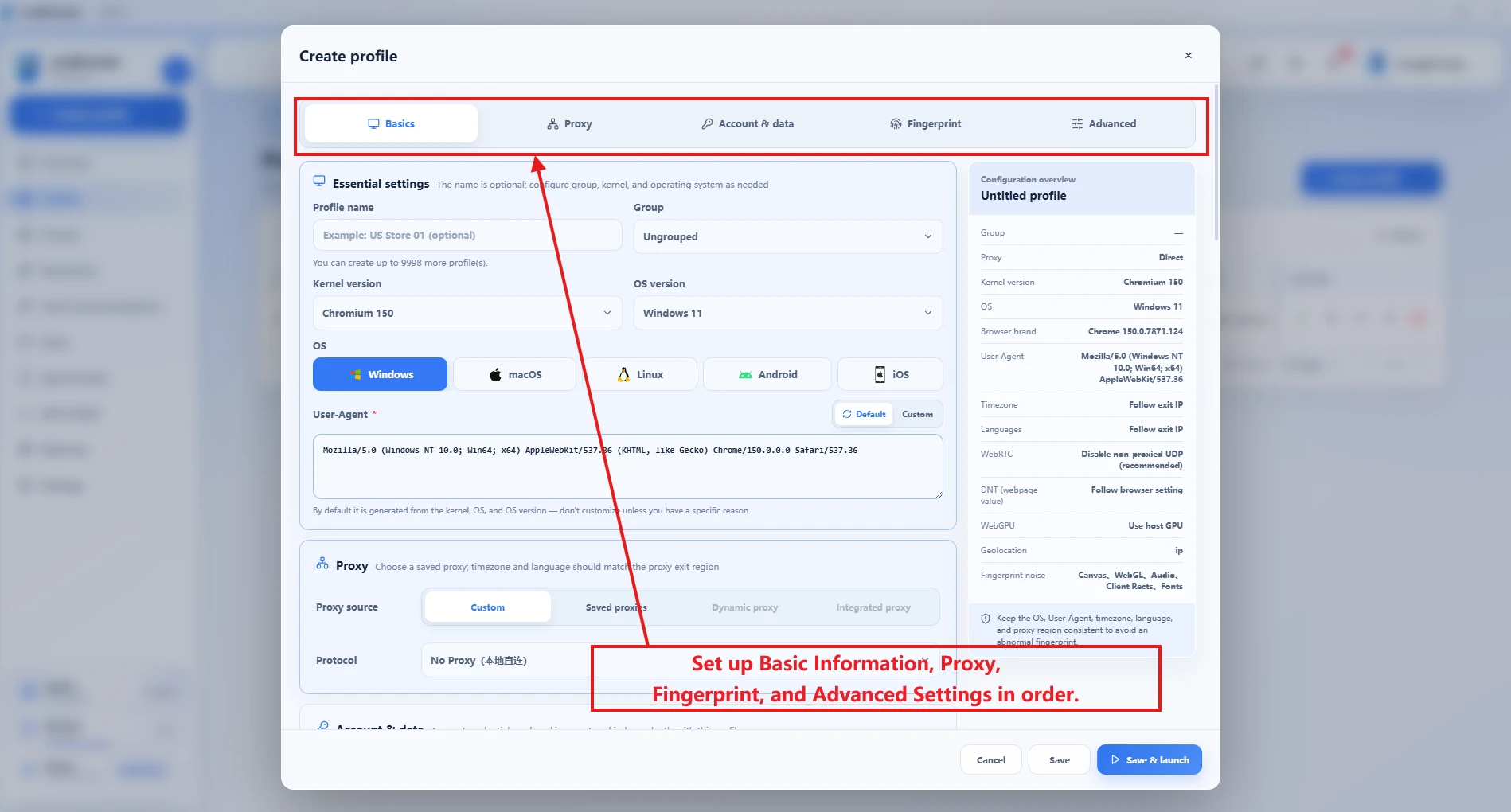
ovo Browser can establish independent browser environments for different accounts or work projects, and save cookies, local storage, account notes, fingerprint configurations, and proxy assignments separately. The main value of doing so is to make the browser context clearer, easier to check and reuse; It will not change Claude's account policy, nor can it guarantee that the account will not trigger verification or restrictions.
6、 How to organize multiple Claude work projects using ovo Browser?
If you need to manage personal work, client projects, or team testing environments separately within the scope allowed by applicable terms, you can establish clear browser workspaces in the following ways.
1. One job identity corresponds to a clear environment name
When creating an environment in ovo Browser, use easily recognizable names such as "Claude Personal Work" or "Claude Project A Test". Do not write passwords, complete cookies, 2FA keys, or other sensitive credentials in the environment notes.
When a proxy is needed, first add and detect it, and then reassign it to the environment
The proxy management of ovo Browser supports centralized storage of HTTP, HTTPS, and SOCKS5 proxies. After detecting the connection, the available status, latency, exit IP, and region information can be viewed, and the saved proxies can be assigned to the corresponding environment. In actual use, the results of the client detection and the information provided by the network service provider should be used as the basis.
3. Keep session boundaries to avoid unnecessary cleaning and misoperation
Confirm the corresponding work project for the current environment before starting. Unless there is a need for investigation, do not frequently delete browser data or repeatedly rebuild the environment; If there is suspicion of abnormal sessions on Claude's account, priority should be given to using Claude's official session management and security procedures.
4. When collaborating in a team, use member permissions instead of sharing the main account
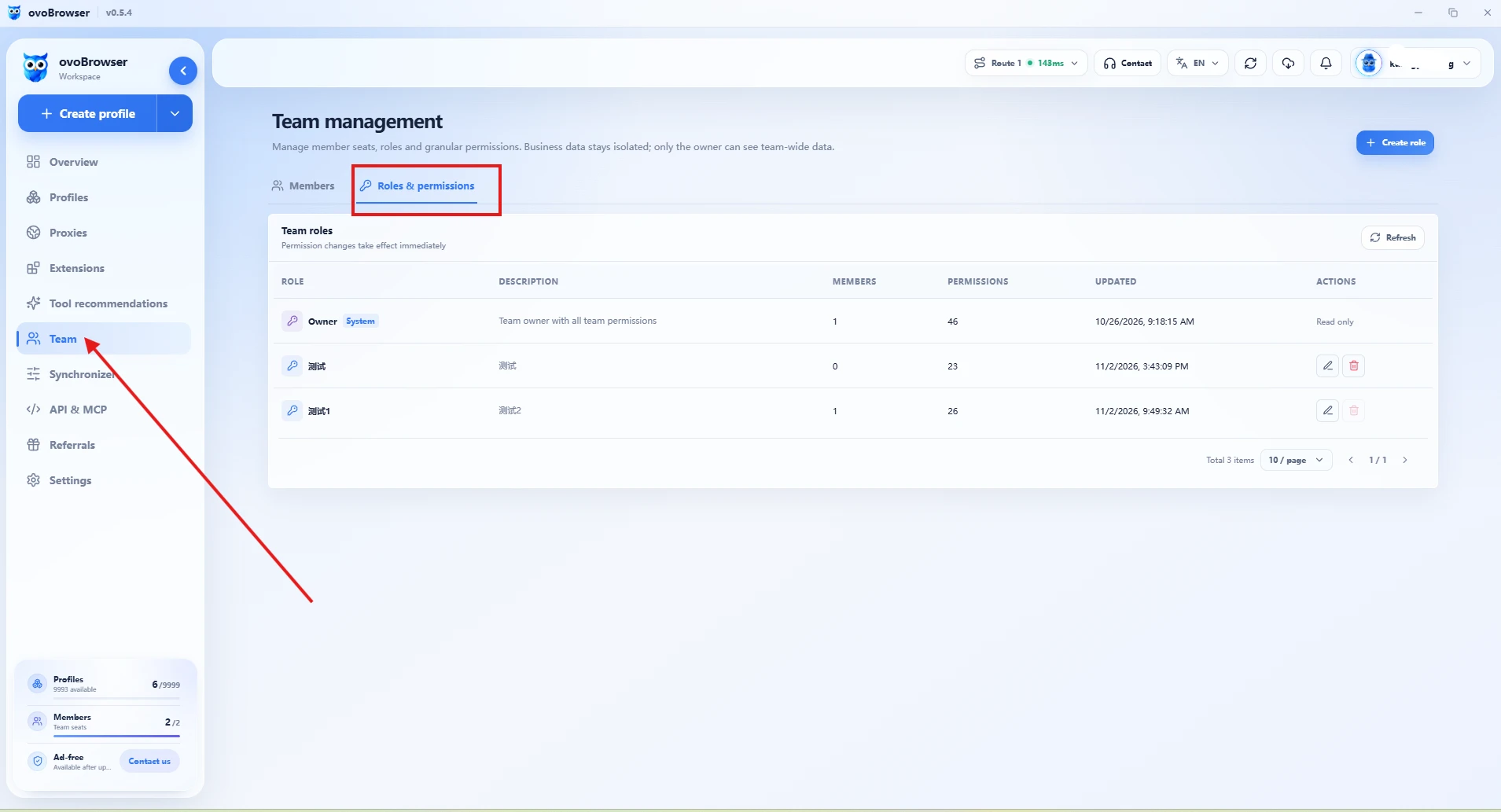
ovo Browser supports team member, role permission, and environment ownership management, and can allocate browser workspaces according to responsibilities. It solves the issues of browser environment and team resource management, and does not mean that personal Claude accounts can be shared; Team members should still use accounts and authorization methods that comply with Anthropic rules.
5è±è¯
7、 After verification, warning, or restriction occurs, it is recommended to troubleshoot in this order
First, record the original text, appearance time, and current account status of the page prompt, and distinguish between payment verification, safeguards warnings, and account deactivation.
Check if your region is within Claude's support range and confirm if the network export information matches the actual situation.
If it is payment verification, follow Claude's official page to complete the verification; If using policy warnings, read the corresponding policies and prompts first.
If the account has been suspended or terminated, submit a review through the appeal portal of Claude's official help center, and do not attempt to evade existing processing with a new account or tool.
If you suspect that your account session is being used by someone else, you can log out of all active sessions on the Claude web page by going to Settings>Account and re verifying your login.
Keep necessary bills, verification records, and official emails to avoid disclosing passwords, cookies, 2FA keys, and payment information in public screenshots or third-party work orders.
Claude's official help center states that users who believe their account has been mistakenly suspended or terminated can log in to the affected account and submit a complaint; If the account page shows that the organization has been suspended, you can also apply for a review according to the prompts on the page. The appeal should truthfully describe the situation, provide relevant materials, and not submit false information.
8、 What can ovo Browser help and what cannot it replace?
The value of ovo Browser is not to make risk control judgments for Claude, but to organize the user manageable browser working environment.
Independent environment: Save cookies, local storage, account information, fingerprint configuration, and proxy allocation separately.
Proxy management: Centralize the storage of HTTP, HTTPS, and SOCKS5 proxies, detect export IP addresses, regions, and latency.
Batch environment management: supports creating, importing, and batch operating environments based on templates; The official function page states that a maximum of 100 environments can be created in a single batch, but in reality, it is still limited by the remaining balance of the account.
Teamwork: Invite members, create custom roles, and assign permissions and environmental ownership based on responsibilities.
Window synchronization and Local API: Provides workflow connectivity for authorized repetitive browser operations and automated testing.
These abilities can improve environmental management and operational efficiency, but cannot replace Claude's official account verification, appeal process, service terms, or regional policies.
ä¼ä¸å¾®ä¿¡æªå¾_20260908145619
Conclusion: Don't guess the so-called "bonus points", focus on the manageable aspects first
When Claude's account experiences verification, warning, or restriction, the most important thing is to first identify the specific status and then handle it in accordance with Anthropic's published usage policy, terms of service, and support region requirements. Network, payment, browser session, and device changes can serve as clues for investigation, but cannot be simplified into an unverified account suspension rating formula.
For users who need to handle multiple projects or work identities simultaneously, ovo Browser can help establish an independent and verifiable browser environment, centrally manage proxy, session, and team permissions, and make daily operations more organized.
Download ovo Browser and organize your browser's working environment
Can ovo Browser guarantee that Claude's account will not be banned?
No. ovo Browser is used to manage browser environments, proxies, and workflows, and does not control Anthropic's account auditing or execution results.
Can changing agents solve Claude's account restrictions?
Not necessarily. Restrictions may involve different reasons such as usage policies, service terms, support regions, or payment verification. You should first check the official instructions, as agents cannot bypass regional policies or account processing.
How long does Claude's account need to be used regularly for security?
Anthropic has not publicly disclosed the so-called fixed "number of days for account maintenance" or internal trust scores. Don't treat the online schedule as an official rule.
Does Claude's payment method verification indicate that his account has been banned?
Not representing. The official statement states that payment method verification is a separate verification process and should be completed according to the pop-up instructions.
If the account is suspended, can it continue to be used by changing the environment through ovo Browser?
The browser environment should not be used to circumvent account suspension or platform restrictions. When it is believed that there is an error in the handling, a review should be applied for through Claude's official appeal channel.
 ovobrowser