 ovobrowser
Jump to an article section
How to choose ovo Browser, GoLogin, and AdsPower? Free version, automation, comprehensive price comparison
ovo Browser, GoLogin, and AdsPower can all help users manage multiple independent browser environments, but they differ in terms of free quotas, window synchronization, automation APIs, team collaboration, and usage costs. This article compares the free version, environmental management, automation capabilities, team features, and package prices of three products based on their official pages and help documents, to assist cross-border e-commerce sellers, social media operators, and teams in selecting suitable tools.
If you are choosing a multi account browser tool, you may encounter a very practical problem: all three software programs seem to be able to create independent browser environments, but what can the free version do? Is there an additional fee for window synchronization and automation? Will the cost suddenly increase after the number of accounts increases?
This article takes ovo Browser as the protagonist and compares GoLogin and AdsPower, sorting out several aspects including free solutions, environment management, automation capabilities, team collaboration, proxy configuration, and price structure. We prioritize using information that can be found on three official websites, pricing pages, and help centers; There is no clearly stated quota publicly, no guessing of numbers, and no stating promotional prices as permanent prices.
First of all, the conclusion is that if you are most concerned about whether the core functions can be used for free in the long term, you can try ovo Browser first; If you value mature visual RPA and multiple batch operations more, you can focus on experiencing AdsPower; If you need a cloud browser, Cloud Android, or cloud access to your work environment, you can learn about GoLogin. Finally, it is still recommended to try it out according to one's own actual process, rather than just looking at a menu.
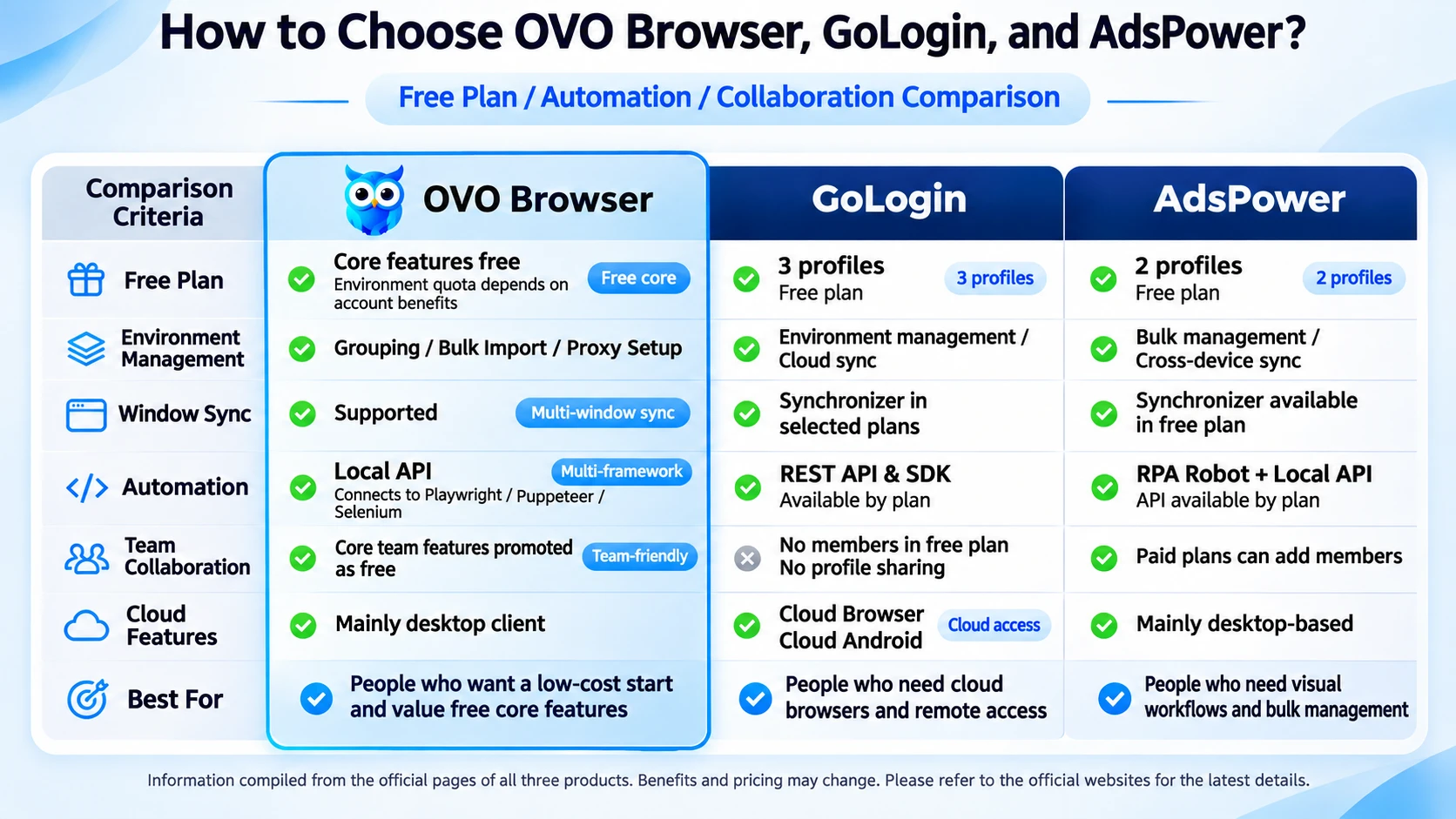
1、 First, let's take a look at the conclusion: What is the biggest difference between the three tools?
The three products solve similar but not identical problems. They can all put different accounts into independent browser environments, but in terms of automation, cloud capabilities, and free policies, the routes are not the same.
| Comparison dimension | ovo Browser | GoLogin | AdsPower |
|---|---|---|---|
| Core positioning | Browser environment management, window synchronization, and local automation connection | Independent browser environment, cloud browser, and team sharing | Multi account environment management, RPA, and team automation |
| Free Plan | The official website claims that the core functions of individuals and teams are permanently free; The new user environment quota is subject to the registration page | Forever free version with 3 environments; Excluding environmental sharing and team members | Forever free version with 2 environments; Includes partial window synchronization and RPA functionality |
| Environmental Management | Create, edit, batch import, start, close, group, and recycle bin | Environment configuration, grouping, batch operation, cloud synchronization | Batch environment management, grouping, cross device synchronization |
| Window synchronization | Support window synchronization, which can synchronize mouse, keyboard, scrolling, text, and tabs, etc | The pricing page lists synchronizers; The specific gear is subject to the selected package | Free version to experience Synchronizer |
| Visual RPA | The official website's functional navigation does not include the independent visual RPA editor as a core feature; Mainly provides window synchronization and API integration | The official website package focuses on listing Cookie Bot, API, MCP, etc; Do not describe it as an AdsPower style RPA editor | Provide RPA Robot and process templates |
| API/Automation | Local API, The local service returns CDP connection information, which can connect to Playwright, Puppet, Selenium; The official website claims that the basic API is free | REST API / SDK; The current public pricing page includes APIs in higher levels such as Professional 100 | Local API; The official pricing page shows that the free package does not include the Local API, while the paid package provides the requested quota based on the package |
| team collaboration | Official functional navigation lists members, roles, and permission management; The official website claims that the core functions of the team are free, and the specific member/environment quota is subject to the display in the account | The free version does not include team members and environment sharing; Paid Business and above provide team capabilities | The free version has 0 members; Paid files can add members and configure permissions |
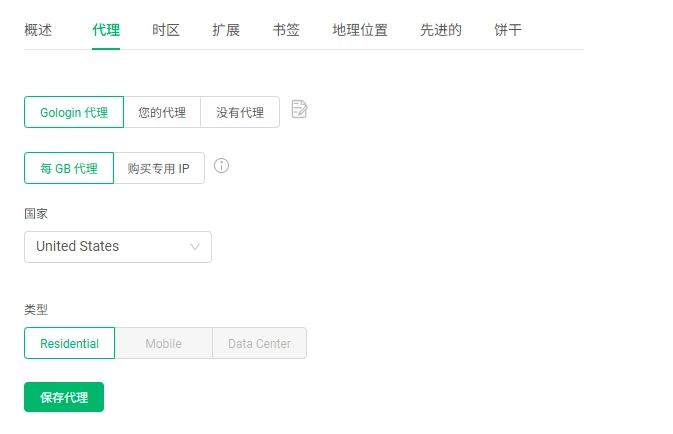
| Proxy configuration | Support saving, detecting, and allocating HTTP, HTTPS, and SOCKS5 proxies; Prepare agency resources according to actual business needs | You can use GoLogin's built-in proxy or add a third-party proxy; Some packages include residential agent traffic | Support HTTP, HTTPS, SOCKS5, and proxy service provider resources; Can be configured/purchased on the client side |
| Cloud usage | The current focus of public information is on Windows/macOS clients and local APIs; Not using cloud browsers as the main selling point | Provide Web App/Cloud Browser, with some packages limiting the number of concurrent cloud launches | The focus of public information is on desktop environment management; Cloud capabilities are subject to the current official package |
| Target Audience | Individuals or teams who wish to use core environment management, window synchronization, and basic APIs for free first | Users who require cloud browsers, cloud based Android, proxy traffic, and cross device access | Individuals and teams who require visualization of RPA, batch management, and mature functional ecosystems |
The "free" in the table refers to the free benefits explicitly listed on the official public page, and does not mean that all premium services, proxy traffic, or third-party resources are free. Especially ovo Browser: The official website claims that the core functions of individuals and teams are permanently free, but the current public page does not provide a fixed number of environments that can be directly aligned with competitors. Therefore, do not write "unlimited environments" or a fixed 9999 in the article without authorization. Please refer to the registration page and account display for the actual limit.
2、 Free version comparison: What can you experience without paying first?
1. ovo Browser: The official website focuses on core functions that are permanently free
The official website of ovo Browser states that core functions for individuals and teams are permanently free, and includes environment management, window synchronization, proxy configuration, and basic APIs as free capabilities. The functional navigation also lists environment creation, editing, batch import, start, close, group, recycle bin, member and permission management, as well as the Local API.
For those who are just starting to manage multiple stores or work accounts, the advantage of this model is that they can first streamline daily processes and then decide whether additional proxy resources or other third-party services are needed. It should be noted that the official website currently displays a "permanent environmental quota" benefit reminder, and does not explicitly state the total number of environments that apply uniformly to all users on the public homepage. Therefore, registration should be based on the actual display on the page.
2. GoLogin: Free version provides 3 environments
The official pricing page and FAQ of GoLogin state that the Forever Free free plan includes three browser environments. The official FAQ also states that the free plan does not include environmental sharing and team members; The paid package provides more capabilities such as environment, cloud startup, API, etc.
The feature of GoLogin is that in addition to the desktop client, it also provides a Web App/Cloud Browser. Users can manage and start cloud environments in their browser, without having to constantly use their original computer. However, the number of cloud startups, concurrency, and other cloud service benefits will be limited by the package.
3. AdsPower: Free version provides 2 environments
The official pricing page of AdsPower shows that the Free plan includes 2 environments and 0 additional members, priced at $0 and marked as permanently free. The official download page of AdsPower also states that the free version can experience most basic features such as environment management, window synchronization, and RPA.
If you want to experience visual process operations first, AdsPower's free solution is an easy to get started entrance; But the official pricing page shows that the Local API is not available in the Free mode, and you need to select the paid mode to obtain the corresponding API request quota.
3、 Environmental management: Are daily operations smooth after having multiple accounts?
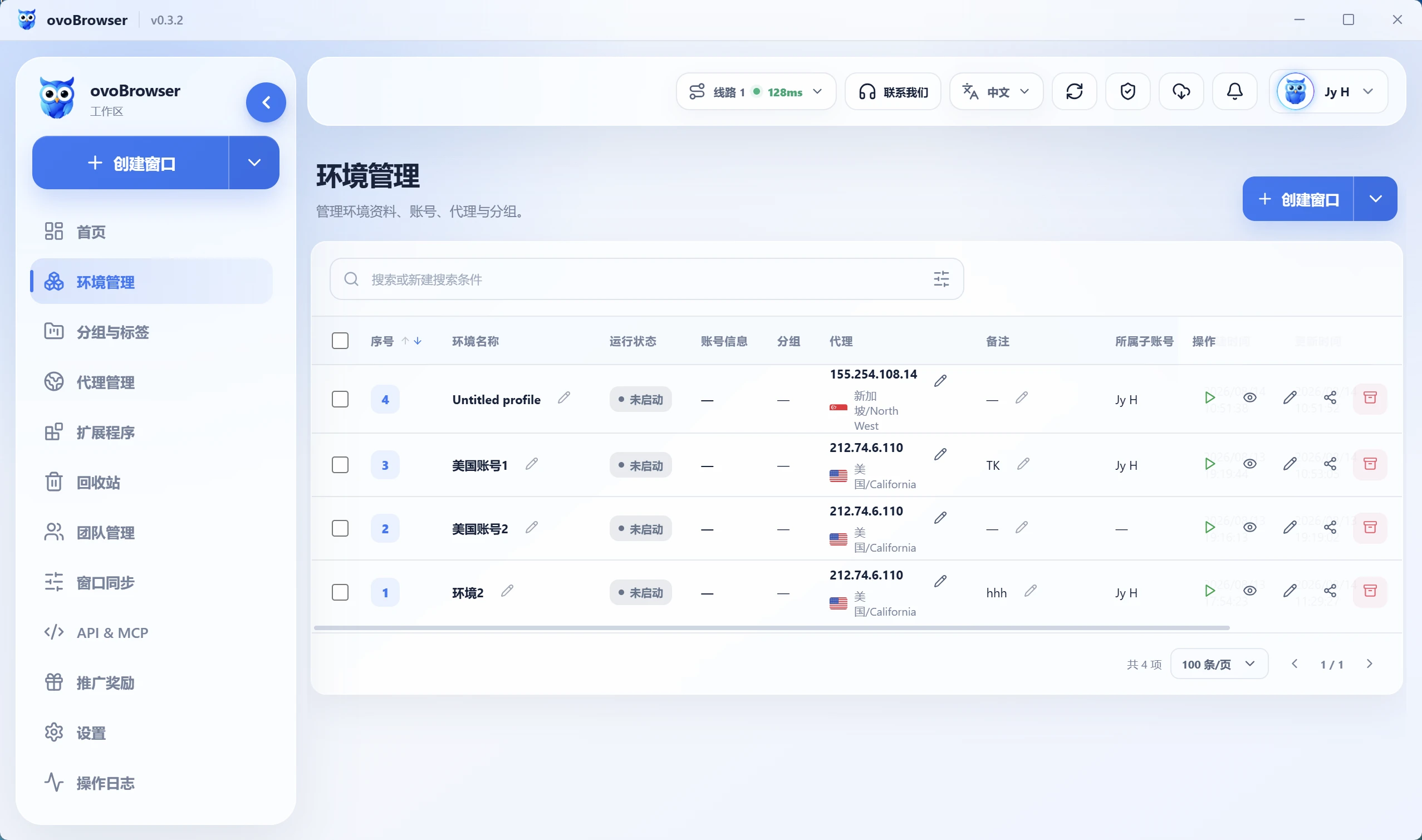
ovo Browser: Put environments, groups, and proxies in one workspace
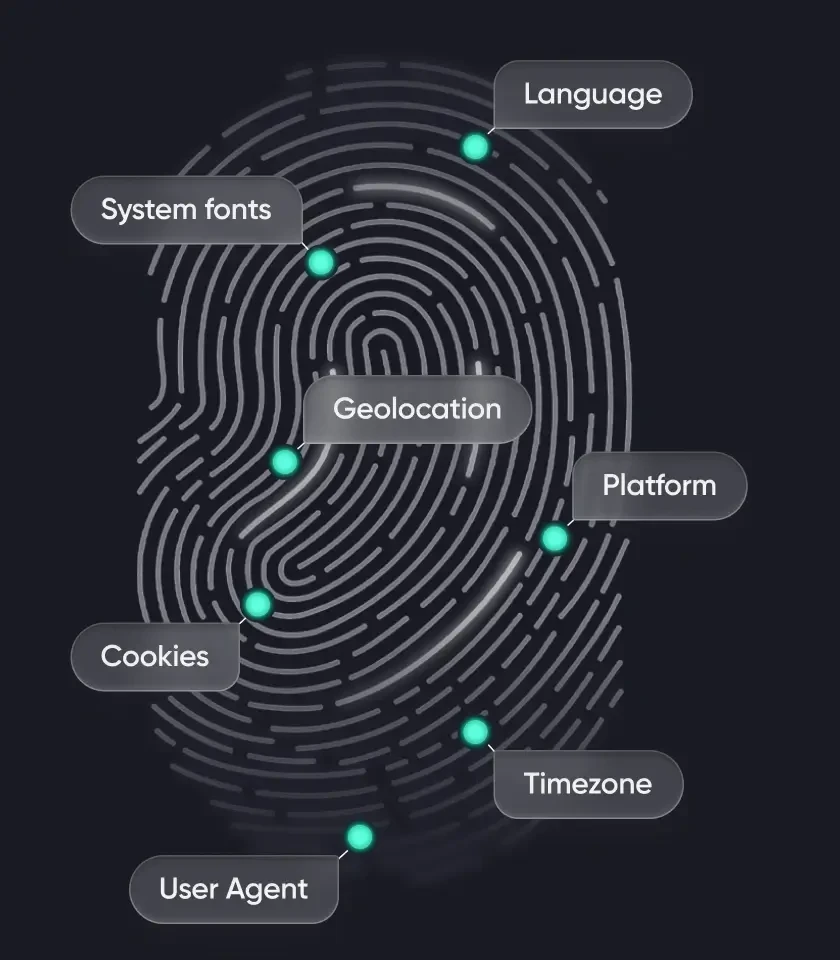
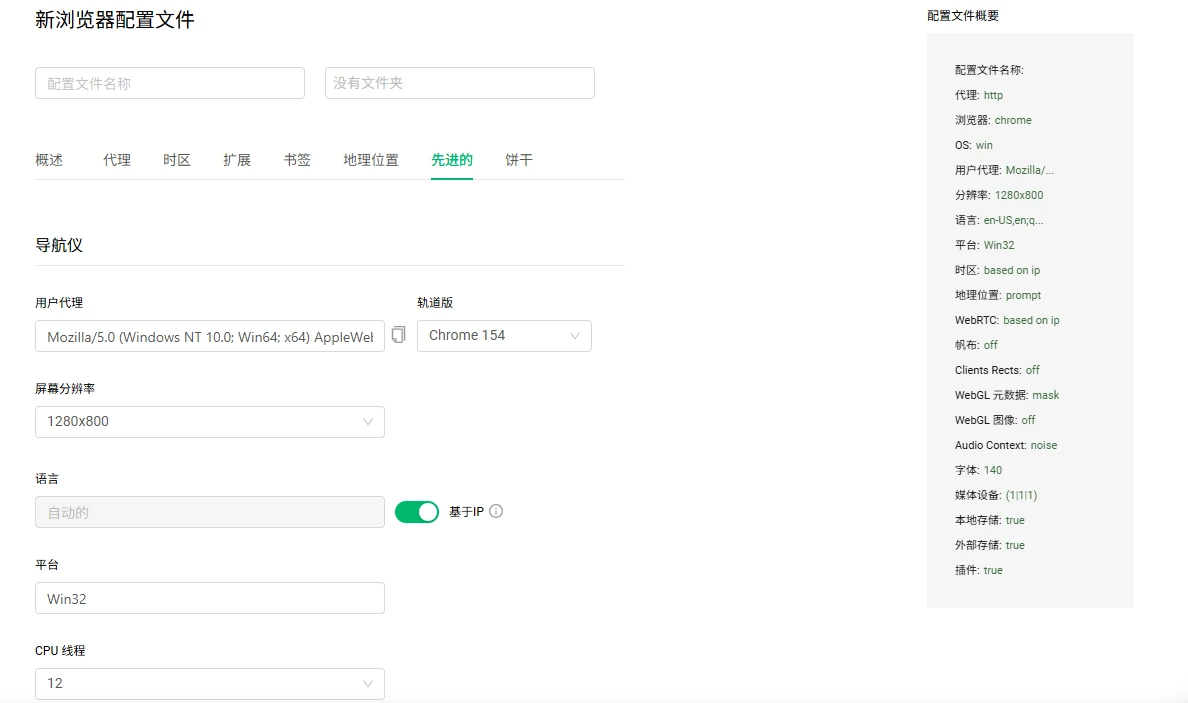
The official feature navigation of ovo Browser lists environment creation, editing, batch import, startup, shutdown, sharing, and deletion; Each environment can independently store account information Cookie、 Proxy, browser fingerprint, local storage, boot tab, and browser behavior.
After the number of environments increases, grouping and labeling can be used to organize lists by store, project, region, or person in charge; The proxy management page supports saving HTTP, HTTPS, SOCKS5 proxies, and testing the export IP, region, and latency before assigning them to the corresponding environment.
This type of function is more suitable for people who need to categorize their daily work: for example, one environment corresponds to one store or project, and then a unified naming convention is used to record the region, responsible person, and purpose.
GoLogin: Integration of Environment and Cloud Access
The official help center of GoLogin states that each environment has an independent browser fingerprint Cookie、 Local storage, historical records, expansion, and proxy connections. It also provides organization methods such as folders, statuses, and notes, and supports accessing cloud environments through a web app.
If you often need to view or continue working between different computers, GoLogin's cloud browser will be a key point worth evaluating. It should be noted that the resource consumption and interaction latency of cloud browsers and local browsers are different, and the user experience will be affected by network connectivity.
AdsPower: Batch Management and Multiple Operation Options
The official AdsPower page lists features such as batch environment management, cross computer synchronization of environment data, team permissions, and environment sharing. For users with a large number of environments, batch modification, batch allocation of agents, and unified adjustment of environment settings can reduce duplicate clicks.
If your daily work mainly involves maintaining a large number of environments and assigning permissions to the team, it is recommended to focus on checking whether the environment list, batch operations, and permission settings are in line with your work style during the trial period, rather than just comparing the number of environments that can be created.
4、 Automation comparison: What are the differences between window synchronization, RPA, and API?
Supporting automation does not mean that the three software programs provide the same capability. Window synchronization is the process of synchronizing operations from one window to multiple windows; RPA builds repetitive processes through visual steps; API allows developers to control the environment and browser through code. When choosing a tool, you should first think clearly about which one you want.
ovo Browser: Window Sync+Local API
ovo Browser official function navigation instructions: Window synchronization can synchronize the mouse, keyboard, and scrolling operations of the main control window to multiple follow-up windows. It also supports window arrangement, batch input, and tab management.
On the developer side, ovo Browser provides a local HTTP API. After opening the environment, you can obtain the CDP connection address and hand it over to automation tools such as Playwright, Puppet, or Selenium. The official website lists basic APIs as free core features.
For ordinary users, window synchronization can reduce repetitive operations; For developers, local APIs provide an entry point to integrate the browser environment into existing scripts or automation projects. It does not mean that a complete no code RPA editor is built-in, and the page operation logic still needs to be implemented by automation tools or their own processes.
GoLogin: REST API, Synchronizer, and Cloud Browser
The official pricing page of GoLogin lists REST APIs and provides different request frequencies according to the package; In the current package comparison, the Professional 100 level will start listing features such as Synchronizer, Cookie Bot, REST API&SDKs, and MCP server.
GoLogin also provides Cloud Browser, and the official documentation states that the cloud environment runs on a remote server, which users can access through a web app; The official update in October 2026 also mentioned that the cloud launched environment has opened API access.
Therefore, if you want to run your environment in the cloud, or want to use GoLogin's cloud browser for remote access and automation, you can focus on evaluating its cloud duration, concurrent startup count, and API package threshold.
AdsPower: Visual RPA, Window Synchronization, and Local API
The official documentation of AdsPower lists RPA Robot, Synchronizer, and Local API as automation related capabilities. The advantage of RPA is that it can configure web operations through visual processes; Window synchronization is suitable for synchronizing the same set of mouse, keyboard, or page operations to multiple environments.
It should be noted that the official pricing page of AdsPower currently marks the Local API of Free files as unavailable, while paid files such as Professional, Business, and Enterprise offer different request limits. If your workflow relies on APIs, when comparing packages, you need to include whether the API is open and the number of requests per minute.
5、 Price comparison: In addition to the free version, it also depends on long-term costs
The price is most likely to change due to billing cycle, number of environments, number of members, region, and activities. The following only lists the publicly available information verified this time, and distinguishes the official website dynamic calculator from the article examples. Please reopen your respective price pages to confirm the final settlement amount before purchasing.
| product | Free Plan | Public paid price reference | Price verification reminder |
|---|---|---|---|
| ovo Browser | The official website indicates that the core functions of individuals and teams are permanently free, ¥ 0/permanent | The current public homepage does not display a fixed paid package price with the same caliber as competitors | The environmental quota is based on the actual rights and interests on the registration page and within the account; Do not write the activity limit as permanently unlimited |
| GoLogin | 3 environments, permanently free | Official price page example: Professional pays about $9 in October; Annual payment conversion is approximately $4.50/month; Other gears vary with the number of environments | Annual payment discounts, proxy traffic, Cloud Browser and Cloud Android benefits need to be confirmed according to the selected level |
| AdsPower | 2 environments, permanently free | AdsPower official comparison article lists examples of 10 environments costing around $9/month and 100 environments costing around $36/month | The official website price calculator will calculate based on the number of environments, members, and billing cycle, and the final settlement page will prevail |
From a cost perspective, the most obvious feature of ovo Browser currently is that its core functions are permanently free; GoLogin has one more free environment than AdsPower and provides paid cloud services; The price of AdsPower will vary with the number of environments and team members, and is suitable for calculation based on actual scale.
Don't just compare the subscription amount for one month. Suggest putting the required number of environments, member seats, API usage, proxy traffic, cloud browser duration, and annual payment discounts in the same table to calculate how much money will actually be spent in a year.
6、 Teamwork: What should be considered when multiple people work together?
When a person uses it, the quantity and price of the environment may be the most important; But when the team uses it, they also need to consider who can see which environments, whether they can share existing login status, how to revoke permissions after members leave, and whether the operation records are easy to track.
- ovo Browser: Official feature navigation lists team members, roles, and permission management; The official website claims that the core functions of the team are free. The specific number of members and different role permissions can be added, based on the display in the current workspace.
- GoLogin: Official FAQ states that the free version does not include environment sharing and team members; Paid Business and above packages include team member and environment sharing capabilities.
- AdsPower: Official free plan for 0 additional members; The paid plan can add members and configure permissions, and the official pricing page lists the monthly pricing for additional members.
If you are a small team of two or three people, it is recommended to directly invite members to experience: check whether the environment sharing is convenient, whether the permissions are detailed enough, and whether it is possible to avoid sending passwords directly to colleagues. For sensitive information such as proxy passwords, cookies, 2FA keys, etc., it is also important to minimize exposure in screenshots, chats, and logs.
7、 Who are the three tools suitable for?
Prioritize the case of ovo Browser
- I hope to use a free plan to manage multiple browser environments first, and I don't want to bear fixed subscription fees from the beginning.
- Daily needs include grouping, batch importing, proxy configuration, and window synchronization.
- Some developers or technical colleagues hope to integrate their browsers with Playwright, Puppet, or Selenium through local APIs.
- We need team members and permission management, but we would like to confirm whether the free core features can meet the current work requirements first.
Prioritize the situation of GoLogin
- Need to access the cloud environment from the web browser, do not want to rely on the original computer all the time.
- There is a clear requirement for Cloud Browser, Cloud Android, or built-in proxy services.
- The free version has three environments that are sufficient for initial experience, and after that, we are willing to pay based on the number of environments and cloud resources.
Prioritize the situation of AdsPower
- I hope to replicate the webpage process through visual RPA configuration instead of writing scripts all by myself.
- Requires window synchronization, batch management, and multiple team management options.
- We can accept API functionality to be opened as a package and are willing to calculate fees based on the number of environments and member seats.
8、 Frequently Asked Questions
Is ovo Browser completely free?
The official website of ovo Browser currently states that the core functions for individuals and teams are permanently free, including environment management, window synchronization, proxy configuration, and basic APIs. Whether the proxy service itself, third-party APIs, or other external resources are charged needs to be determined according to the corresponding service provider's rules; The specific environmental quota is subject to the registration page and the rights within the account.
Does ovo Browser have window synchronization and API?
have The official feature navigation of ovo Browser lists window synchronization and Local API. Window synchronization can synchronize the mouse, keyboard, and scrolling operations of the main control window to the following window; The Local API can manage the environment lifecycle and obtain CDP addresses, connecting to Playwright, Puppet, or Selenium.
How many environments are there in GoLogin Free Edition?
The official pricing page and FAQ of GoLogin state that the free version includes three browser environments. The free plan does not include environment sharing and team members.
Can the free version of AdsPower use RPA?
The official download page of AdsPower states that the free version can create 2 environments and experience most features such as environment management, Synchronizer, and RPA. However, the official pricing page shows that the Free file does not include the Local API; If an API is required, the request limit for the paid tier should be checked.
Which of the three tools is the cheapest?
If only comparing the core function free policy clearly marked by the official, ovo Browser claims that individual and team core functions are permanently free; GoLogin Free Edition has 3 environments; AdsPower Free Edition has 2 environments. Who is more cost-effective after payment depends on the number of environments, members API、 Proxy traffic and cloud services cannot be concluded based solely on one package price.
Can using a fingerprint browser ensure that an account is not restricted by the platform?
No. Browser environment management tools cannot guarantee that accounts will not encounter platform verification, access restrictions, or other risk control measures. When using, one should still comply with platform rules, service terms, and applicable laws, and not describe the tool as a guarantee to circumvent platform rules.
Conclusion: Don't just look at the name, choose according to your own workflow first
ovo Browser, GoLogin, and AdsPower can all help users manage independent browser environments, but their product focuses are not the same. The advantage of ovo Browser is that its core functions are permanently free, and it provides window synchronization and local APIs; The characteristics of GoLogin are cloud browser, Cloud Android, and cloud access; AdsPower places RPA, window synchronization, batch management, and team functionality in a relatively important position.
If you haven't decided which one to use for the long term, why not use a free solution to complete a real small process: creating several environments, configuring proxies, opening commonly used backends, testing window synchronization, and then see if API or team permissions are needed. It is often easier to make a decision by actually operating it once than just looking at the price list.
When learning about ovo Browser, it is recommended to start with the official product feature page, help center, and current registration benefits. First, confirm your system, environment quota, and team requirements before deciding whether to include it in your daily workflow.
Reference materials and official sources
- ovo Browser Official Homepage
- ovo Browser Function Navigation
- ovo Browser Local API Page
- GoLogin official pricing page
- GoLogin Official FAQ
- GoLogin Official Web App/Cloud Browser Instructions
- AdsPower official pricing page
- AdsPower official download page and free version instructions
- AdsPower comparison article reference: How to choose between Gologin and AdsPower?
Related articles

2026 Facebook Page Growth Guide: Content Strategy, Daily Operations, and Multi Account Collaboration
For cross-border e-commerce, overseas brands, and social media operation teams, Facebook page growth is not simply about increasing the number of posts, but about continuously providing valuable original content, establishing clear brand positioning, responding to audiences in a timely manner, and adjusting content direction based on data. This article starts with homepage preparation, content planning, 30 day operation rhythm, team collaboration, and data review, and introduces how ovo Browser helps teams manage multiple authorized business environments more clearly.
Read article
2026 GitHub Open Source Crawler Project Recommendation
10 tools worth collecting, with ovo Browser automation integration guide attached
Read article
Why did Claude's account trigger verification, warning, or restriction?
This article follows the order of "account status - region and network - payment verification - usage behavior - devices and sessions - environment management", sorts out the links worth checking, and introduces how ovo Browser helps users organize their browser work environment.
Read article