ovobrowser Editing Team | Account Security and Management
ovo Browser 团队About 10 min read
Jump to an article section
ovobrowser Editing Team | Account Security and Management
For cross-border e-commerce, social media marketing, and advertising operation teams, building and maintaining multiple accounts from scratch often means a significant investment of time and manpower. Therefore, some operators may consider taking over existing business accounts or purchasing accounts with certain historical records, hoping to shorten the preparation period in the early stage.
However, an account is not a simple digital commodity. The number of fans, registration time, or store ratings you see may not necessarily represent the true usability of the account. Unclear sources, historical violations, incomplete handover, and changes in login environment may all result in losses for subsequent operations.
So, what should be checked before purchasing or taking over an account? How to standardize management after obtaining an authorized account? This article starts from practical operational scenarios and outlines a set of risk inspection and account management methods applicable to social media, e-commerce, and advertising businesses.
First, let's clarify one premise: many platforms restrict or prohibit account buying and selling. Before trading, the platform terms should be checked first, and official supported account transfer, enterprise asset handover, or member authorization mechanisms should be prioritized. No browser tool can guarantee that an account will not be banned.
1、 Why do some people choose to take over existing accounts?
1. Save time from operating from scratch
New accounts on some platforms require completing information settings, identity verification, permission applications, and daily maintenance. If the business account taken over is legal, with complete information and operational records, the team may be able to connect with existing projects more quickly. But account history does not guarantee future traffic or permissions.
2. Facilitate project handover and team collaboration
Proxy operations, brand proxy operations, and cross-border teams often encounter personnel adjustments or customer switching. At this point, standardizing the transfer of account ownership, authorization permissions, and operational records is more important than simply obtaining a password.
3. Support business management for different markets
When a team is responsible for multiple regions, customers, or stores simultaneously, using clear grouping, network configuration, and environment naming rules can help reduce login confusion and data misuse. However, the regional attribute of an account does not necessarily imply a higher natural weight.
2、 The five most alarming risks when purchasing or taking over an account
1. Platform rules and account ownership risks
The platform may prohibit the sale, rental, or private transfer of accounts. Even if the transaction has been completed, the account may still be restricted due to non-compliance with the terms of service. We should first confirm whether the official provides legal channels such as asset transfer and changes in enterprise administrators.
2. Seller's retrieval or incomplete transfer of control
If the original holder still holds the recovered email, phone number, two factor authentication, or other appeal materials, the buyer may lose control at any time. Especially for accounts that bind real name, payment, and store funds, a traceable formal handover process should be adopted.
3. Historical violations and hidden restrictions
The account may have received advertising rejections, content warnings, withdrawal restrictions, abnormal login prompts, or consumer complaints. It is difficult to determine the true risk based solely on the number of fans and registration year.
4. Data does not match asset quality
False fans, abnormal interactions, invalid customer data, and exaggerated transaction records can directly affect the commercial value of an account. Before purchasing, verifiable data should be verified to avoid making decisions based solely on the seller's screenshot.
5. Chaotic account and login environment management
Multiple people sharing a common browser, frequently switching accounts, and misusing cache can easily cause session confusion, data leakage, or erroneous operations. IP、 Significant changes in devices and behavior may also trigger platform security verification, but this does not mean that maintaining the same environment can bypass platform audits.
3、 Checklist for account transactions and handover before handover
It is recommended to confirm the following information item by item before making payment, signing handover documents, or receiving operational permissions:
Check dimension
Key verification
Suggested approach
Platform Terms
Is the account allowed to be transferred and can administrator authorization be used
According to the official regulations of the platform; Do not trade if not allowed
control
Restore email, phone number, 2FA, and administrator privileges
Transfer using official procedures and delete old authorizations that are no longer needed
Require joint verification in the official backend
Funds and Business
Balance, bill, payment method, withdrawal status
Confirm responsibility attribution and retain transaction receipts
Data authenticity
Audience, interaction, orders, traffic sources
Verify backend reports with business proof
Safe handover
Password, recovery method, secondary verification, member authorization
Transfer through secure channels and enable new security settings
Subsequent management
Responsible person, project group, environment, agent and authority
Establish account asset ledger and operational standards
For high-value accounts, additional contracts, payment terms, handover acceptance, and dispute resolution mechanisms can be added. Accounts that cannot provide legal proof of origin or historical records should be treated with caution.
4、 Multi account management: why do we need a separate browser environment?
After the increase in the number of accounts, the difficulty of daily management is not only whether they can log in at the same time, but also how to make each account's information Cookie、 Maintain clear communication and operational responsibilities. Multiple tabs in a regular browser may share storage and login status, and team members may easily mistakenly bring one customer's information into another project.
Browser fingerprints typically contain information such as User Agent, language, time zone, screen parameters, and some device features. Different websites use these signals in different ways; Browser environment isolation can help organize independent sessions, but it cannot replace platform compliance and account security measures.
Create exclusive environments for different business accounts using ovobrowser
ovobrowser supports saving browser fingerprints, proxies Cookie、 Local storage and account information, and provide functions such as environment grouping, batch management, window synchronization, and team permissions. For authorized multi account businesses, these features can reduce session mixing between projects and improve management order. Understand ovobrowser
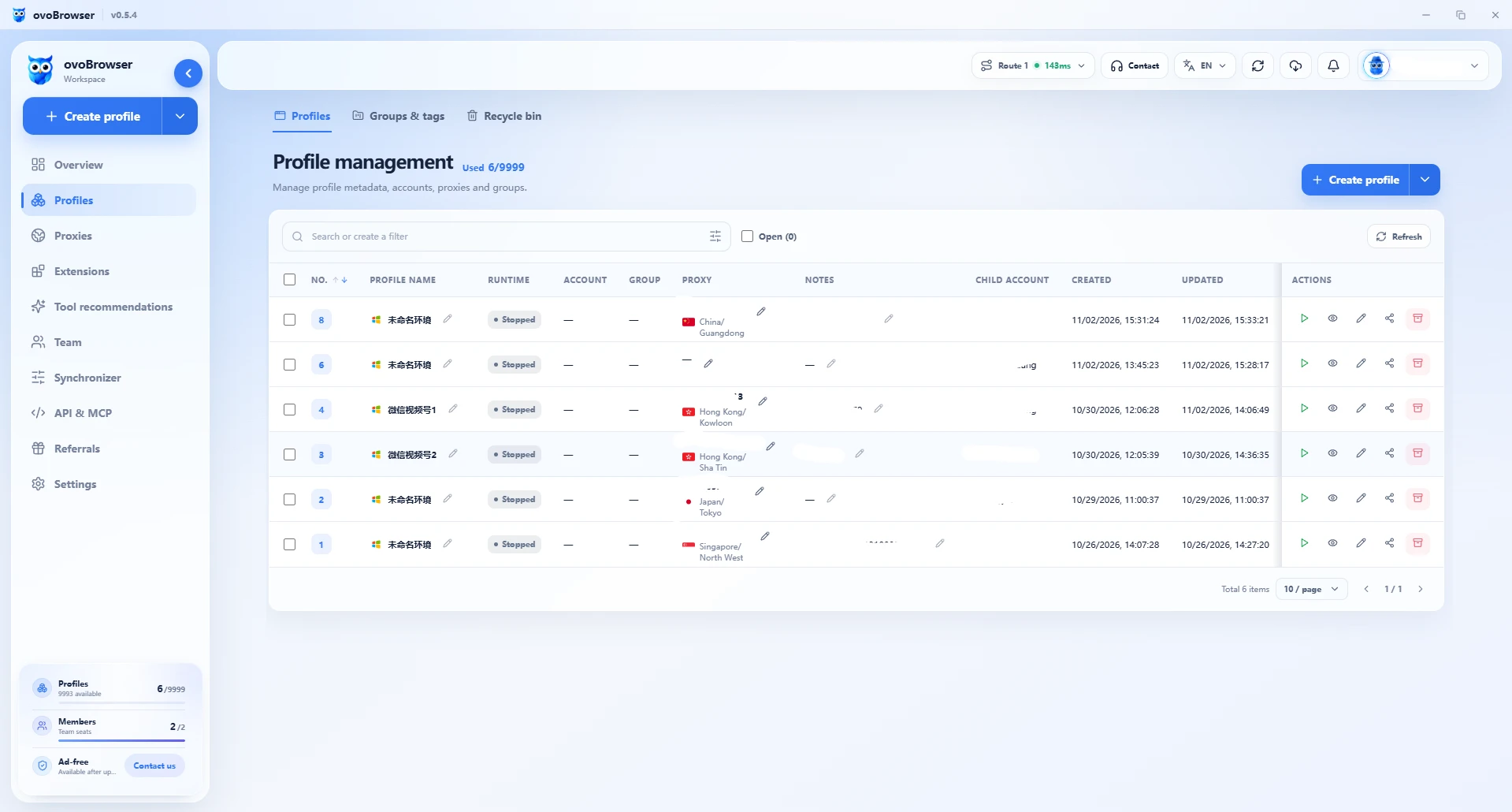
The independent environment stores fingerprints, cookies, and local data separately by account or project. Agent management centralizes the entry and detection of agents, and assigns network configurations to the environment. Batch management creates environments through templates or tables to centrally manage startup and shutdown. Team permissions are assigned based on roles to reduce misoperation and out of scope access.
5、 How to use ovobrowser to manage multiple accounts in a standardized manner?
Step 1: Establish grouping and naming rules by business
Suggest organizing the environment according to customer, brand, store, region, or responsible person. For example, "Brand A-Store 01 Operations Group" is easier to identify than "Account 1, Account 2". Grouping is a management tool that does not automatically change network exits or browser fingerprints.
Step 2: Create a separate environment for the authorized account
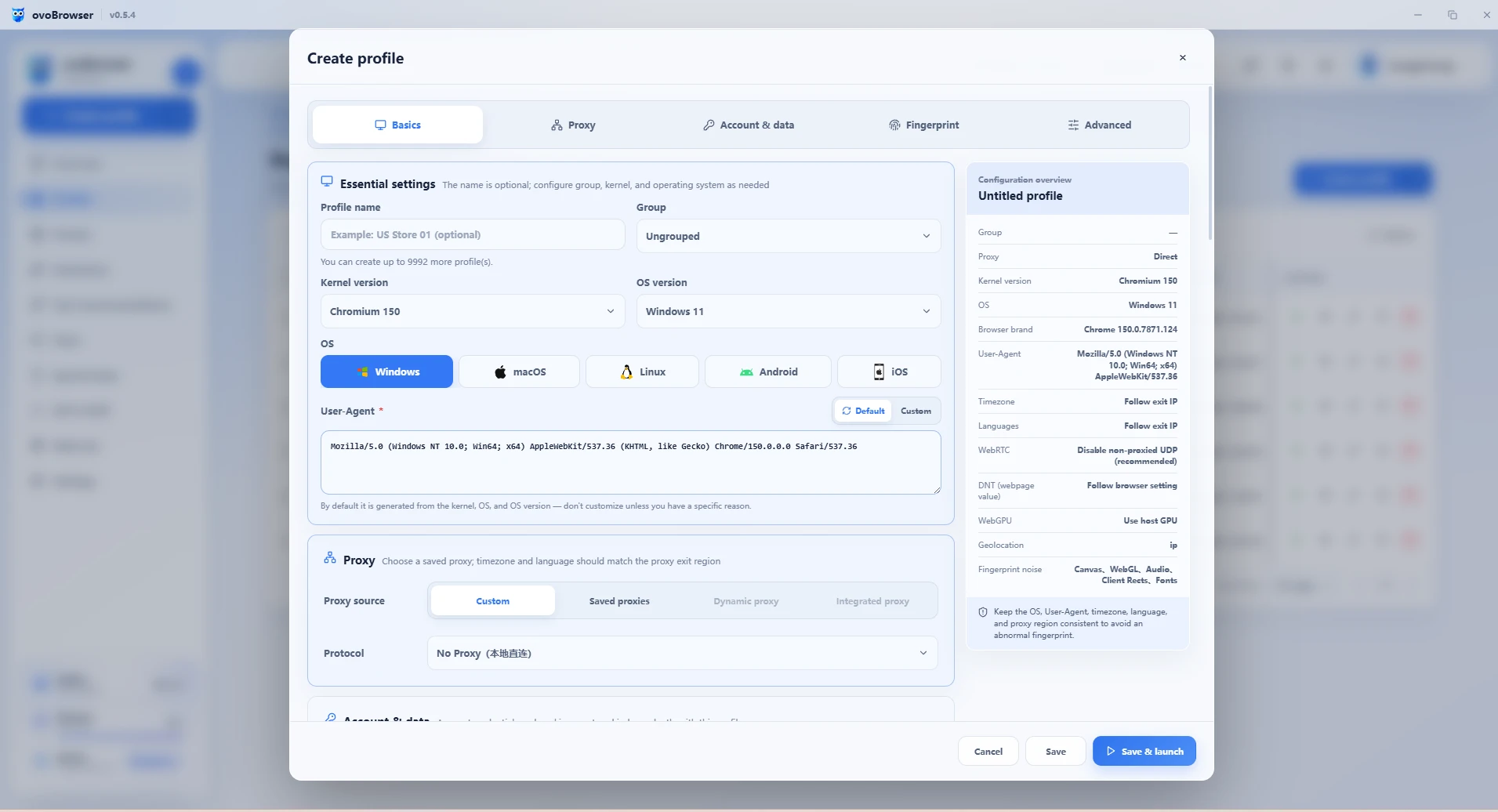
Enter the "Environment Management" of ovobrowser, create a new environment, set the name, group, system, and browser configuration. For first-time use, default fingerprint settings can be prioritized to avoid frequent modification of unnecessary parameters in pursuit of "randomness".
Step 3: Configure and Check Network Connections
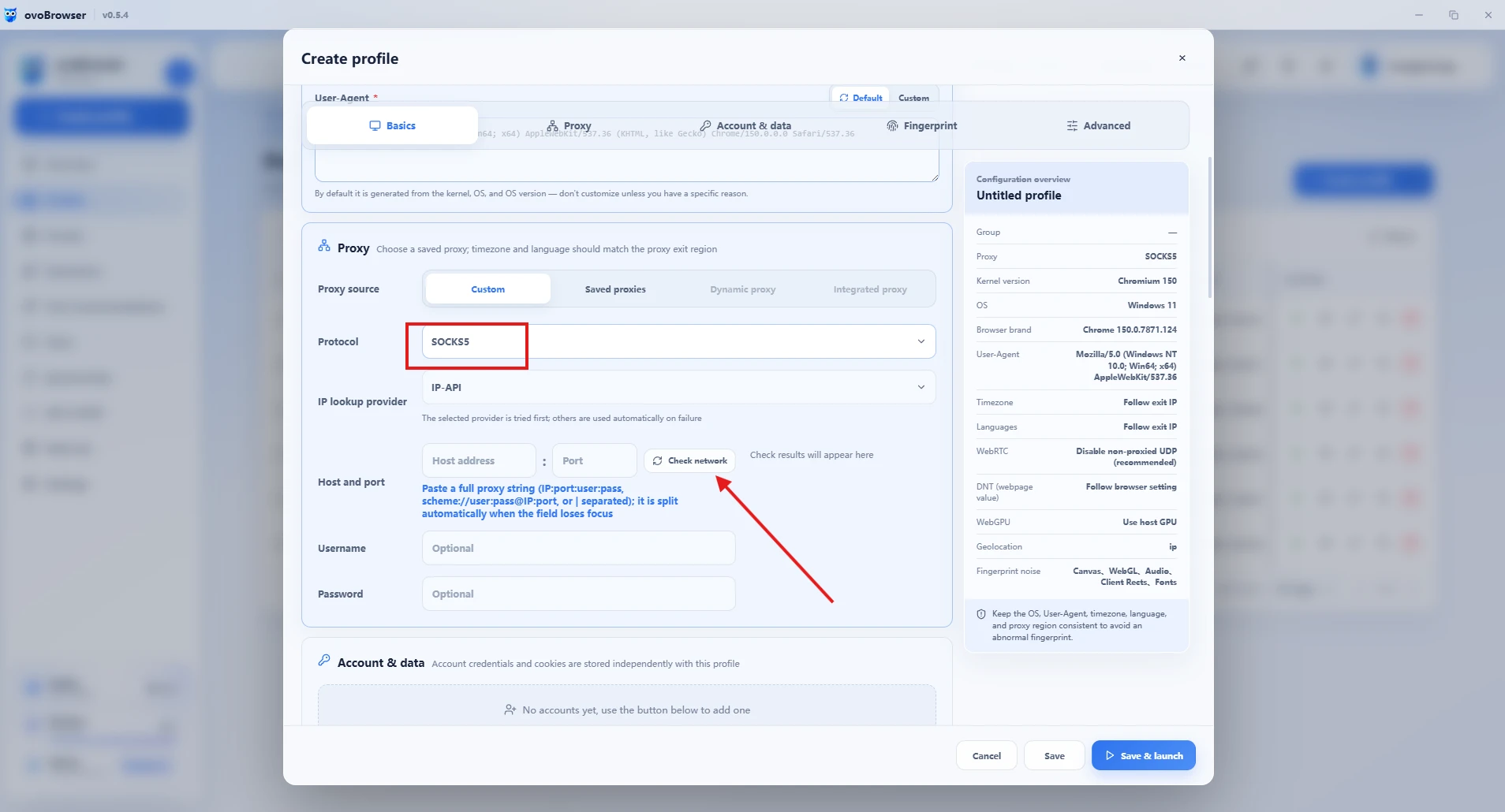
If the business indeed requires specifying a network exit, you can save HTTP, HTTPS, or SOCKS5 proxies in proxy management, then select a proxy for the corresponding environment and click "Check Network" to verify the exit IP and region. Do not equate 'agent filled in' with 'agent already in effect'.
Step 4: Safely store account information and conversations
With the authorization of the account owner, account information can be saved in the manner supported by the product. Cookies may contain valid login credentials and should only be used for personal or authorized account session data. Do not import cookies from unknown sources, and do not disclose passwords or 2FA keys in screenshots or tickets.
Step 5: Batch create and import environments as needed
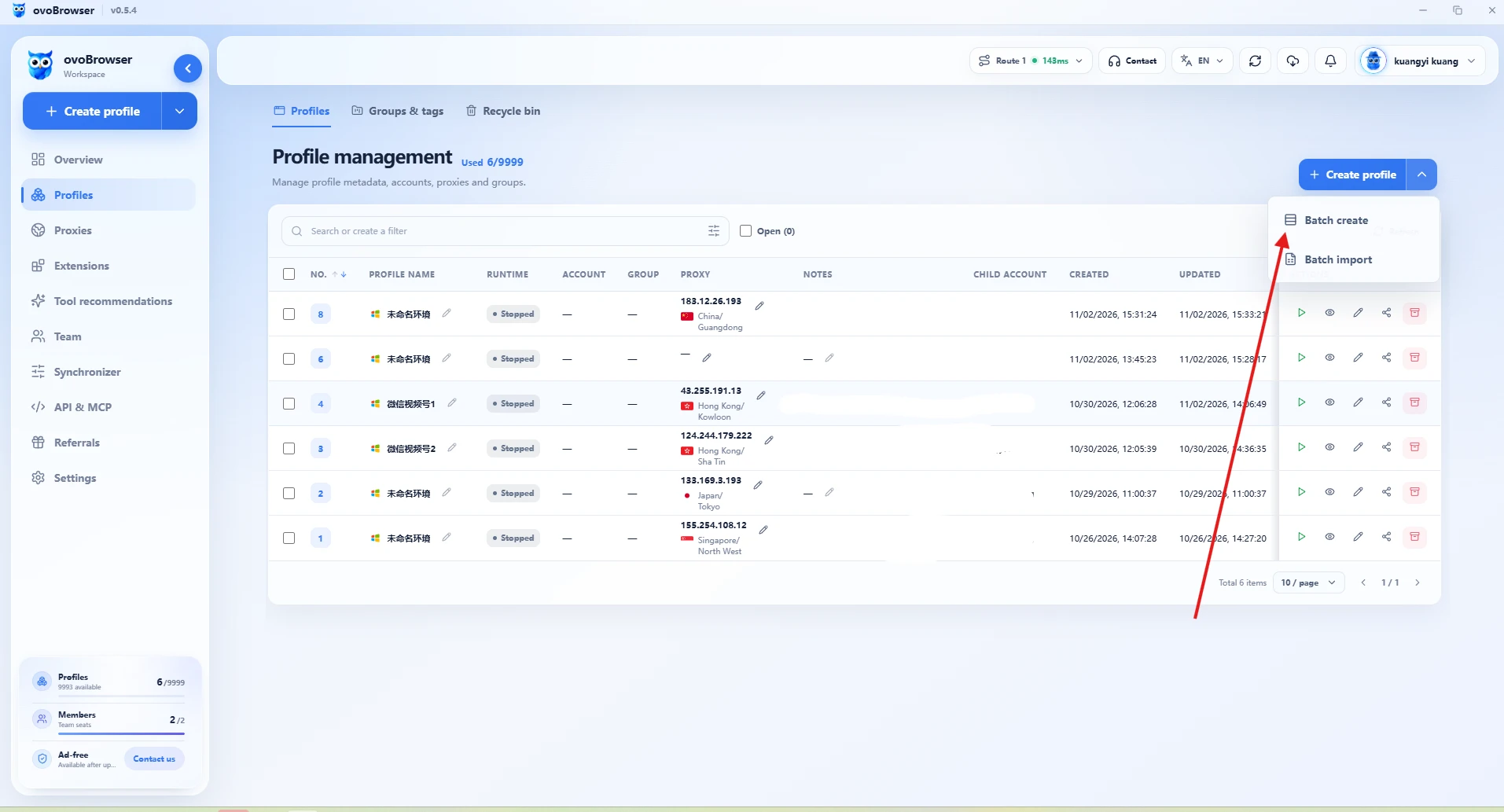
When there are a large number of accounts, batch creation or table batch import can be used in the "More Creation Methods" section. The official documentation states that XLSX, XLS, and CSV are supported. After uploading, you should preview and correct any errors one by one. Batch capability is used to improve the management efficiency of authorization business, rather than avoiding platform registration, authentication, or usage restrictions.
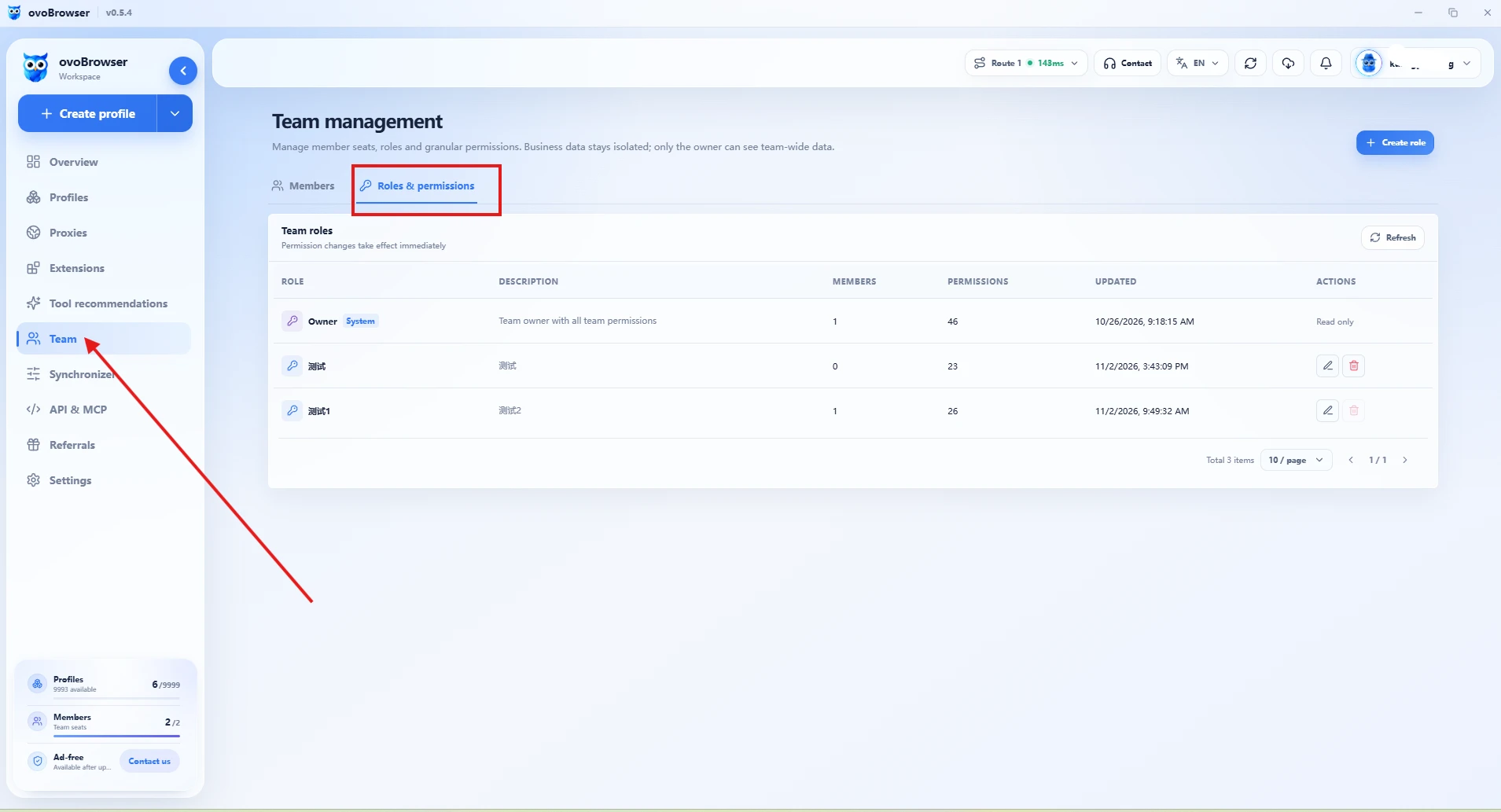
Step 6: Establish team permissions and handover process
When collaborating with multiple people, roles can be created in "Team Management" to assign permissions such as environment viewing, editing, and member management based on job positions. It is recommended to follow the principle of minimum privilege, revoke access promptly after resignation or project completion, and keep necessary handover records.
Manage each business account in a clearer way
From independent environment to batch management and team collaboration, try ovobrowser's multi account workbench.
6、 How to reduce unnecessary account risks in daily operations?
Comply with platform rules: Prioritize the use of official enterprise accounts, sub accounts, and asset authorization functions.
Maintain traceability of information: record account ownership, responsible person, permission changes, and handover time.
Enable security measures: Use independent strong passwords, multi factor authentication, and controlled recovery methods.
Avoid frequent and unnecessary environment changes: use stable and reasonable business configurations, and follow platform procedures when verification occurs.
Control automation scope: Use window synchronization or API only in scenarios allowed and authorized by the platform to avoid junk information and abnormal batch behavior.
Regular review: Check account warnings, member permissions, proxy health status, and access to sensitive information.
Attention: Environmental isolation can improve management methods, but it cannot eliminate platform penalties for illegal activities, nor can it guarantee long-term account availability.
7、 Frequently Asked Questions (FAQ)
Q1: Is buying an account with a history necessarily safer than a new account?
Not necessarily. Historical records may contain real operational data, as well as violations, false interactions, and control issues. Verify platform rules, sources, and historical status before deciding whether to take over.
Q2: Can I directly change all login information after purchasing an account?
We should first confirm the officially supported handover process and gradually complete the changes to the administrator, recovery method, and secondary verification. The modification of some important information may trigger security audits, and it is not advisable to blindly concentrate operations.
Q3: Can an ovobrowser environment manage multiple accounts?
The product supports saving account information in the environment, but in actual operation, it is recommended to establish clear one number one environment or one project one environment rules according to business and authorization boundaries to avoid session mixing. The specific quantity and permissions are subject to the client.
Q4: Can using ovobrowser ensure that the account is not banned?
No. It mainly helps manage isolated browser environments, sessions, proxies, and team collaboration. Whether to ban or not still depends on platform terms, account history, business behavior, and risk control judgments.
Q5: How to avoid account information leakage when multiple team members operate?
Allocate minimum permissions according to job positions, do not pass passwords and 2FA keys in group chats, regularly review member access, revoke authorization promptly and transfer resources when members leave.
Summary
The most important thing in account trading is not to "buy a seemingly mature account", but to confirm whether it allows transfer, whether the source is reliable, whether the history is clear, and whether there is an executable security management plan in the future.
For teams that need to operate multiple authorized business accounts simultaneously, standardized environment grouping, session isolation, proxy detection, and member permission management can significantly improve daily operational processes. ovobrowser provides these basic management capabilities, making account asset organization and team collaboration more orderly.
Compliance first, handover later, and management later is the sustainable approach to multi account operations.
 ovobrowser