 Ovobrowser
Proxy detection anomaly
Check proxy connections, protocols, addresses, and authentication information.
Proxy Detection Error
Proxy detection failures usually stem from one of four issues: incorrect configuration details, an unavailable proxy service, a network connection failure between your local machine and the proxy server, or a proxy that connects successfully but cannot access the detection service. Follow the troubleshooting steps on this page in order. Avoid repeatedly changing fingerprint parameters without identifying the root cause.
Step 1: Verify the Original Proxy Details
Confirm the following five items with your proxy provider:
Whether the protocol is HTTP, HTTPS, or SOCKS5.
Whether the host is a domain name or an IP address.
Whether the port number is correct.
Whether authentication uses a username and password or an IP whitelist.
Whether the proxy has expired, exhausted its traffic allowance, or been disabled.
Note: HTTP and HTTPS refer to how the client connects to the proxy server. They do not mean that the proxy can only access HTTP or HTTPS websites. Selecting the wrong protocol can cause a handshake failure.
Step 2: Re-enter the Details and Run the Detection Test
Open Proxy Management.
Edit the target proxy.
Remove any extra spaces from the host field.
Verify that the port is an integer between 1 and 65535.
Re-enter the username and password.
Click Test.
Record the complete error message.
Open Proxy Management.
Edit the target proxy.
Remove any extra spaces from the host field.
Verify that the port is an integer between 1 and 65535.
Re-enter the username and password.
Click Test.
Record the complete error message.
You can paste a full proxy connection string to automatically split it into individual fields. However, verify each field after the string has been parsed.
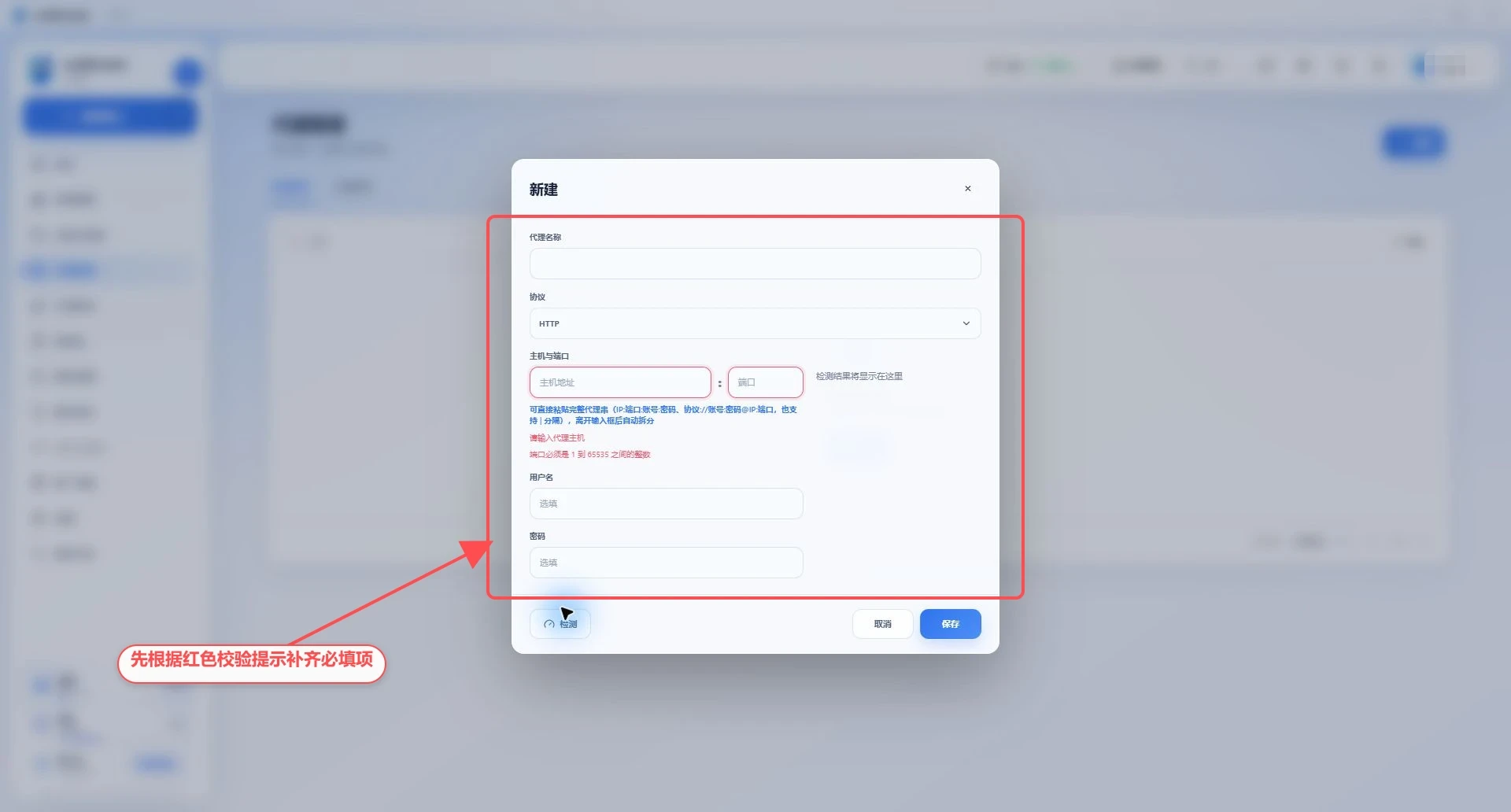
Proxy fields and error messages
Step 3: Check the Local Network and System Proxy
Navigate to Settings > System Settings > Network Detection.
Click Detect Local Network to check the computer's actual network egress without using the system proxy.
Click Detect System Proxy to check the network egress through the system proxy or a local networking tool.
Compare the two results.
If system proxy detection fails, check Windows proxy settings, PAC, VPN, Clash, V2Ray, and other local networking tools.
After making changes to the local network configuration, return to Proxy Management and run the detection test again.
ovoBrowser detects Windows system proxy settings, PAC, HTTP(S)/ALL_PROXY environment variables, and some commonly used local proxy ports in real time. Proxy detection may attempt two connection paths—routing traffic through the system proxy and connecting directly from the local machine—and automatically select the successful path.
The image below shows the actual state before detection has been performed. Click the buttons first, then continue troubleshooting based on the results.
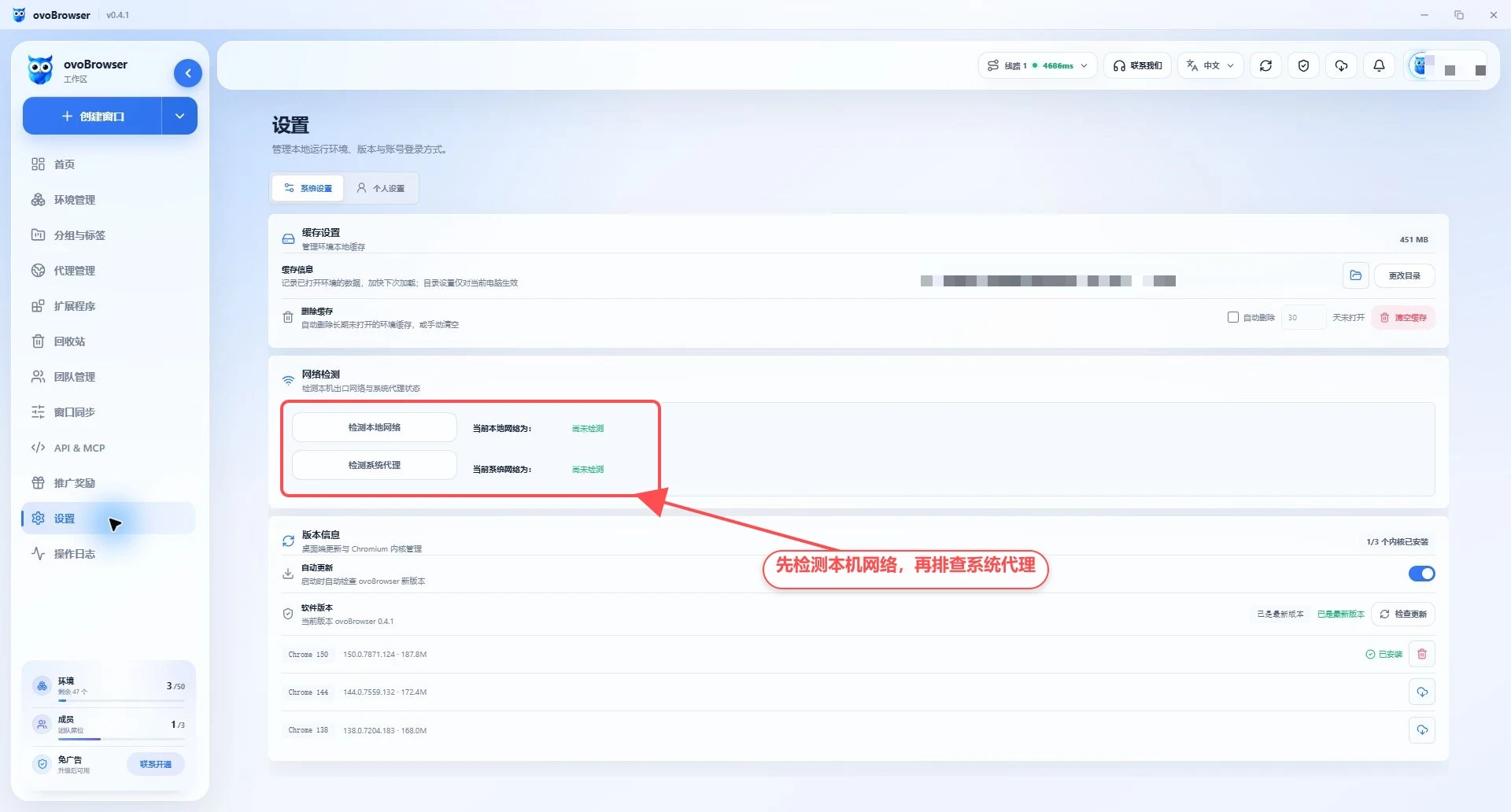
Local network and system proxy detection options
Step 4: Troubleshoot Based on the Error Message
Connection Timed Out or Host Unreachable
Possible causes: An incorrect host or port, a local network that cannot reach the proxy server, firewall restrictions, or an offline proxy server.
Solutions:
Verify the host and port.
Switch to a different local network and try again.
Temporarily review firewall and security software rules.
Contact your proxy provider to confirm that the proxy node is online.
Connection Refused
The destination host is reachable, but no proxy service is listening on the specified port, or the service is refusing connections. Verify the port, protocol, and proxy node status.
DNS Resolution Failed
When the proxy host is a domain name, the local machine cannot resolve it. Try changing the DNS server, checking the domain name for typos, or asking your provider for a working IP address.
Error 407, Authentication Failed, or Upstream Rejected
The username, password, or authentication method is incorrect. If the proxy uses an IP whitelist, add the actual public egress IP of your computer or system proxy to the provider's whitelist. If your network's public egress IP changes dynamically, update the whitelist accordingly.
Error 403 or Access Blocked by Policy
The proxy provider is denying access to the detection target, region, or port. Contact the provider to confirm any restrictions on the target website, concurrent connections, or subscription permissions.
TLS Handshake Failed or Non-HTTP Response Received
This commonly occurs when an HTTP proxy is configured as HTTPS, a SOCKS5 proxy is configured as HTTP, or the proxy port requires a specific TLS configuration. Select the correct protocol according to your provider's instructions.
Anomaly in the Detection Channel
A particular IP lookup service may be temporarily unavailable. You can switch the IP Lookup Channel in the environment editor. The client may also try alternative channels when the preferred channel fails.
Step 5: Determine Whether the Problem Is the Proxy or the Local Network
Perform cross-tests to isolate the cause:
Test the same proxy on another computer or using your provider's testing tool.
Test a known-working proxy on the current computer.
Test the current proxy on different local networks.
Compare the results.
The proxy fails on every device: The proxy itself is the more likely cause.
All proxies fail only on the current computer: The local network or security software is the more likely cause.
The proxy works only through the system proxy: The direct connection cannot reach the upstream proxy server.
Detection succeeds, but the target website fails: The proxy may restrict access to that website.
Detection Succeeds, but the Environment Still Reports a Detection Failure After Startup
Confirm that the environment uses the same proxy you just tested.
Close the running environment.
Save the proxy and environment settings.
Restart the environment.
Check the startup progress panel to see whether the process is stuck at Checking Proxy, Detecting Network, or Starting Kernel.
If the failure occurs during the kernel stage, the issue may be unrelated to the proxy. Check kernel downloads and fingerprint configuration.
Confirm that the environment uses the same proxy you just tested.
Close the running environment.
Save the proxy and environment settings.
Restart the environment.
Check the startup progress panel to see whether the process is stuck at Checking Proxy, Detecting Network, or Starting Kernel.
If the failure occurs during the kernel stage, the issue may be unrelated to the proxy. Check kernel downloads and fingerprint configuration.
What to Provide When Contacting Customer Support
Provide the proxy protocol, a redacted host, port, time of detection, complete error message, whether a system proxy is in use, and the results of local network and system proxy detection.
Do not disclose your username, password, or complete proxy connection string.