 Ovobrowser
Restoring the profile in the Recycle bin
profiles deleted from "Profile Management" will go to the Recycle bin. You can restore accidental deletions or completely delete data you no longer need.
Restoring the profile in the Recycle bin
profiles deleted from "Profile Management" will go to the Recycle bin. You can restore accidental deletions or completely delete data you no longer need.
Recycle bin retention rules
The Recycle bin holds a maximum of 100 profiles;
profiles do not automatically become ineligible for recovery simply because they remain in the Recycle bin for an extended period of time;
When the Recycle bin is full, if you continue to delete the profile, you will be prompted to empty the Recycle bin first or choose to delete it permanently;
Restoring the profile requires available profile credits;
Permanent deletion cannot be restored.
View and filter
After entering the "Recycle bin", you can search by name or serial number, and switch the deletion time sort. The list shows profile settings, deletion time, and recovery and Permanent deletion operations.
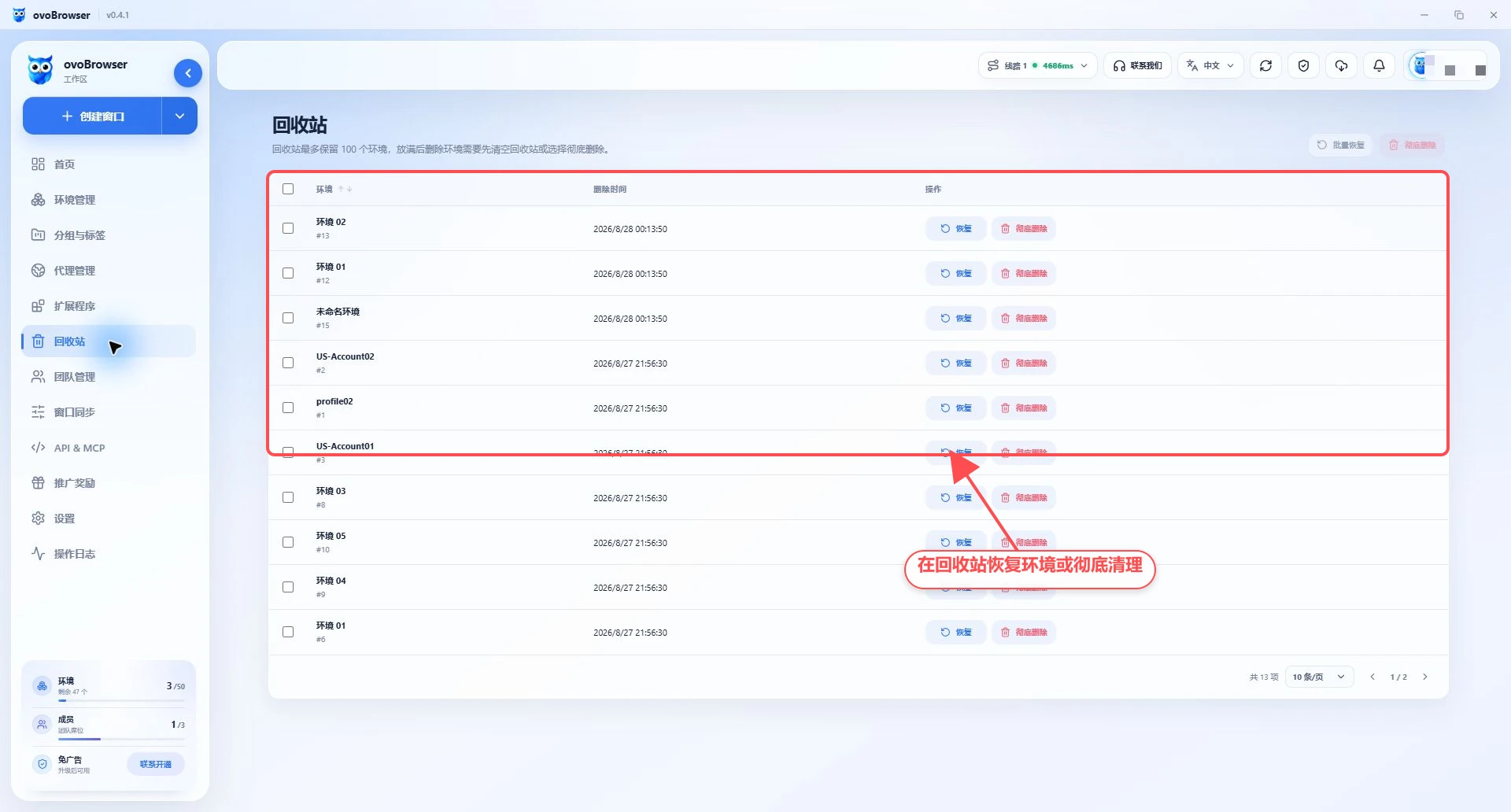
Restore a single profile
Find the target profile;
Click "Restore";
Wait for the list to be refreshed;
Return to "Profile Management" to confirm that the profile has appeared.
If it prompts that the quota is insufficient, you need to release the profile quota first. In a team scenario, recovery will also check the personal profile caps of the members to which the profile belongs.
Batch recovery
Check multiple profiles;
Click "Batch Restore";
Wait for the operation to complete;
Go to "Profile Management" to check the recovery results.
Before batch recovery, you should confirm that both the total quota and the personal upper limit of relevant members have sufficient space.
Delete completely
Check one or more profiles;
Click "Delete Completely";
Read the confirmation prompt;
Execute after confirmation.
Permanent deletion permanently removes the profile record and cannot be restored from the Recycle bin. Before execution, confirm that the profile's account information, Cookie, browser fingerprints and other configurations are no longer needed.
Delete profile when Recycle bin is full
When the Recycle bin reaches 100 profiles, deleting new profiles from Profile Management will occur in two ways:
To cancel the deletion, first enter the Recycle bin to clean up the old profile;
Explicitly select Complete Delete to let the target profile skip the Recycle bin.
The second method is not recoverable. It is recommended to give priority to cleaning up the old profile that is confirmed to be useless.
Deleting the profile and deleting the local cache
The Recycle bin manages the profile records in the server; the local cache is the browsing data on the current computer, and they are different.
Check "Also delete profile local cache" in Profile Management to clear the local cache when moving it to the Recycle bin;
When unchecked, the local cache may continue to occupy the disk;
The recovery profile does not guarantee recovery of all local browsing storage that has been manually cleared;
When you need to manage disk usage, please go to "Settings > Cache Settings".
FAQ
Recycle bin is empty but profile not found
Confirm whether you have switched to the correct account or team, whether you have permission to view the profile, and whether the profile has been permanently deleted.
Restore button is not available
Check whether the role has recovery permissions and confirm that the profile quota is not full.
Can the website login status be restored after deletion?
If you just move it to the Recycle bin without deleting the local cache, the original cache can usually still be used after restoration. If the local cache has been cleared, the system can use the Cookie data saved during normal close, but complete recovery of local storage of all websites is not guaranteed.